
Geotagged Screenshots Modern
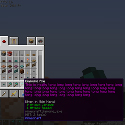
Enriches screenshots with metadata like in-game coordinates to make them viewable in Xaero's World Map.
介绍
Geotagged Screenshots Modern
Originally created by CCr4ft3r. This is a modernized fork maintained by ludwici, focused on supporting newer Minecraft versions and keeping the mod compatible with current releases.




About
Minecraft usually saves screenshots as files without an easy way to find the location where they were taken. Geotagged Screenshots links your screenshots to waypoints in Xaero’s World Map and Xaero’s Minimap, letting you revisit memorable places.

Features
- Save screenshots in PNG or JPEG format.
- Temporarily hide the HUD when taking screenshots and restore your previous F1 state.
- Automatically create screenshot waypoints in Xaero’s maps.
- Display screenshot thumbnails on Xaero’s World Map.
- Open full-size screenshots by clicking their waypoints on the world map.
- Regenerate missing thumbnails from the original screenshots.
- Customize waypoint sets and screenshot-related chat notifications.
Configuration
Settings are stored in the Minecraft config directory in geotagged_screenshots-client.toml (NeoForge) or geotagged_screenshots-client.json (Fabric).
FAQ
I can’t see my screenshots on the world map. What should I check?
Make sure screenshot waypoints are enabled and the Geotagged Screenshots waypoint set is selected in Xaero’s map. Screenshots need their corresponding waypoints to appear.
Can I include Geotagged Screenshots in my modpack?
Yes. Please follow the project’s LGPL-3.0 license and retain the applicable copyright notices.
Where can I report a bug or request a feature?
Use the GitHub issue tracker.
Links
GitHub repository · Issues and feature requests · Original mod
My modpacks:
Check my other mods:







常见问题
Geotagged Screenshots Modern 支持哪些 Minecraft 版本?
Geotagged Screenshots Modern 支持 Minecraft Java 版 1.21.1,可用的加载器:Fabric / NeoForge。下载时注意选择和你游戏版本一致的文件。
Geotagged Screenshots Modern 怎么安装?
先用 PCL2 或 HMCL 启动器安装对应版本的 Fabric / NeoForge,再把下载的 .jar 文件放进游戏目录的 mods 文件夹,重新启动游戏即可。开启了版本隔离的,mods 文件夹在 versions/版本名 下面。



评论
登录后评论和评分