Outlined Ores By PeakMC 6725 (Glowing/Visible Ores)
A 16x utility pack adding 1-pixel, color-matched outlines to vanilla ores and raw metal blocks, including deepslate variants. Glow support via OptiFine emissives or Iris + LabPBR shaders. Java 1.17–26.x.
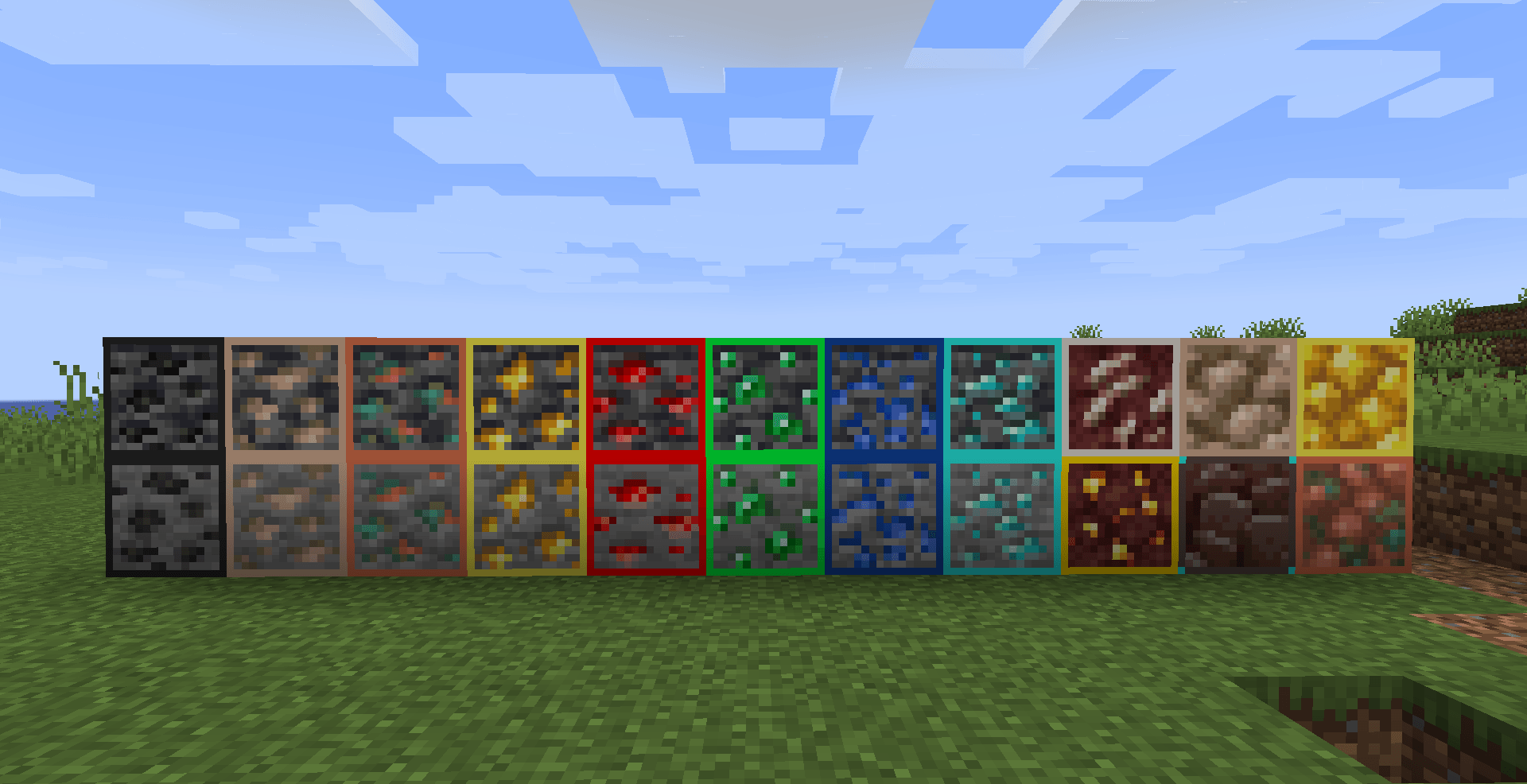
截图
介绍
⛏️ Outlined Ores by PeakMC6725
See your ores clearly, while keeping Minecraft’s vanilla look.
Want to make ores easier to spot without changing their original appearance? Outlined Ores is a 16x utility resource pack that adds a thin, 1-pixel, color-matched border around every vanilla ore.
The original ore textures and surrounding stone remain completely untouched. Only the borders are added, keeping the familiar vanilla appearance while making ores stand out more clearly.
With compatible emissive textures or shaders, the outlines can also glow in dark caves!
✨ FEATURES
-
16x Resolution: Uses Minecraft’s standard 16x texture resolution.
-
1-Pixel Outlines: Adds a thin, color-matched border around every vanilla ore.
-
Vanilla Interiors: Original ore interiors and surrounding stone remain untouched.
-
Color-Matched Borders: Each ore has its own carefully selected border color.
-
Emissive Support: The borders can glow with compatible OptiFine settings or Iris shaders.
-
Raw Metal Blocks: Raw iron, raw copper, and raw gold blocks receive matching outlines.
-
Deepslate Support: Includes deepslate ore variants.
-
Client-Side: No server installation is required.
🎨 ORE BORDER COLORS
Each ore uses its own border color to help distinguish it from other ores.
| Ore / Block | Border Color | Hex Code |
|---|---|---|
| Coal Ore | Dark Gray | #262626 |
| Iron Ore | Light Brown | #D8AF93 |
| Copper Ore | Orange | #E0734D |
| Gold Ore | Yellow | #FCEE4B |
| Redstone Ore | Red | #FF0000 |
| Lapis Lazuli Ore | Blue | #1044A1 |
| Diamond Ore | Cyan | #29F3E8 |
| Emerald Ore | Green | #00FF3C |
| Nether Quartz Ore | Off-White | #E8E3D9 |
| Nether Gold Ore | Gold | #FFD700 |
| Ancient Debris | Brown with Cyan Corners | #594742 |
| Raw Iron Block | Matching Iron | #D8AF93 |
| Raw Copper Block | Matching Copper | #E0734D |
| Raw Gold Block | Matching Gold | #FCEE4B |
All applicable deepslate ore variants are included as well.
💡 GLOWING OUTLINES
The outlines can glow in dark caves, but glowing requires compatible emissive-texture support.
Only the colored borders glow. The original ore interiors and surrounding blocks remain unchanged.
🔹 OptiFine
-
Install OptiFine for your Minecraft version.
-
Launch Minecraft with the OptiFine profile.
-
Open
Options → Video Settings → Quality. -
Set Emissive Textures to ON.
-
Enable Outlined Ores in the Resource Packs menu.
The outlines should now glow!
🔹 Iris + Shaders
-
Install Iris and launch Minecraft.
-
Install a shaderpack that supports LabPBR.
-
Enable the shaderpack in your video settings.
-
Activate Outlined Ores in the Resource Packs menu.
The outlines will glow when used with a compatible LabPBR shaderpack.
Note: Coal and ancient debris outlines appear dimmer under LabPBR shaders compared to the other ores.
🔹 Vanilla / Plain Sodium
You can still use the pack without OptiFine or shaders!
-
All outlines remain visible.
-
The ores retain their outlined appearance.
-
The outlines do not glow.
Important: Sodium by itself does not provide emissive-texture support. You need compatible emissive support or a suitable shaderpack for the glow effect.
📦 WHICH DOWNLOAD SHOULD YOU CHOOSE?
There are two available downloads. Choose the one that matches your Minecraft Java Edition version.
| Download | Supported Versions |
|---|---|
| Legacy | 1.17 – 1.21.8 |
| Modern | 1.21.9 – 26.x |
Legacy
Choose this download if you’re playing Minecraft Java Edition 1.17 through 1.21.8.
Modern
Choose this download if you’re playing Minecraft Java Edition 1.21.9 through 26.x.
Compatibility note: Some Minecraft versions between 1.18 and 1.20.1 may display a Made for a different version warning. The pack should still load despite this label.
The pack starts at 1.17 because raw ore blocks and deepslate ore variants were introduced in that version.
🛠️ INSTALLATION INSTRUCTIONS
🎮 Vanilla Minecraft
-
Download the correct
.zipfile for your Minecraft version. -
Keep the file zipped. Do not extract it.
-
Launch Minecraft Java Edition.
-
Open
Options → Resource Packs. -
Click Open Pack Folder.
-
Move the downloaded ZIP file into that folder.
-
Return to Minecraft and enable Outlined Ores.
-
Click Done to apply the pack.
You’re ready to go!
⚙️ OptiFine
-
Install OptiFine for your Minecraft version.
-
Launch Minecraft using the OptiFine profile.
-
Install Outlined Ores using the resource-pack instructions above.
-
Navigate to
Options → Video Settings → Quality. -
Turn Emissive Textures ON.
You can now use the glowing outlines!
🌈 Iris + Shaders
-
Install Iris for your Minecraft version.
-
Install a LabPBR-compatible shaderpack.
-
Launch Minecraft with Iris.
-
Enable Outlined Ores in the Resource Packs menu.
-
Enable your compatible shaderpack.
Enjoy the glowing outlines!
❓ FREQUENTLY ASKED QUESTIONS
Does this pack affect performance?
There is no measurable performance impact from the textures themselves. It is a lightweight 16x resource pack.
Is this pack allowed on multiplayer servers?
The pack is client-side, but some servers restrict ore-highlight or visibility-enhancing resource packs. Always check the server rules before using it.
Why aren’t my outlines glowing?
The outlines are visible by default, but glowing requires compatible emissive-texture support. Use OptiFine with Emissive Textures enabled or Iris with a LabPBR-compatible shaderpack.
Plain Sodium and vanilla Minecraft display the outlines without glow.
Why do coal and ancient debris glow less brightly?
Under LabPBR shaders, coal and ancient debris have dimmer glowing borders than the other ores. This is how their emissive appearance is configured.
Do the original ore textures change?
No! The original ore interiors and surrounding stone stay vanilla. Only a 1-pixel border is added.
Why does Minecraft say the pack is made for a different version?
Some versions between 1.18 and 1.20.1 may display this warning. The pack should still load despite the label.
👤 CREATED BY
PeakMC6725
A Minecraft creator making resource packs, datapacks, mods, maps, and other projects for the community.
Thanks for checking out Outlined Ores by PeakMC6725!
If you encounter any issues or have suggestions, feel free to leave a comment on the project page.
Keep it vanilla. Make ores stand out. ⛏️
Outlined Ores by PeakMC6725 is not an official Minecraft product. It is not approved by, associated with, or endorsed by Mojang or Microsoft.
常见问题
Outlined Ores By PeakMC 6725 (Glowing/Visible Ores) 支持哪些 Minecraft 版本?
Outlined Ores By PeakMC 6725 (Glowing/Visible Ores) 支持 Minecraft Java 版 1.17–26.3,共 34 个版本。下载时注意选择和你游戏版本一致的文件。
Outlined Ores By PeakMC 6725 (Glowing/Visible Ores) 怎么安装?
把下载的 .zip 文件(不用解压)放进游戏目录的 resourcepacks 文件夹,进游戏后在「选项 → 资源包」里把它移到右边启用。
PeakMC6725 的其他作品
查看全部 →
Falling Tree – OneChop (Tree Vein Miner) By PeakMC6725
使用 Falling Tree – OneChop,让砍树更轻松!砍下一根原木,就能立刻砍倒树上相连的原木。支持 12 种木材和所有原版斧头,助你更快收集木材,把时间留给建造和探索!
PeakMC6725’s Ultimate PvP Utilities (Low on Fire, Lower Shields, No Carved Pumpkin Blur, Smaller Totem Pops, Lower Sword Block)
用 PeakMC6725 的终极 PvP 实用工具提升你的 Minecraft PvP 体验!为 1.21+ 提供低火焰、低盾牌、无南瓜模糊和更小的图腾弹出效果,并为 1.8.9 提供低火焰、无南瓜模糊和更低的剑格挡。更清晰、更流畅的战斗。

SkyBlock by PeakMC6725
从一座只有一棵树和一个箱子的小浮岛开始。生存、收集资源,从几乎一无所有中建造。搭桥前往沙岛获取黑曜石,探索虚空下界中的5x5萤石岛,征服要塞并击败末影龙!
Smooth Flaps By PeakMC6725 (Smooth Doors, Trapdoors and Fence Gates)
为门、活板门和栅栏门添加流畅的客户端开关动画。
评论
登录后评论和评分