
Unstable Essentials
作者:habi.chan
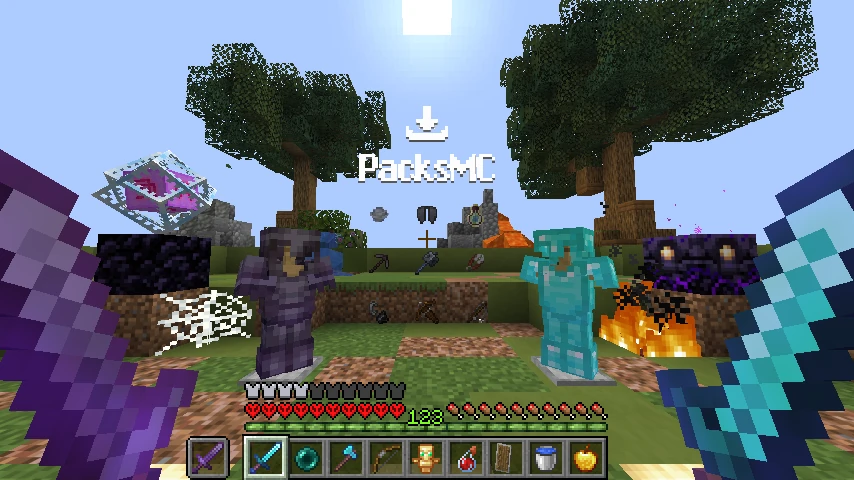
A lightweight, performance-focused resource pack designed to boost FPS, clear visual clutter, and improve PvP visibility with lower fire, clean hearts, optimized particles, and refined item models inspirated by the unstable smp's progatonists povs.
截图
介绍
中文介绍正在准备中,下面暂时显示原文。
⚡ Unstable Essentials
Unstable Essentials is a clean, lightweight, and performance-friendly Minecraft resource pack designed to boost FPS, minimize screen clutter, and maximize visibility during PvP and survival gameplay.
🚀 Key Features
🔥 Low & Clean Fire
- Unobstructed View: Both standard fire and Soul Fire have been lowered and cleaned, preventing fire from blocking your crosshair during combat or Nether exploration.
❤️ Refined HUD & Heart Icons
- Clear Health Status: Completely redesigned health icons for all status effects—absorption, freezing, poison, wither, custom damage animations, and standard hearts.
💥 Optimized Explosion Particles
- Zero Lag Spikes: Cleaned explosion animations (TNT, End Crystals, Creeper explosions) that enhance combat clarity and prevent frame drops in intense battles.
🛡️ Cleaned Item & Block Models
Optimized 3D models for better visual clarity:
- 🛡️ Shields: Cleaner blocking animation (
shield_blocking) and holding angle. - 🗿 Totem of Undying: Compact and less intrusive held perspective.
- 🛏️ Beds: Refined models for all 16 color variants.
- 📦 Containers: Sleek models for Chests, Ender Chests, Trapped Chests, and Shulker Boxes.
- 💀 Heads & Skulls: Optimized Player, Zombie, Skeleton, Wither Skeleton, Creeper, Dragon, and Piglin heads.
- 🚩 Banners, Decorated Pots, and Conduits.
👁️ Minimal Vignette
- Softened screen edges for a brighter, more consistent, and clean visual experience.
⚙️ Compatibility
- Minecraft Versions: 1.20 / 1.21+ (Vanilla & Modded)
- Performance Mods & Clients: Fully compatible with Sodium, Iris, OptiFine, Feather Client, Lunar Client, and Badlion.
- Client-Side: 100% safe for all multiplayer servers and PvP networks.
📥 Installation Guide
- Download the
.zipfile from the Versions tab. - In Minecraft, open Options ➔ Resource Packs…
- Drag and drop the downloaded
.zipfile into the game window or into yourresourcepacksfolder. - Move Unstable Essentials to the top of the selected list and click Done!
常见问题
Unstable Essentials 支持哪些 Minecraft 版本?
Unstable Essentials 支持 Minecraft Java 版 1.20–26.2,共 19 个版本。下载时注意选择和你游戏版本一致的文件。
Unstable Essentials 怎么安装?
把下载的 .zip 文件(不用解压)放进游戏目录的 resourcepacks 文件夹,进游戏后在「选项 → 资源包」里把它移到右边启用。
评论
登录后评论和评分