Iron’s Arms ‘n Artifice : Spellbullet
为枪械弹药注入来自 Iron's Spells 'n Spellbooks 的法术!释放原汁原味的法术、连续齐射、轨道空袭、激光,以及层层蔓延的冰霜裂隙;所有效果均由原生渲染器实现。
截图
介绍
Iron’s Arms Spell Bullet 🔫✨
Bridging the magical mastery of Iron’s Spells ‘n Spellbooks with the high-octane firearm gunplay of Iron’s Arms ‘n Artifice on Minecraft NeoForge 1.21.1.
⚠️ Requirements & Compatibility Scope
Required Dependencies
- NeoForge (21.1.84 or newer)
- Iron’s Spells ‘n Spellbooks (v3.16.0+ — Core mod only)
- Iron’s Arms ‘n Artifice (v1.1.0+)
- GeckoLib
- Curios API
Note on Addon Mods:
Currently supports core Iron’s Spells ‘n Spellbooks across all 9 schools of magic. Third-party spell packs (e.g. Cataclysm Spells, Alchemical Spells) are not supported at this time.
🌟 Key Features
📜 1. Inscribed Spell Bullet Crafting & Ammo Switching
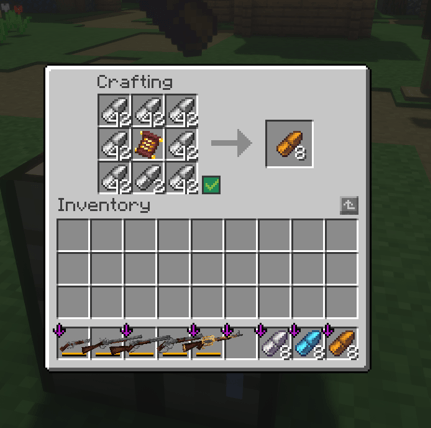
- Simple Crafting Recipe: Place any valid Core Spell Scroll in the center slot of a 3×3 crafting grid, surrounded by 8 standard Bullets (
irons_artifice:bullet). - Direct Infusion: Ammunition is infused directly into standard bullets—keeping your inventory clean and compatible.
- Yield: Produces 8 Inscribed Spell Bullets retaining the exact spell identity, school, and level of the consumed scroll.
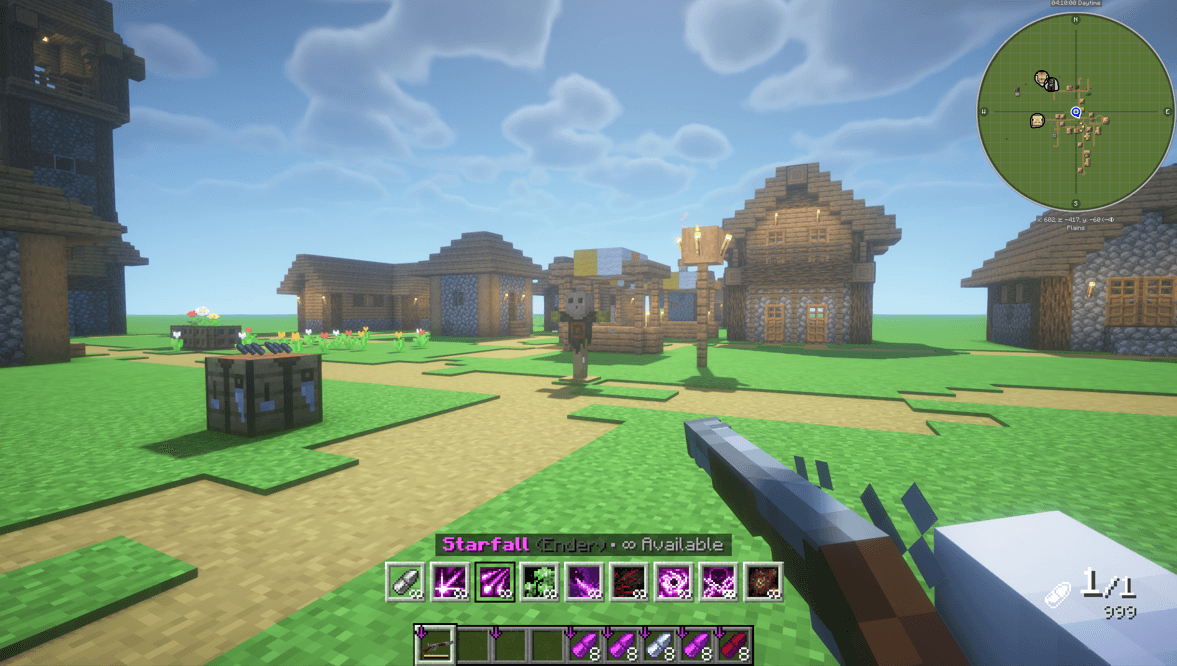
- Instant Firearm Casting: Spells launch instantly at bullet velocity upon pulling the trigger—zero cast time, zero windup animation delay, and 0 mana cost.
- Muzzle Offset & Target Convergence: Spells emanate directly from the firearm muzzle and dynamically converge onto your crosshairs downrange for authentic ballistic feel.
🎨 2. Interactive In-Game HUD Config & Action Bar
- In-Game HUD Config Screen (Default Key:
K):- Live Preview: See real-time visual updates of your Action Bar layout.
- Click & Drag Repositioning: Click directly on the Action Bar preview to freely drag and place it anywhere on screen.
- Screen Anchors: Snap to
Hotbar Center,Bottom Left,Bottom Right,Top Left,Top Right, orScreen Center. - Flexible Layout: Toggle between
HorizontalandVerticalorientations, customize columns/rows (1 to 20), and scale the HUD (50% to 200%).
- Spell Bullet Name Customization:
- Toggle Display: Turn the active bullet name
ONorOFF. - 4-Way Alignment: Place the name
Above,Below,Left, orRightof the action bar slots. - Size & Offsets: Adjust font scale (50% to 150%) and fine-tune axis offsets ($\pm 100\text{px}$).
- Toggle Display: Turn the active bullet name
- Quick Ammo Cycling (
Left Alt+Mouse Scroll):- Hold
Left Altand scroll to switch between standard ammunition and loaded spell bullets. - Features clear slot contrast, active gold highlights, school badges, and infinite ammo indicators (
∞) in Creative Mode.
- Hold
🚫 3. Mobility & Teleportation Spell Restrictions
Currently, all Teleportation, Dash, and Mobility spells are not permitted for spell bullet crafting and cannot be converted into ammunition.
- Restricted Spells: Teleport, Frost Step, Blood Step, Burning Dash, Volt Strike, Shadow Slash, Ascension, Recall, Portal, Pocket Dimension, and Charge.
- Why are they restricted?
- Combat Balance & Exploits: Movement spells are designed around player-centered cooldowns and cast times. Binding instant teleportation to firearms allows bypassing wall collision, instantaneous out-of-bounds traversal, and combat evasions that break core gameplay.
- Intended Role: Mobility spells remain fully functional through traditional spellcasting with spellbooks and scrolls.
🎯 4. Spell Archetypes & Gunplay Integration
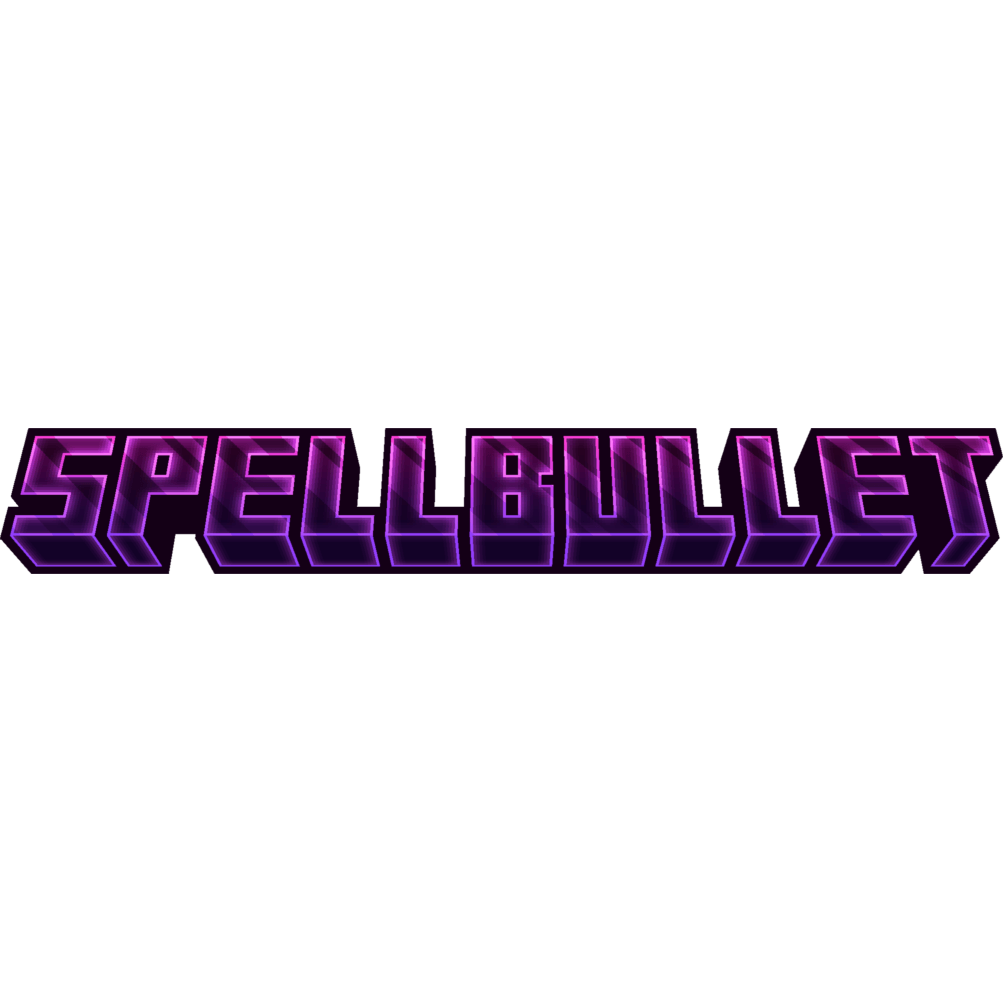
Every spell is adapted into firearm gunplay using authentic entities, particles, and sounds directly from Iron’s Spells ‘n Spellbooks:
- Ballistic Magic Projectiles: Spells with projectile nature (Fireball, Magma Ball, Firebolt, Icicle, Lightning Lance, Magic Missile, Acid Orb, Poison Arrow) launch with authentic ballistic trajectories.
- Rapid-Fire Spell Bursts: Multi-cast barrage spells (Blaze Storm, Flaming Barrage, Blood Needles) fire in rapid sequential bursts tracking your crosshair.
- Tactical Airstrikes & Orbital Storms:
- Thunderstorm: Creates an authentic storm zone with hovering dark storm clouds (
FOG_THUNDER_DARK) and calls downLightningStrikeentities directly on nearby enemies. - Starfall & Arrow Volley: Designate impact points downrange, raining down celestial comets or arrow barrages from the heavens.
- Thunderstorm: Creates an authentic storm zone with hovering dark storm clouds (
- Cascading Ground Seismic Waves:
- Ice Spikes: Erupts a rippling line of jagged ice spikes that scales in size with distance and culminates in a massive finisher spike.
- Fang Strike: Evoker fangs chomp sequentially forward across the terrain towards the target.
- Precision Beams & Elemental Lasers: Instant high-penetration rays (Ray of Frost, Ray of Siphoning, Sunbeam) striking targets downrange with line-of-sight precision.
- Tactical Support & Healing Darts: Ranged ally buffs, healing darts, area-denial barriers, and crowd-control ice tombs.
👥 5. Tactical Minion Summoning (Recast UI & Summon Limits)
- Supported Summons: Summon Polar Bear, Summon Undead (Zombie / Skeleton), Summon Vex, Summon Horse, and Summon Swords.
- Native Recast UI Integration: Fully integrated with Iron’s Spells’ native
PlayerRecastsandSummonManagersystems. Displays circular Recast UI overlays with active minion count and duration countdown timers. - Strict Summon Limits: Prevents infinite minion spawning. Minions automatically despawn upon expiration or death.
⚖️ 6. Shotgun Gunplay & Holster Safety
- Shotgun Specialization:
- Shotguns exclusively accept Projectile and Ray spells—filtering out non-compatible spells for optimal gunplay.
- Projectile Scatter: Spells like Fireball and Icicle scatter multiple projectiles across the shotgun spread pattern.
- Multi-Beam Spread: Ray spells split into multiple simultaneous beams covering the pellet spread cone.
- Damage Balance: Multi-pellet shotguns apply a -3 Spell Level penalty to balance burst damage output.
- Holster & Swap Safety:
- Unequipping your firearm, swapping hotbar slots, or holstering immediately cancels continuous beams, cones, or sprays.
- Weapon durability loss and internal ammo consumption while firing will never interrupt active bursts.
- Zero lingering particles on player models.
❓ Frequently Asked Questions (FAQ)
- Q: Does firing spell bullets consume player mana?
A: No. Spell bullets are propelled by mechanical cartridge propellant, consuming zero mana. - Q: Can I customize where the ammo HUD appears?
A: Yes! PressKin-game to open the interactive configuration screen and drag the Action Bar anywhere on your screen. - Q: How do I change ammo types while holding a gun?
A: HoldLeft Altand scroll your mouse wheel to select loaded spells or standard bullets. - Q: Can I use third-party addon spells?
A: Not currently. Only core Iron’s Spells ‘n Spellbooks spells across all 9 schools are supported. - Q: Can I put this mod in my modpack?
A: Yes! Iron’s Arms Spell Bullet is open source under the MIT License. Feel free to include it in public or private modpacks.
常见问题
Iron’s Arms ‘n Artifice : Spellbullet 支持哪些 Minecraft 版本?
Iron’s Arms ‘n Artifice : Spellbullet 支持 Minecraft Java 版 1.21.1,可用的加载器:NeoForge。下载时注意选择和你游戏版本一致的文件。
Iron’s Arms ‘n Artifice : Spellbullet 怎么安装?
先用 PCL2 或 HMCL 启动器安装对应版本的 NeoForge,再把下载的 .jar 文件放进游戏目录的 mods 文件夹,重新启动游戏即可。开启了版本隔离的,mods 文件夹在 versions/版本名 下面。
JPanOu 的其他作品
查看全部 →
MCA x Minecolonies Integration
一个无缝衔接的 NeoForge 桥接模组,将 MineColonies 工人的 AI 与 MCA Reborn 的类人生物渲染、遗传系统、年龄成长和沉浸式社交互动融为一体。

Minecolonies Iron’s Integration
Integration mod between MineColonies and Iron's Spells 'n Spellbooks & Iron's Arms 'n Artifice for Minecraft 1.21.1 (NeoForge).

Mineclonies X Fungal Infection: Spore
Unite your colony's defenses against the Fungal Infection! Equips guards to target Spore mobs proactively, shields colony territory from natural spawns, and adds immersive citizen infection & hospital cure mechanics.
评论
登录后评论和评分