
PotionHUD
A clean, customizable HUD that keeps active potion effects, levels, and timers visible at a glance.
介绍
PotionHUD
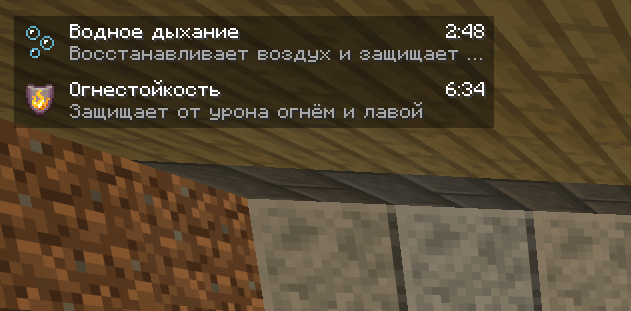
PotionHUD adds a clean, compact overlay that shows your active effects exactly when you need them. Check effect names, levels, remaining time, and short descriptions at a glance while staying focused on the world around you.
Everything at a glance
- Live countdown timers for every active effect.
- Effect icons, names, and levels, with Roman numerals for amplifiers.
- Short, helpful descriptions for all vanilla effects.
- Infinite-effect support, displayed with a clear
∞symbol. - Hidden-particle support — effects remain visible even when their particles are disabled.
- No duplicate indicators — vanilla effect icons are hidden while PotionHUD is enabled.
Designed to fit your screen
Choose where the overlay feels most natural:
- Top left
- Top right
- Bottom left
- Bottom right
The panel adjusts to the available screen space, while optional names, descriptions, and a translucent background let you control how much information it shows.
Easy to configure
Open Mods → PotionHUD → Config to:
- enable or disable the overlay;
- change its screen position;
- show or hide effect names;
- show or hide effect descriptions;
- toggle the translucent background.
Changes apply immediately — no restart required. When PotionHUD is disabled, the vanilla effect indicators return.
Client-side by design
Install PotionHUD only on your client. It works in single-player and on servers without requiring a server-side installation. No additional libraries are needed.
Try it in-game
Use these commands to see the overlay in action:
/effect give @s minecraft:water_breathing 180 0
/effect give @s minecraft:fire_resistance 420 0
/effect give @s minecraft:speed 120 1
/effect give @s minecraft:regeneration infinite 0 true
Clear all test effects with:
/effect clear @sLocalization
The configuration interface and built-in effect descriptions are available in English and Russian.
Requirements
- Game version: Java Edition 26.3
- Loader: NeoForge 26.3.0.100 or newer for game version 26.3
- Java: 25
- Side: Client only
常见问题
PotionHUD 支持哪些 Minecraft 版本?
PotionHUD 支持 Minecraft Java 版 26.3,可用的加载器:NeoForge。下载时注意选择和你游戏版本一致的文件。
PotionHUD 怎么安装?
先用 PCL2 或 HMCL 启动器安装对应版本的 NeoForge,再把下载的 .jar 文件放进游戏目录的 mods 文件夹,重新启动游戏即可。开启了版本隔离的,mods 文件夹在 versions/版本名 下面。

评论
登录后评论和评分