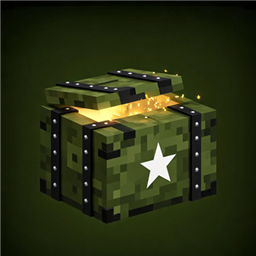
Battle Cache
Supply caches generate across the overworld. Walk up to one, right-click its front, and the lid pops open — loot bursts out and lands flat on the ground. After a full day-night cycle the crate reseals itself and restocks, ready for the next run.
介绍
Features
Find caches in the wild
-
Caches generate naturally on the surface of overworld biomes (oceans and rivers excluded).
-
Default density: roughly one cache per 6 chunks (configurable from 1 per chunk to very rare).
-
Each cache is a 1×2 military crate with a hinged lid and a stencilled star.
Crack it open
-
Right-click the front of the crate (the latch side). Aiming from the sides or back does nothing.
-
The lid animates open and loot bursts out towards the player, then lies flat on the ground like a supply drop.
-
Synthesized opening thud + rattling nut sounds; everything is server-authoritative.
Reseal and restock
-
After
refreshTicks(default 24000 ticks = one full Minecraft day / 20 real minutes) the crate closes, reseals, and rolls fresh loot. -
Restock state is stored in the left half’s block entity and survives world reloads.
Creative loot editor (F8)
-
Press F8 in creative mode at any time. No cache needs to be targeted.
-
Two tabs:
-
This Cache — a custom loot list that replaces the loot table roll for that crate.
-
Global Pool — a pool shared by every save, dimension and player on the installation, stored in
config/battlecache-global-pool.dat.
-
-
Aiming at a cache opens its per-cache tab; aiming at nothing opens the global pool tab.
-
Search every registered item, filter by creative tab, or import your inventory — imported stacks keep their full NBT/components (enchants, custom names, potions, mod data).
-
Both lists hold up to 54 entries.
Weighted loot
-
Every entry has a weight from 1 to 999. Weights are relative: a weight of 10 is ten times as likely as a weight of 1.
-
Hover a configured slot and scroll the mouse wheel to change the weight ( Shift = ±10 ). The slot shows a small
w12badge and the tooltip shows the exact value. -
Each open draws 2–4 entries by weight (duplicates allowed) and rolls a quantity between 1 and the entry’s stored count.
-
Loot priority: this cache’s custom list → global pool → built-in loot table.
-
Legacy worlds and pool files load unchanged; old entries simply get weight 1.
Replace chests (optional)
-
replaceVanillaChests(default true): naturally generated vanilla chests and trapped chests become supply caches. -
The cache inherits the chest’s loot table, so structure loot is preserved.
-
replaceModdedChests(default false): also replaces chests from other mods whose block entity stores a loot table. -
protectNamedChests(default true): never replaces an anvil-renamed chest, protecting player bases.
Break it down
- Breaking a crate destroys it and its contents — no crate item, no loot spill. This is intentional: caches are one-shot supply drops, not storage.
How to use
- Explore the surface until you spot a crate (or craft nothing — they only spawn in the world).
- Stand in front of it and right-click to open.
- Collect the loot. The crate reseals after about one in-game day and can be opened again.
- As a creative player, press F8 to edit loot: wheel over a configured item to change its weight, or import items from your inventory.
常见问题
Battle Cache 支持哪些 Minecraft 版本?
Battle Cache 支持 Minecraft Java 版 1.20.1,可用的加载器:Forge。下载时注意选择和你游戏版本一致的文件。
Battle Cache 怎么安装?
先用 PCL2 或 HMCL 启动器安装对应版本的 Forge,再把下载的 .jar 文件放进游戏目录的 mods 文件夹,重新启动游戏即可。开启了版本隔离的,mods 文件夹在 versions/版本名 下面。
HE666zz 的其他作品
查看全部 →
Swarm Drones
A one-tap swarm airdrop. Call in a heavy carrier that sweeps overhead and drops a swarm of **attack drones** and **ambient drones** — black clouds blot the sky, droning from every direction.

Loot Table Studio
Browse and edit chest, mob and mod loot tables in-game through a visual editor.
评论
登录后评论和评分