
截图
介绍
中文介绍正在准备中,下面暂时显示原文。
BuddelTech Quest Theme
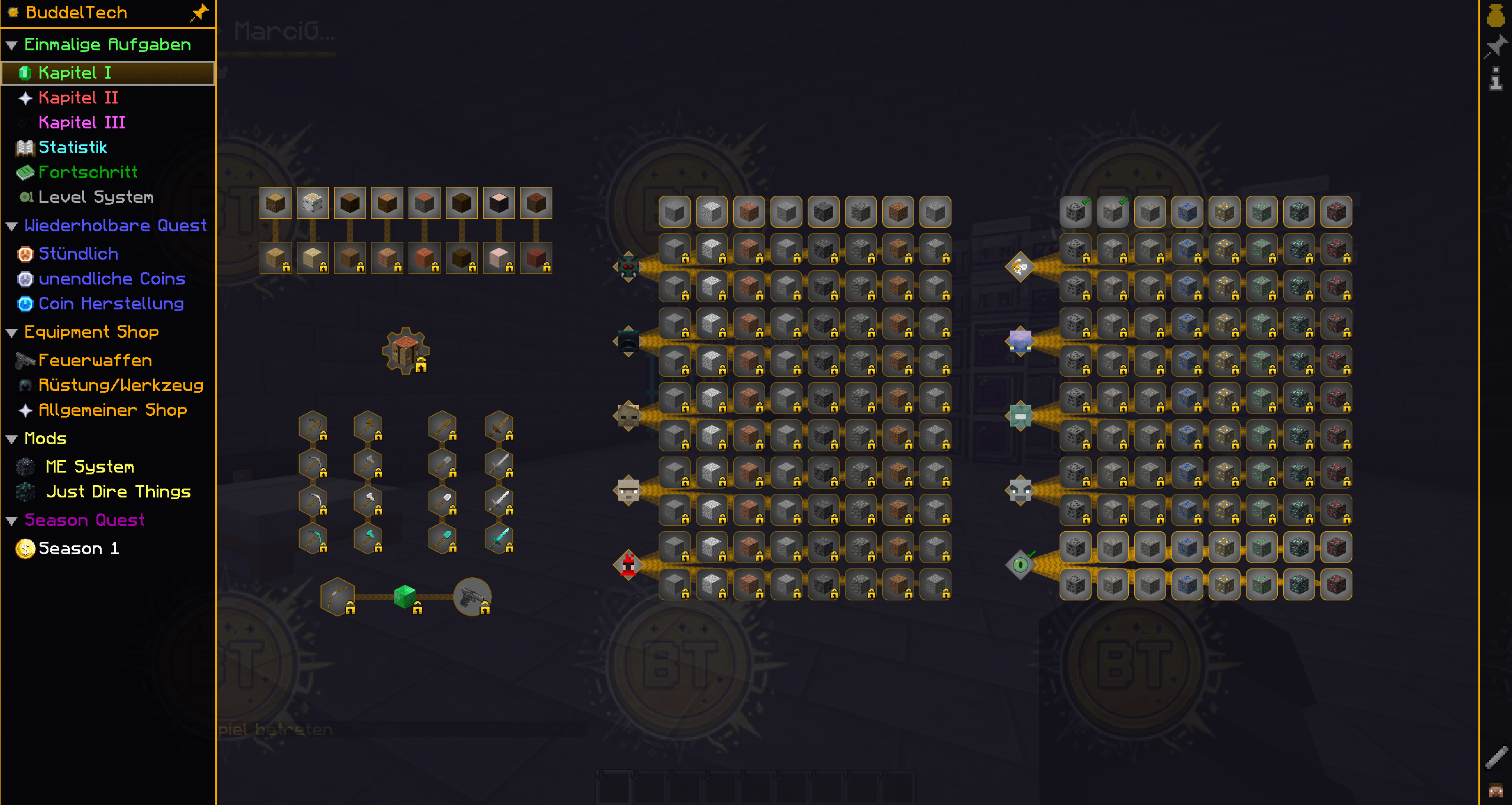
A custom resource pack that replaces the default FTB Quests UI theme with a sleek, dark design tailored for the BuddelTech server experience.
Features
- Custom quest panel background — dark blue-gray tones for a clean, modern look
- Restyled locked quest color — subtle gray overlay (
#88CCCCCC) instead of the harsh vanilla black - BuddelTech watermark — a faint server logo tile on the quest background at 7% opacity
- Improved readability — high contrast between locked and unlocked quests without visual clutter
- Fully compatible with FTB Quests for NeoForge 1.21.1
Compatibility
| Component | Version |
|---|---|
| Minecraft | 1.21.1 |
| FTB Quests | 2101.1.24+ |
| NeoForge | 21.1.x |
Installation
- Download the
.zipfile - Place it in your
resourcepacks/folder - Enable it in Options → Resource Packs
- The FTB Quests UI will automatically use the new theme
Credits
Designed by 2area for the BuddelTech Minecraft server.
Join the server: Buddeltech.com
Discord:
2area| CurseForge: 2area’s Projects
常见问题
BuddelTech-Quest Theme 支持哪些 Minecraft 版本?
BuddelTech-Quest Theme 支持 Minecraft Java 版 1.21.1。下载时注意选择和你游戏版本一致的文件。
BuddelTech-Quest Theme 怎么安装?
把下载的 .zip 文件(不用解压)放进游戏目录的 resourcepacks 文件夹,进游戏后在「选项 → 资源包」里把它移到右边启用。
2area 的其他作品
查看全部 →
HWID-Tracker (Notification/Listing/Kick/Ban) by Area
by 2area
静默追踪玩家硬件 ID,以启用基于 HWID 的封禁、多账号检测和操作员警报。
2,358
3 个月前
CurseForge

End Access (End Toggle per Player or Global) byArea
by 2area
默认锁定末地维度,并允许管理员通过简单命令为个别玩家解锁——非常适合任务和进程导向的服务器。
1,063
4 个月前
CurseForge

Buddeltech
by MarciGamer98, 2area
加入服务器:buddeltech.com
878
2 个月前
CurseForge

EnderPearl Chunkload (Like newest MC Versions) byArea
by 2area
Keeps the chunk a thrown Ender Pearl occupies loaded and preserves in-flight pearls across logout/login, enabling working Stasis Chambers on servers.
381
4 个月前
CurseForge
评论
登录后评论和评分