
No Pause
作者:Rieversed
A lightweight mod that stops Minecraft from auto-pausing when you tab out or click away from the window.
截图




介绍
中文介绍正在准备中,下面暂时显示原文。
NoPause
Overview
A lightweight Fabric mod that prevents Minecraft from auto-pausing when tabbing out or clicking away from the window. Features a toggle system with keybinds and commands.
Features
- Prevents auto-pause when tabbing out
- Toggle mod on/off with ‘N’ key (configurable in controls)
- In-game commands:
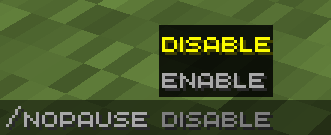
/nopause enable/nopause disable/nopause chat on/off/nopause visual on/off- Chat notifications when toggling
- Visual Indication for when the mod is enabled/disabled (with a fade-out animation to reduce hud clutter)
- Normal pause menu (Escape key) still works
Requirements
- Fabric Loader
- Fabric API
Installation
- Install Fabric Loader for your preffered (supported) Minecraft version
- Drop the mod and Fabric API into your
modsfolder - Launch Minecraft and enjoy!
Usage
- Press ‘N’ (or your configured key) to toggle the mod
- Use
/nopause enableor/nopause disablein chat - Use
/nopause chat on/offor/nopause visual on/offto enable/disable a specific notification method.
License
All rights reserved.
常见问题
No Pause 支持哪些 Minecraft 版本?
No Pause 支持 Minecraft Java 版 1.19–1.21.1,共 13 个版本,可用的加载器:Fabric。下载时注意选择和你游戏版本一致的文件。
No Pause 怎么安装?
先用 PCL2 或 HMCL 启动器安装对应版本的 Fabric,再把下载的 .jar 文件放进游戏目录的 mods 文件夹,重新启动游戏即可。开启了版本隔离的,mods 文件夹在 versions/版本名 下面。运行环境:仅客户端。
评论
登录后评论和评分