
介绍
Project Description Template
Title: [Warden Custom REWORK]
The display in Vanila version: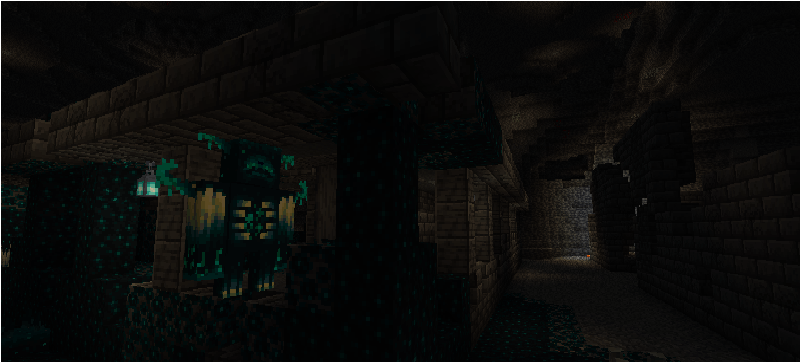
About: This resource pack brings a unique look to the Warden in Minecraft. By utilizing custom entity modeling, it provides a refreshed aesthetic while maintaining the Warden’s terrifying presence in the deep dark. Please check the pack.png file included in the resource pack to see a preview of the custom model!
Key Features:
-
Custom Entity Model: A completely redesigned model for the Warden.
-
Immersive Design: Optimized for a seamless experience within the deep dark biome.
-
Easy to Use: Simply drop the pack into your resource packs folder and enjoy.
Requirements:
-
To ensure the custom model displays correctly, please make sure you have the following mods installed:
-
EMF (Entity Model Features)
-
ETF (Entity Texture Features)
-
Installation:
-
Download the resource pack file.
-
Open your Minecraft launcher and navigate to your game folder.
-
Place the downloaded
.zipfile into theresourcepacksfolder. -
Ensure you have EMF and ETF mods installed in your
modsfolder. -
Launch the game, go to Options -> Resource Packs, and enable this pack.
常见问题
WardenCustomRework 支持哪些 Minecraft 版本?
WardenCustomRework 支持 Minecraft Java 版 1.19–26.1.2,共 27 个版本。下载时注意选择和你游戏版本一致的文件。
WardenCustomRework 怎么安装?
把下载的 .zip 文件(不用解压)放进游戏目录的 resourcepacks 文件夹,进游戏后在「选项 → 资源包」里把它移到右边启用。
MochiLinesStudio 的其他作品
查看全部 →
Lower Fire:Blue Fire: Safe & Low Visuals
一个让下界探索更安全的资源包
Sword Texture|VoidWalker:katana
Project: AZURE-GLITCH 风格:赛博朋克/科幻风下界合金剑设计
Sword 3D model : FlameDragonOverlord
为下界合金剑更换更好看的皮肤
Animated Ores
为所有矿石制作独特的动态纹理
评论
登录后评论和评分