OdarIs Overlay
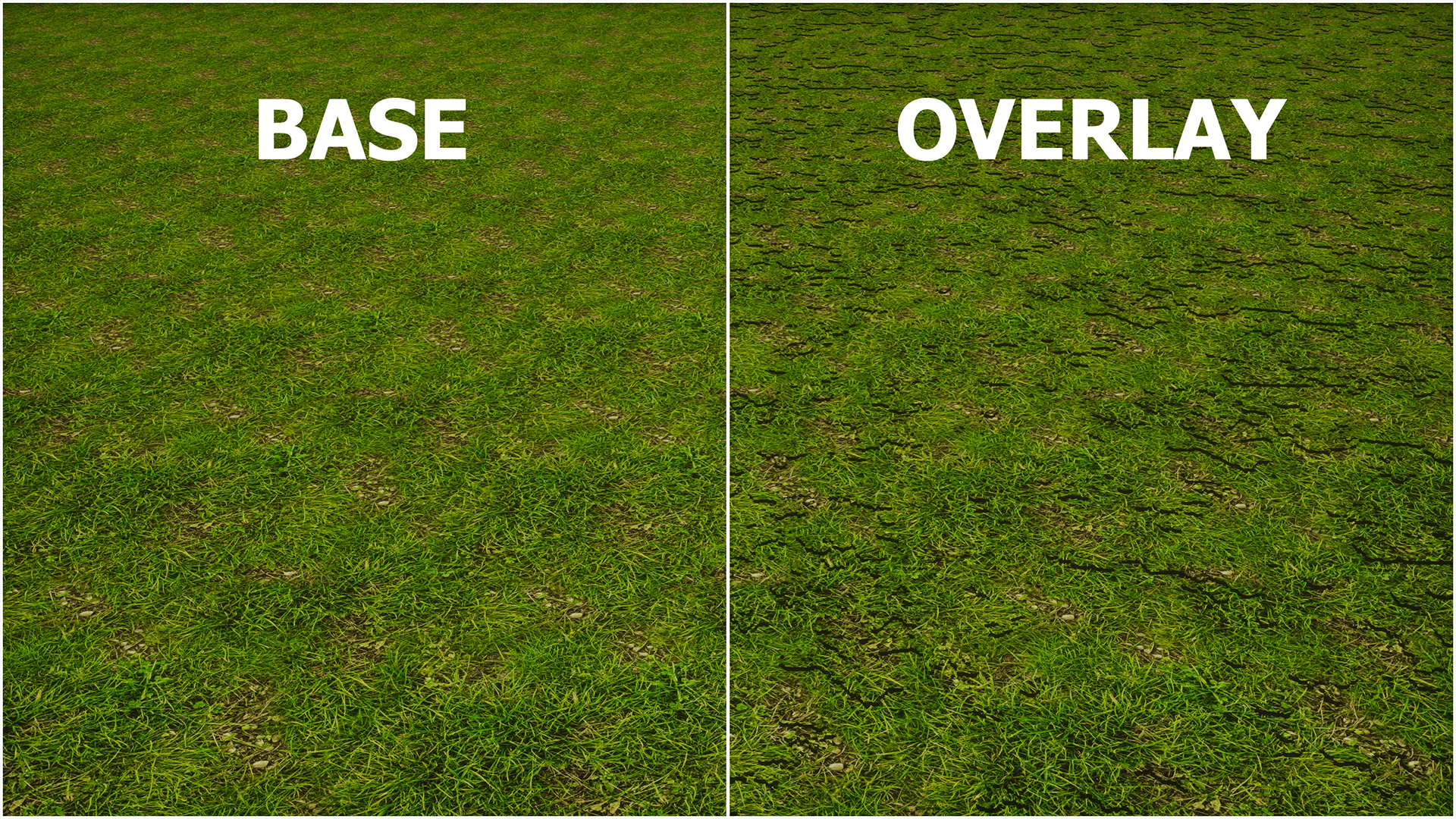
Adds subtle plants and surface details to OdarIs grass blocks, giving terrain more depth and variety while keeping the enhanced-vanilla look. Optional add-on; requires OdarIs Base.
截图
介绍
MORE DEPTH. SAME TERRAIN.
Subtle vegetation and surface detail for OdarIs grass.
7 resolutions · 32x to 2048x · Java Edition · No required mods
OdarIs Base · Files · Gallery
A little more life on the ground.
OdarIs Overlay is an optional add-on that adds small vegetation details to grassy surfaces. I wanted the ground to feel a little richer without covering up the material underneath. The original OdarIs grass texture stays visible, while the extra detail makes the surface feel less flat.
This is an optional add-on. It requires OdarIs Base and does not replace the main resource pack.
Alpha 0.1 – Overlay Add-on
The first release focuses on controlled grass-surface detail. It’s meant to blend into the environment rather than stand out as a separate layer everywhere you look.
- Small plants and surface details over grass.
- The original grass material remains recognizable underneath.
- Optional on top of Base; Random Blocks is not required.
Available in 32x, 64x, 128x, 256x, 512x, 1024x, and 2048x. Match the resolution of the packs you use together.
Installation & load order
Required packs: Base.
Keep the downloaded ZIP files intact and enable them under Minecraft > Options > Resource Packs. Place the add-on above Base.
Recommended setup, top to bottom:
- 30 – Overlay
- 10 – Base
If you use every OdarIs add-on:
- 40 – Foliage
- 31 – Random Overlay
- 30 – Overlay
- 20 – Random Blocks
- 10 – Base
If you use Random Blocks together with Overlay, add Random Overlay above both for matching randomized surface detail.
Other OdarIs packs
- 10 – Base: The main resource pack.
- 20 – Random Blocks: Texture variants, including alternative Halloween pumpkin faces in Alpha 0.2.
- 30 – Overlay: Small plants and surface detail on grass.
- 31 – Random Overlay: Matching overlays for randomized terrain.
- 40 – Foliage: Fuller tree canopies.
You don’t need every add-on. Only use the ones you want and their required companions.
Compatibility & performance
- Edition: Minecraft Java Edition. Check the Files tab for listed game versions.
- Mods: No OptiFine or other mods required.
- Shaders: Optional. Lighting, transparency, and surface details can look different depending on settings.
- Resolution: Match resolutions where available. Higher resolutions may use more video memory.
These add-on files are currently published as Alpha 0.1. The Base and Random Blocks packs have separate release versions.
Support OdarIs
Public releases of OdarIs will remain free.
If you enjoy the project and would like to support its development, you can do that on Patreon. I share upcoming textures, previews, and Early Builds there before they become part of public releases.
Support OdarIs on Patreon
Thanks to everyone who’s already supporting OdarIs. I really appreciate it.
Found something that looks wrong? Let me know on Discord. A screenshot, Minecraft version, OdarIs resolution, and shader name (if used) are especially helpful.
Gallery screenshots were captured with Photon Shaders. Some images also show other optional OdarIs add-ons.
常见问题
OdarIs Overlay 支持哪些 Minecraft 版本?
OdarIs Overlay 支持 Minecraft Java 版 1.20–26.2,共 23 个版本。下载时注意选择和你游戏版本一致的文件。
OdarIs Overlay 怎么安装?
把下载的 .zip 文件(不用解压)放进游戏目录的 resourcepacks 文件夹,进游戏后在「选项 → 资源包」里把它移到右边启用。
Im_Teodor 的其他作品
查看全部 →
OdarIs
以熟悉的方块设计、更丰富的自然材质以及最高 2048x 的分辨率,从全新视角欣赏 Minecraft。
OdarIs Foliage
Makes OdarIs trees fuller and forests denser with enhanced foliage models, while keeping the familiar Minecraft shape and enhanced-vanilla style. Requires OdarIs Base.
OdarIs Random Blocks
Adds handcrafted texture variations to selected OdarIs blocks, reducing visible repetition while keeping the same enhanced-vanilla style. Requires OdarIs Base.
OdarIs Random Overlay
Matching overlay variations for OdarIs Random Blocks, made to work with the Base Pack and Overlay add-on while reducing repetition on grass surfaces.
评论
登录后评论和评分