截图
介绍
Dungeoned Note Blocks
A Minecraft Dungeons 2 inspired overhaul for Note Blocks.
WARNING!!! THE RESOURCE PACK DOESN’T WORK WITH VANILLA MINECRAFT (yet)
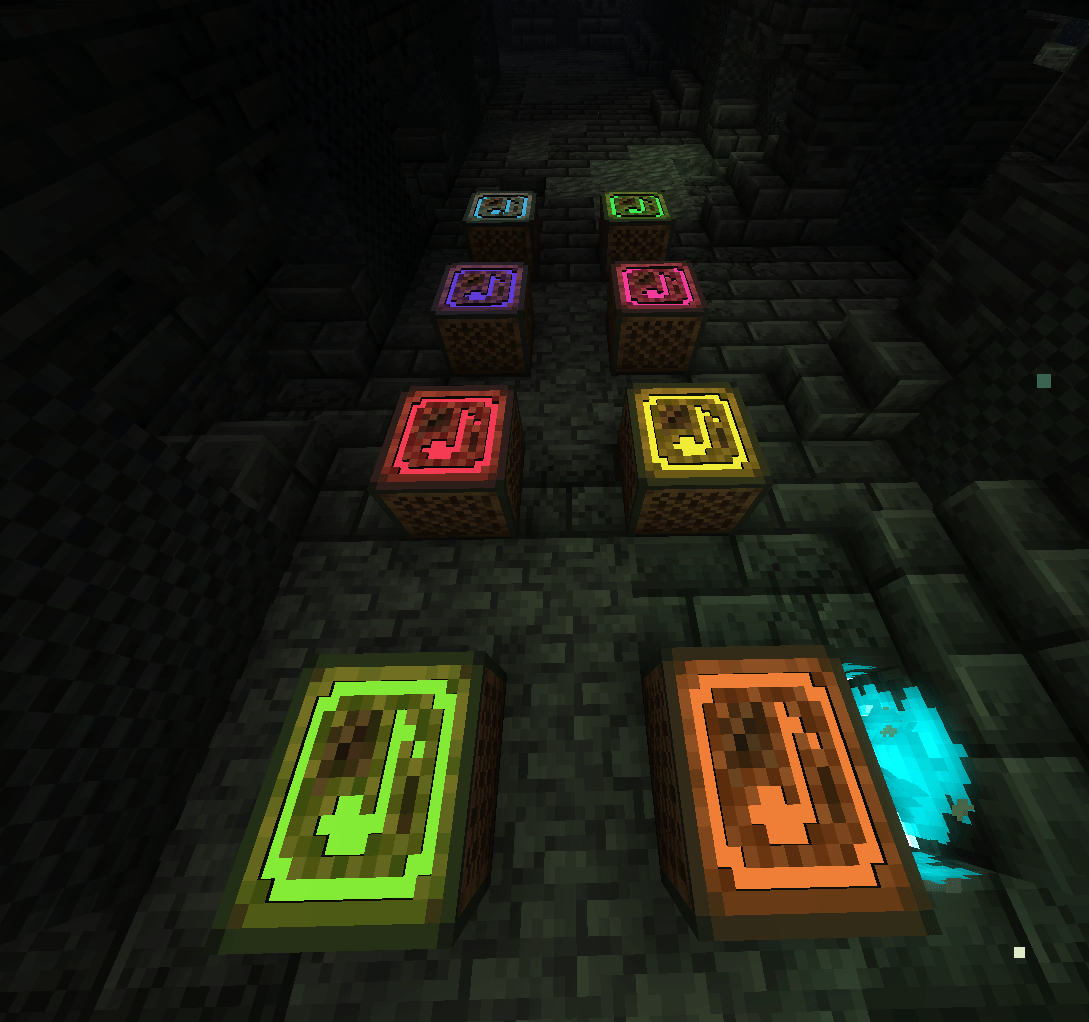
Dungeoned Note Blocks is a lightweight resource pack that gives vanilla Note Blocks a distinctive neon, dungeon-inspired appearance while keeping them fully functional for music and redstone builds.
✨ Features
- 25 unique Note Block textures covering the full F#3–F#5 range
- Pitch-based visuals — each note has its own distinct color
- Emissive textures for a bright, neon-like appearance
- Clean 16×16 textures designed to remain readable in large musical build
- Minecraft Dungeons 2 texture look
❗Required Mod
You NEED to download the companion mod otherwise the textures will be broken or won’t appear at all!
🎶 Mielon’s The Sift Compatibility
When used together with Mielon’s The Sift and the Dungeoned Note Blocks companion mod, Note Blocks placed on Sonorous Deepslate in Note Mode can display 8 Sonorous colors based on their note.
The colors cycle through:
Red → Orange → Yellow → Green → Cyan → Blue → Purple → Pink
The companion mod is optional. Without it, the resource pack continues to work normally; only the additional Sonorous color mapping is unavailable.
💡 Optional Compatibility
The pack looks especially good with Glowtone and LambDynamicLights or other lighting/shader setups that emphasize emissive textures.
📦 Installation
- Download the resource pack.
- Place it in your Modpack
resourcepacksfolder. - Enable it in Options → Resource Packs.
- For Sonorous color support, install Mielon’s The Sift
Supported Minecraft versions: 26.2, 26.3, 1.20.1
Resolution: 16×16
———————————————————————————————————————–
Note from a dev:
Hi, I am currently working on a new version that will work on Vanilla Minecraft and Modded!
For now, you need to install the companion mod
Sorry for that!
常见问题
Dungeoned Note Blocks 支持哪些 Minecraft 版本?
Dungeoned Note Blocks 支持 Minecraft Java 版 1.20.1–26.3,共 3 个版本。下载时注意选择和你游戏版本一致的文件。
Dungeoned Note Blocks 怎么安装?
把下载的 .zip 文件(不用解压)放进游戏目录的 resourcepacks 文件夹,进游戏后在「选项 → 资源包」里把它移到右边启用。

评论
登录后评论和评分