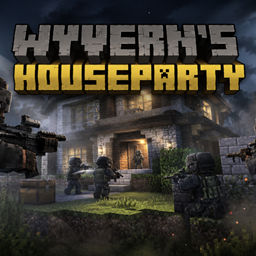
[SBW] Wyvern’s Houseparty
Command custom mercenary squads in Minecraft with Superb Warfare weapons. Plan raids with chalk, set priority targets, manage an emerald bank, and hire timed protection with helicopters or AC-130 support, finite ammo, and replacement waves.
介绍
Wyvern’s House Party
Plan your raid. Hire your squad. Call in support.
Wyvern’s House Party brings tactical raids, customizable mercenary squads, and paid protection contracts to Minecraft. Built around Superb Warfare, it combines armed NPCs, specialist roles, an emerald economy, vehicle transport, and air support.
Mark a building entrance with chalk and organize an assault, select priority targets, or hire a personal escort to accompany you through your world.
AI-assisted development: This mod was developed with extensive assistance from AI tools, including programming, debugging, and automated testing. Gameplay direction and in-game testing are guided by the creator. NPC behavior runs through Minecraft’s gameplay systems; playing does not require an online AI service or an API key.
Required Mods and Installation
The current release is built for Minecraft Java Edition 1.21.1 with NeoForge.
| Component | Required version |
|---|---|
| Minecraft | 1.21.1 |
| NeoForge | 21.1.265 or newer for Minecraft 1.21.1 |
| Java | 21 |
| Superb Warfare | 0.8.9.2 — Minecraft 1.21.1 / NeoForge build |
| Kotlin for Forge | 5.12.0 — full distribution with NeoForge support |
Install Wyvern’s House Party, Superb Warfare, and Kotlin for Forge on both the client and the server when playing multiplayer.
SecurityCraft is optional. House Party includes recognition for supported SecurityCraft doors while retaining access restrictions.
Plan Raids with Chalk
Use Chalk on a supported door to open your private raid planner. Choose your squad, available raid radius, deployment timing, transport, objectives, and optional support.
Review the complete price before confirming the purchase. Your selected squad and equipment are saved with the accepted order, so changing a template afterward does not change an existing deployment.
The planner also includes a Targets tab with separate mob and player categories. Drag targets into your priority list and arrange their order. Selecting a mob type makes eligible matching mobs within the raid area required targets.
Build Your Own Squad
Unlock three squad tiers through the Raid Workbench and create a personal squad template with up to ten members.
Combine five roles:
-
Leader: The required leader of your custom squad.
-
Rifleman: General infantry equipped for direct combat.
-
Breacher: Handles eligible door breaching, limited structural entry, and wooden access construction during raids.
-
Sniper: Uses scoped rifles and seeks suitable firing positions.
-
Trapper: Places a limited number of player-triggered mines.
Choose from 30 supported Superb Warfare weapons, organized into browsable categories. Snipers use a dedicated selection of scoped rifles, while other roles choose from the remaining supported weapon categories.
Soldiers wear Superb Warfare’s US IOTV Chest and PASGT Helmet. You can also unlock a configurable Task Force 141-inspired squad featuring Price, Ghost, Soap, and Gaz.
Emerald Banking and Progression
Deposit emeralds at the Raid Workbench to fund your operations through a persistent personal account.
Use your balance to:
-
Unlock higher squad tiers.
-
Pay for raids and additional objectives.
-
Purchase transport and air support.
-
Hire timed protection.
-
Buy aircraft ammunition and replacement aircraft.
Tier upgrades can be paid directly from your bank balance. Prices and purchase requirements are controlled by the server.
Objectives, Hit Lists, and Reinforcements
Expand an operation with additional objectives, including bed-related missions, mine placement, and hunting tasks. Orders track their results individually, so a paid deployment can report completed objectives alongside unfinished tasks.
The Hit List item lets you select an eligible online player and arrange an operation around a fixed target area.
Purchase up to three raid replacement waves by default. A replacement arrives after the entire current squad has died and uses the same booked equipment and transport. Replacement waves do not extend the original mission timer.
Trapper mines remain after their squad is gone and expire after 12,000 server ticks, approximately ten minutes at normal server speed. They are triggered by players, including the owner and teammates.
Ground Transport and Air Support
Choose how your raid squad arrives:
-
On foot
-
Sodayo Pick Up
-
AH-6 Little Bird
Larger squads use multiple transport vehicles when necessary. Paid transport requires a suitable route or landing area.
Optional AC-130 support adds airborne firepower to raid operations.
Vehicles, weapons, and aircraft use Superb Warfare’s native equipment and models.
Hire Personal Protection
Craft the PMC Protection Tablet to hire squads that follow and protect you.
Protection contracts support:
-
Up to three simultaneously reserved squads per player.
-
Contract durations of up to 30 minutes by default, configurable up to four hours.
-
Selected replacement waves for each squad.
-
Defensive or offensive engagement behavior.
-
A protected-player list with online selection and manually entered offline names.
-
Optional Little Bird, Mi-28, or AC-130 escort support.
Defensive protection engages hostile monsters and eligible attackers. Offensive protection can additionally engage eligible opposing players. Owner protection, team relationships, protected-player selections, and server PvP settings remain relevant.
Protection time pauses while the owner is offline or dead. Squads and surviving aircraft retain their saved condition when protection resumes. Dimension changes wait for suitable loaded deployment space.
Finite Aircraft Ammunition and Paid Replacements
PMC aircraft have finite ammunition. Their weapons reload from existing reserves, and an empty supply requires a paid purchase.
Open Active in the tablet to inspect remaining contract time, aircraft health, loaded ammunition, and reserves.
Default ammunition packages are:
-
1,000 standard rounds: 10 emeralds.
-
42 Mi-28 rockets: 20 emeralds.
-
10 AC-130 heavy-cannon rounds: 20 emeralds.
Explosive ammunition requires the corresponding weapon option. Package sizes and prices are configurable.
Opponents can damage and shoot down escort aircraft. A destroyed aircraft stays destroyed until you explicitly purchase a replacement through the tablet.
Replacement pricing uses the remaining contract time and the original air-support rate, with a 10% discount, rounded up to whole emeralds. Replacing an aircraft does not extend the contract.
Configurable Explosive Block Damage
PMC explosive air support can damage eligible enemies without destroying buildings.
Block destruction is disabled by default through this dedicated gamerule:
/gamerule Wyvernshouseparty:pmcExplosionBlockDamage falseSet it to true to allow block destruction from PMC aircraft explosives. This rule applies specifically to House Party’s PMC air support.
Server Configuration
Server owners can adjust prices, squad progression, mission limits, protection duration, replacement waves, ammunition packages, transport settings, and other gameplay limits.
Operations use loaded areas, and transport and aircraft require suitable space. Breaching follows configured limits and protection checks.
English and German translations are included.
Getting Started
-
Craft Chalk and a Raid Workbench.
-
Deposit emeralds and unlock your preferred squad tier.
-
Configure your available squad template.
-
Mark a supported door with Chalk, or select a player through the Hit List.
-
Review your operation and confirm payment.
-
Craft a PMC Protection Tablet when you want a mobile escort.
Superb Warfare provides the weapons, vehicles, and equipment that power these operations. Wyvern’s House Party adds the squad management, raid planning, progression, and protection systems around them.
常见问题
[SBW] Wyvern’s Houseparty 支持哪些 Minecraft 版本?
[SBW] Wyvern’s Houseparty 支持 Minecraft Java 版 1.21.1,可用的加载器:NeoForge。下载时注意选择和你游戏版本一致的文件。
[SBW] Wyvern’s Houseparty 怎么安装?
先用 PCL2 或 HMCL 启动器安装对应版本的 NeoForge,再把下载的 .jar 文件放进游戏目录的 mods 文件夹,重新启动游戏即可。开启了版本隔离的,mods 文件夹在 versions/版本名 下面。
评论
登录后评论和评分