介绍
# Lumina Main Menu
The official title screen for **Lumina City**, a modern city roleplay modpack for Minecraft 1.19.2.
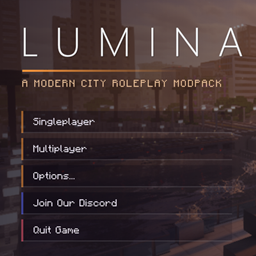
Lumina Main Menu replaces the vanilla title screen with one built for Lumina City. The game opens on the city at sunset, with a clean menu and a direct link to the community.
## Features
– **City backdrop:** a full-screen shot of Lumina City at sunset. It drifts slowly and shifts slightly as you move your mouse.
– **Lumina City branding:** the Lumina City wordmark and tagline, with shading behind the menu so it stays readable over the skyline.
– **Animated menu:** the Singleplayer, Multiplayer, Options, Join Our Discord and Quit buttons slide in when the screen opens and light up when you hover over them.
– **Community card:** a “Join the community” card in the corner. Click it, or the Join Our Discord button, to open the invite. Minecraft asks you to confirm before opening the link.
– **Mods button in Options:** the Forge mod list is in the top-right corner of the Options screen.
– **Vanilla behaviour kept:** Multiplayer shows the usual first-time warning and stays greyed out where multiplayer is disabled. The Forge and Minecraft version info stays in the corner.
## Configuration
`config/luminamainmenu-client.toml`
– `discordInviteUrl`: the invite that the button and card open. It defaults to the official Lumina City Discord.
## Good to know
– **Client-side only.** Servers don’t need it, and you can join servers with or without it.
– **Requirements:** Minecraft 1.19.2 and Forge 43 or newer.
– **Made for Lumina City.** The artwork and branding are part of the mod, so it isn’t a general menu customiser.
– **Conflicts:** other mods that replace the title screen, such as FancyMenu or Custom Main Menu, may conflict with it.
## Join the community
Development updates, previews and citizen applications are on our Discord: https://discord.gg/8NBCpyP5NA
常见问题
LuminaMainMenu 支持哪些 Minecraft 版本?
LuminaMainMenu 支持 Minecraft Java 版 1.19.2,可用的加载器:Forge。下载时注意选择和你游戏版本一致的文件。
LuminaMainMenu 怎么安装?
先用 PCL2 或 HMCL 启动器安装对应版本的 Forge,再把下载的 .jar 文件放进游戏目录的 mods 文件夹,重新启动游戏即可。开启了版本隔离的,mods 文件夹在 versions/版本名 下面。
MrDoOMysterious 的其他作品
查看全部 →
City Life: Lumina City
城市生活!你可以买车或乘坐公共交通,成为基础设施建设领域的熟练工人,也可以自己创业。RPG玩法无穷无尽!种点可疑植物,还能拥有枪支!(这个整合包以 Greenfield 地图为核心)

Advanced Interactions
An Interactive display mod that allows to create any type of hologram with full customization of capabilities for your server needs.
评论
登录后评论和评分