
WorldHost
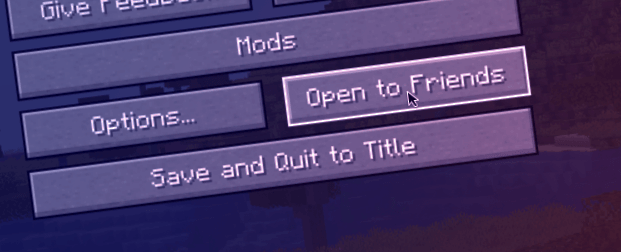
Play with your friends and host like the newest version of Minecraft. This mod makes playing with your friends easy.
截图
介绍
Host your singleplayer worlds without having to run a server or setup port forwarding! In the future, we also plan to support Bedrock Edition clients through the use of Geyser.
What if my friend doesn’t have the mod installed?
If your friend doesn’t have the mod installed, you cannot use the friends system with them. However, you can run the command /worldhost ip to get an IP that can be used with tunneling. Do note, however, that not using the friends system could increase ping. If you don’t want the ping increase, you can run /worldhost tempip to get a temporary server IP that lasts for at least 60 seconds. Clients who connect within the 60 seconds will remain connected. If you plan to never use the friends system, you can disable it in the mod settings.
How does this mod work?
This mod has a server that your client connects to, this server is used to communicate with other clients using World Host.
- When your friend wants to join you, your friend’s client asks the server for an IP address to connect to.
- The server then asks your client to create a join mode (
JoinTypein the protocol). There are two join mods: UPnP and Proxy. - UPnP mode is tried first. Your client tries to open a temporary port forward in your router that your friends client can use to connect to you directly.
- If UPnP succeeds, your client tells the server the port to use, then the server tells your friend’s client your IP and the port number.
- If UPnP fails, then your client tells the server to use Proxy mode. The server will then give your friend’s client the same “proxy IP” as
/worldhost ipdoes.
/worldhost tempip tries to do UPnP first instead of just giving you the proxy IP straightaway.
常见问题
WorldHost 支持哪些 Minecraft 版本?
WorldHost 支持 Minecraft Java 版 1.20.1,可用的加载器:Fabric。下载时注意选择和你游戏版本一致的文件。
WorldHost 怎么安装?
先用 PCL2 或 HMCL 启动器安装对应版本的 Fabric,再把下载的 .jar 文件放进游戏目录的 mods 文件夹,重新启动游戏即可。开启了版本隔离的,mods 文件夹在 versions/版本名 下面。
The_RocketSMP_Team 的其他作品
查看全部 →
Project Viltrumite
成为势不可挡的维尔特鲁姆人,征服世界、飞行、战斗,在更强大的敌人面前生存下来。

TheQuantumSMP
This is the Modpack for TheQuantumSMP join the discord for support and play.

DRAGONBLOXZ
Enter the world of Dragon Ball in Minecraft! Train your power, unlock incredible transformations, battle powerful enemies, and become the strongest warrior in an action-packed adventure.

Attack On Pillagers
This is a modpack made for my Attack on Pillagers mc server
评论
登录后评论和评分