
截图
介绍
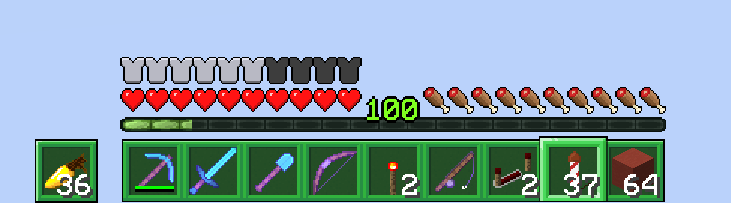
When I was creating my main resource pack, Faithful Tweaks, I had an idea to make the hotbar/buttons look like the buttons from the game’s launcher/website. However, the more I looked at it, the more I realized I hated it, and that it strayed too far from Faithful 32x. Because I didn’t want to keep releasing something I didn’t like, I decided to remove it in release 1.5. However, just in case someone wanted to use it, I have updated it one more time to 1.13. Do not expect any further updates to this pack!*
As you can see, three files have been uploaded:
- Launcher Styled Hotbar – changes only the hotbar
- Launcher Styled Buttons – changes various buttons (back to game, quit game, options, etc.)
- Launcher Styled GUI – combination of the other two files (needed for compatibility reasons)
*Unless this becomes really popular, in which case I will consider re-adding it to the main pack
常见问题
Launcher Styled GUI 支持哪些 Minecraft 版本?
Launcher Styled GUI 支持 Minecraft Java 版 1.13。下载时注意选择和你游戏版本一致的文件。
Launcher Styled GUI 怎么安装?
把下载的 .zip 文件(不用解压)放进游戏目录的 resourcepacks 文件夹,进游戏后在「选项 → 资源包」里把它移到右边启用。
评论
登录后评论和评分