QuickCmd – NeoForge
作者:tanoleo_hash
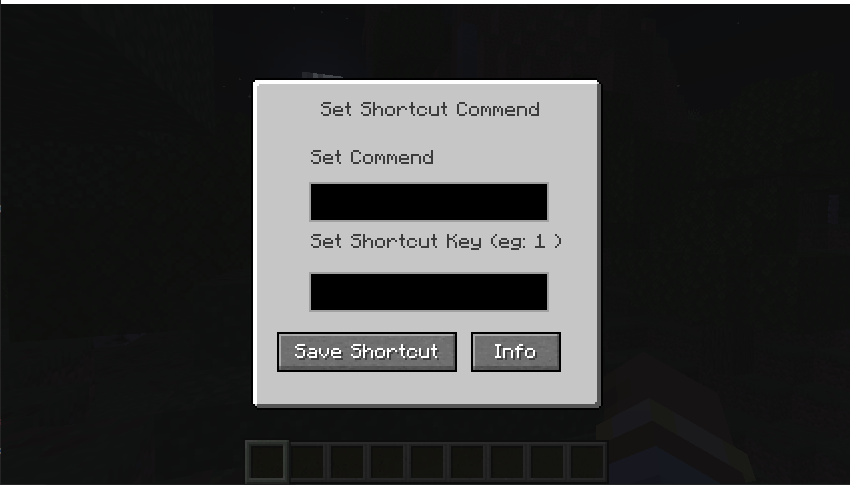
Allows players to open a GUI with the 'O' key and execute shortcut commands.
截图
介绍
中文介绍正在准备中,下面暂时显示原文。
QuickCmd
QuickCmd is a lightweight utility mod designed specifically for Minecraft 1.21.1 running on the NeoForge (26.1.2) mod loader. Built to improve quality-of-life for server administrators, creators, and everyday players, QuickCmd eliminates the friction of repeating complex commands.
🌟 Key Features
- Instant GUI Access: Press the default hotkey
Oat any time in-game to bring up the QuickCmd interface instantly. - Custom Command Binding: Easily bind any valid command or shortcut key directly through the clear and user-friendly menu interface.
- Built-in Information Menu: Access mod documentation, credits, and licensing policy directly from the integrated Info screen.
- Lightweight & Optimized: Designed with zero impact on game performance, ensuring smooth frame rates while running in the background.
🛠️ How to Use
- Press
Oin-game to open the ShortcutsMenu. - Type your preferred command and shortcut key in the input fields.
- Click Save Shortcut to store your configuration.
- Click Info to view license and mod details.
📜 Licensing & Credits
- Author: tanoleo-hash (Thwin Thit)
- License: MIT License
- Official Website: quick-cmdmc.vercel.app
常见问题
QuickCmd – NeoForge 支持哪些 Minecraft 版本?
QuickCmd – NeoForge 支持 Minecraft Java 版 26.1.2,可用的加载器:NeoForge。下载时注意选择和你游戏版本一致的文件。
QuickCmd – NeoForge 怎么安装?
先用 PCL2 或 HMCL 启动器安装对应版本的 NeoForge,再把下载的 .jar 文件放进游戏目录的 mods 文件夹,重新启动游戏即可。开启了版本隔离的,mods 文件夹在 versions/版本名 下面。
评论
登录后评论和评分