介绍






Trophies, tracking compasses, and meaningful consequences for player deaths in Minecraft.
Overview
Death Outcomes is a lightweight, server-friendly Minecraft mod that introduces meaningful rewards, trophies, and tracking mechanics when players die:
- Player Head Drops – Slain players drop authentic player heads preserving their exact skins, usernames, and 3D hat layers.
- Smart PvP Validation – Detects both direct melee combat and indirect projectile/potion kills while filtering out accidental environmental deaths and self-damage.
- Player’s Compass – Craft an enchanted compass bound to any player head that tracks the target player live across the world, even retaining their coordinates when offline.
- 100% Server-Side – Only required on the server. Players can join using standard vanilla Minecraft clients without installing any client-side mod or resource pack.
Features
1. Player Head Trophies
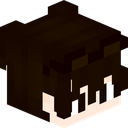
Player Head
- Authentic Profile Resolution: Heads store the player’s profile data via Minecraft’s Data Component system, ensuring the head renders identically to the fallen player’s actual skin.
- Combat Validation:
- Direct Kills: Swords, axes, fists, and direct melee weapon strikes.
- Indirect Kills: Bows, crossbows, tridents, lingering potions, splash potions, thrown projectiles, fireworks, or indirect magical damage originating from another player.
- Suicide and Environment Protection: Self-inflicted deaths (such as falling, drowning, or harming yourself with an arrow or firework) will not drop heads when PvP restriction is active.
- One-Time Head Drop Option: Can be configured so each player’s head can only drop once ever in the world’s lifetime, turning heads into ultra-rare bounty trophies.
2. Player’s Compass (Tracking Compass)
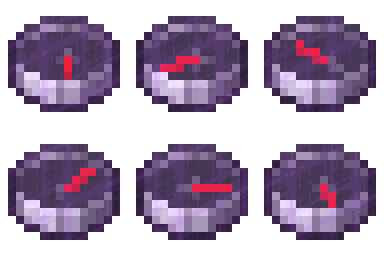
Player’s Compass
<small>Epic Rarity – Enchanted Glint – Real-time Target Tracking</small>
Combine a standard Compass with any Player Head in any 2×2 or 3×3 crafting grid to craft a Player’s Compass:
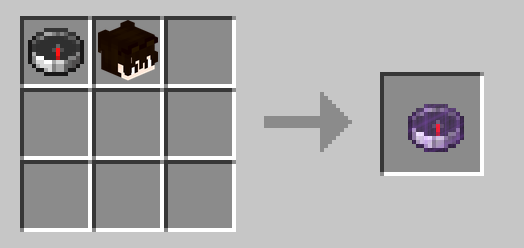
Crafting Recipe: Compass + Player Head = Player’s Compass
- Live Position Tracking: Points continuously toward the target player’s current location in real-time.
- Offline Location Persistence: If the tracked player disconnects from the server, the compass seamlessly retains their last-known position and dimension.
- Cross-Dimension Handling: If the tracked player is in a different dimension, the needle spins randomly until they return or you enter the same dimension.
- Head Recovery / Dismantling (Optional): When enabled in server settings, placing a Player’s Compass alone into any crafting grid dismantles it and returns the original player head:
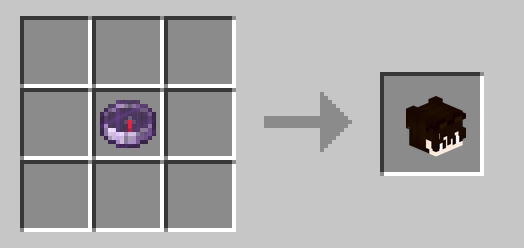
Dismantle Recipe: Player’s Compass = Player Head
Configuration
Settings are saved per world at:
<world_directory>/serverconfig/death_outcomes-server.toml[player_head_drops]
# Whether players should drop their head upon death.
# Default: true
dropPlayerHeadOnDeath = true
# Whether player heads should only drop if the death was caused directly or indirectly by another player.
# If false (and dropPlayerHeadOnDeath is true), heads will drop on any death.
# Default: true
dropPlayerHeadOnlyWhenKilledByPlayer = true
# Whether a player's head should only ever drop once. Once dropped, subsequent deaths will not drop their head.
# Default: false
dropPlayerHeadOnlyOnceEver = false
[tracking_compass]
# Whether crafting a tracking compass by combining a compass and player head is enabled.
# Default: true
enablePlayerTrackingCompassRecipe = true
# Whether placing a Player's Compass in a crafting grid dismantles/recovers the player's head back.
# Default: false
enablePlayerCompassDismantleRecipe = falseLinks and Community
- Documentation & Wiki: https://github.com/yigit-guven/Death-Outcomes/wiki
- Discord Community: https://discord.gg/aPk7Qs5d4H
- Issue Tracker: https://github.com/yigit-guven/Death-Outcomes/issues
License
This project is licensed under the GNU Lesser General Public License v3.0 (LGPL-3.0-only).
常见问题
Death Outcomes 支持哪些 Minecraft 版本?
Death Outcomes 支持 Minecraft Java 版 1.21.1,可用的加载器:NeoForge。下载时注意选择和你游戏版本一致的文件。
Death Outcomes 怎么安装?
先用 PCL2 或 HMCL 启动器安装对应版本的 NeoForge,再把下载的 .jar 文件放进游戏目录的 mods 文件夹,重新启动游戏即可。开启了版本隔离的,mods 文件夹在 versions/版本名 下面。
yigitguven 的其他作品
查看全部 →
Easy Hammers
新增镐类工具,可轻松一次挖掘 3×3 区域。

RPG Backpacks
新增多种容量的背包,让你能携带更多物品。
MX Lib
MX Team 模组的简易前置库

Leather Craft
安装这个模组后,可以通过熔炼腐肉来制作皮革!
评论
登录后评论和评分