Universal Jukebox
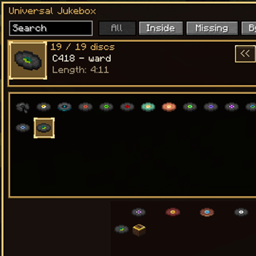
A block that stores every music disc (modded, too), catalogs them in a searchable GUI, and plays them.
介绍
中文介绍正在准备中,下面暂时显示原文。
Universal Jukebox adds a new block that collects, catalogs, and plays music discs — without changing the vanilla jukebox.
Store one of every disc you’ve found, browse them in a searchable catalog, and play any stored track from a single place.
Features
- Disc library — Stores one copy of each music disc you deposit
- Auto-discovery — Finds vanilla and modded discs via music disc tags / jukebox playable items
- Catalog GUI — Grid or list view, with filters for All / Inside / Missing / By Mod
- Search — Filter discs by name without closing the GUI
- Playback controls — Previous, play/pause, stop, next, shuffle, and loop (off / all / one)
- Volume slider — Adjust volume from the side of the GUI
- In-world display — Selected disc sits upright in the jukebox while playing
- Vanilla untouched — The normal jukebox still works exactly as before
Crafting
Note Block
Jukebox
Chest
How to use
- Craft and place a Universal Jukebox
- Insert discs (or use Deposit discs to pull matching discs from your inventory)
- Open the catalog, pick a stored disc, then press Play
- Shift-click a stored disc to remove it
Selecting a disc does not stop current playback — press Play when you want to switch tracks.
Compatibility
- Minecraft: 1.21.1
- Loader: NeoForge
- Works in any NeoForge 1.21.1 modpack
- Picks up discs from other mods automatically when they are tagged correctly
常见问题
Universal Jukebox 支持哪些 Minecraft 版本?
Universal Jukebox 支持 Minecraft Java 版 1.21.1,可用的加载器:NeoForge。下载时注意选择和你游戏版本一致的文件。
Universal Jukebox 怎么安装?
先用 PCL2 或 HMCL 启动器安装对应版本的 NeoForge,再把下载的 .jar 文件放进游戏目录的 mods 文件夹,重新启动游戏即可。开启了版本隔离的,mods 文件夹在 versions/版本名 下面。
评论
登录后评论和评分