QuickPrep
Plan a kit, track missing supplies, and find them in containers you have opened.
截图
介绍
Pack your next kit
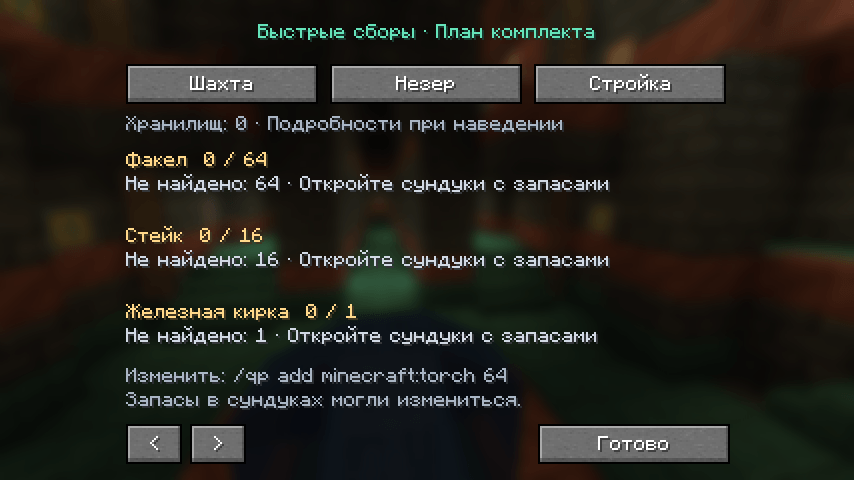
QuickPrep shows what is missing from your kit and where you last saw it. Choose a starter list for mining, the Nether or building, then open your supply containers. The plan suggests how many items to take from each remembered container. Matching items get a green outline while a supported container is open.
Example: you need 64 torches and carry 16. A remembered barrel held 20. QuickPrep suggests taking those 20 and shows that another 28 still have no known source. Items in storage never count as already packed.
Installation
Requires Minecraft Java 1.21.1, Fabric Loader 0.16.14+, Fabric API for 1.21.1 and Java 21. Install the JAR in your client profile’s mods folder. Server installation is not required.
Press K to open the plan. Open single chests, barrels or placed shulker boxes to record their contents. Hover a row to see all remembered sources and their observation age.
Edit your kit
- /qp add minecraft:torch 64 sets the desired total.
- /qp remove minecraft:torch removes an entry.
- /qp hud toggles the compact overlay.
- /qp clearstorage clears remembered containers.
Selecting a starter template replaces the active kit. QuickPrep stores one active kit per world/server context and up to 256 containers.
Supported features and limitations
Stock is a record of your last visit and may have changed. Reopen a container to refresh it. Double chests, ender chests, carried shulker contents, third-party backpacks and storage networks are not supported.
Items are matched by ID. Durability, enchantments, potion effects and equipment-slot requirements are not checked. Golden boots in the Nether list are checked for possession, not whether they are worn. Different worlds behind one server address cannot be distinguished automatically.
QuickPrep reads information visible to your client and does not move items. English and Russian text is included. Data stays in the local config/quickprep folder.
Testing and development
Twenty-two core assertions passed. A development Minecraft client completed a real inventory/barrel scenario and saved the observed stock. Dedicated-server multiplayer, arbitrary modpacks and long sessions remain unverified. Please report reproduction steps and your game/mod versions in the comments.
Code and documentation were created with substantial OpenAI Codex assistance. There is no generative AI service running during gameplay. Promotional artwork was created with AI assistance; gameplay screenshots show the actual mod. This is an independent community project.
По-русски
«Быстрые сборы» сравнивает комплект с вещами при себе и подсказывает, в каких ранее открытых хранилищах лежит недостающее. Меню открывается клавишей K. В этой версии двойные сундуки, проверка прочности и подбор замен не поддерживаются. Данные о запасах могли измениться после вашего последнего посещения.
常见问题
QuickPrep 支持哪些 Minecraft 版本?
QuickPrep 支持 Minecraft Java 版 1.21.1,可用的加载器:Fabric。下载时注意选择和你游戏版本一致的文件。
QuickPrep 怎么安装?
先用 PCL2 或 HMCL 启动器安装对应版本的 Fabric,再把下载的 .jar 文件放进游戏目录的 mods 文件夹,重新启动游戏即可。开启了版本隔离的,mods 文件夹在 versions/版本名 下面。
nav1gatorkmb 的其他作品
查看全部 →
Create Performance Analyzer
Measure Create block tick times, locate costly machinery, and save detailed reports.

Packwise AI Assistant
Search items, installed mods and client recipes in-game, with optional local AI explanations through Ollama. For Fabric and NeoForge on Minecraft 1.21.1.
评论
登录后评论和评分