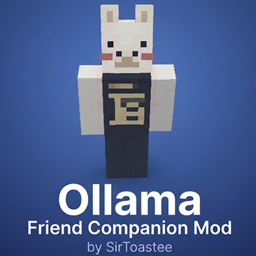
Ollama Companion
Summon a custom interactive AI companion entity straight into your world.
介绍
WARNING: ULTRA-EXCLUSIVE BETA TERRITORY
If you are reading this description right now, consider yourself part of the main character club. You are looking at an ultra-rare, hand-crafted masterpiece built from the ground up to handle a very specific mission. Good luck trying to find this via standard search bars because it is locked deep in the shadow realm—searching won’t work no matter what you type. Unless you have the direct link, you’re basically looking for a needle in pitch-black bedrock.
What does it do?
This mod does one thing: if you have no friends and depression is eating you alive, get this mod.
Let’s face it, playing singleplayer Minecraft means talking to cows that don’t care about your emotional state and trading with villagers who speak exclusively in corporate disappointment. Your mega-base is entirely too quiet, the caves are pitch black, and the phantoms screaming overhead are doing absolute zero favors for your sleep schedule.
Elite Features
-
The Companion: A custom interactive entity that follows your blocky footsteps so you can finally pretend someone else is sharing the agony of strip-mining for diamonds at Y: -58.
-
The Cosmic Summoner: A pixelated item featuring swirling cosmic energy and gold-inlay patterns to bring your digital bestie into existence.
The Fine Print & Beta Disclaimers
-
Strictly BETA: This mod is fresh out of the oven. If your companion achieves digital sentience, clips through the bedrock, or starts styling on your terrible dirt-hut architecture, that is just an unlisted feature.
-
The Chosen Few: Hand-delivered for the elite timeline. If you somehow landed on this page through the holy grail link, you have unlocked rare-tier status. Treat it with respect.
常见问题
Ollama Companion 支持哪些 Minecraft 版本?
Ollama Companion 支持 Minecraft Java 版 1.21.1,可用的加载器:Forge。下载时注意选择和你游戏版本一致的文件。
Ollama Companion 怎么安装?
先用 PCL2 或 HMCL 启动器安装对应版本的 Forge,再把下载的 .jar 文件放进游戏目录的 mods 文件夹,重新启动游戏即可。开启了版本隔离的,mods 文件夹在 versions/版本名 下面。
评论
登录后评论和评分