
截图
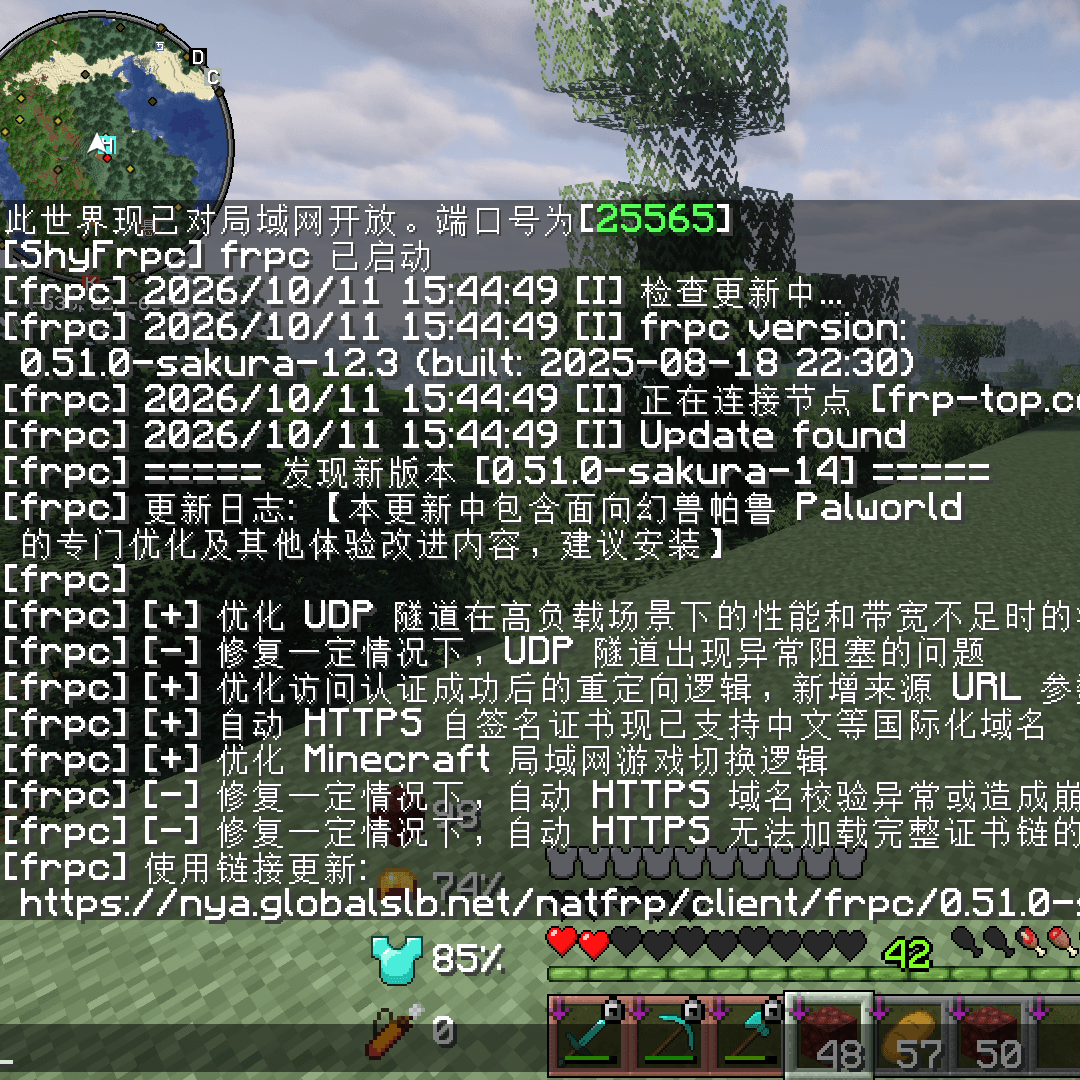
介绍
ShyFrpc
Open your LAN world to the internet without touching your router.
ShyFrpc is a client-side Minecraft mod that launches a local frpc
process from inside the game, so you can forward your singleplayer LAN world through an
FRP tunnel. No port forwarding, no NAT configuration, no external launcher — just a slash
command.
Built for the exact problem every host hits: you want to play with a friend, you open your
world to LAN, and then you realize your ISP put you behind CGNAT and port forwarding is
simply not an option.
Features
- No port forwarding. Works behind CGNAT and carrier-grade NAT.
- Pure client-side. Nothing to install on the other player’s side. They just need your
tunnel address. - Two modes. Point it at your own frpc config file, or use SakuraFrp credentials with
a single command. - Live output. Everything frpc prints goes straight to your in-game chat and to
logs/latest.log, so you can see the tunnel address and spot auth failures immediately. - Auto-start. Turn it on and frpc starts the moment you open your world to LAN.
- Automatic cleanup. Close the LAN room, leave the world, or quit the game — frpc is
stopped for you. No zombie processes. - English and Chinese localization.
- No third-party runtime dependencies.
Requirements
| Minecraft | 26.3 |
| Java | 25 |
| Mod loader | Fabric, Forge or NeoForge |
| frpc | A local frpc executable — not bundled, you supply your own |
For SakuraFrp mode you also need a SakuraFrp account with a
tunnel already created in their panel.
Installation
- Download the jar matching your mod loader and drop it in your
modsfolder. - Install frp and note the full path to
frpc.exe/frpc. - Launch the game, load a singleplayer world, and configure ShyFrpc with the commands
below. - Share the tunnel address that appears in chat with your friends.
Commands
All commands require operator permission. In singleplayer you have it by default.
| Command | Description |
|---|---|
/shyfrpc set app <path> |
Path to the frpc executable. Absolute, or relative to the game directory. |
/shyfrpc set toml <path> |
Path to the frpc config file. Same path rules as app. |
/shyfrpc set sakura <token> <tunnel> |
Store SakuraFrp credentials. Does not switch modes. |
/shyfrpc mode <default|sakura> |
Choose which mode on uses. |
/shyfrpc on |
Start frpc. |
/shyfrpc off |
Stop frpc. |
/shyfrpc auto-start <true|false> |
Start frpc automatically when you open your world to LAN. |
/shyfrpc status |
Show the current configuration and whether frpc is running. |
Usage
Using your own frpc config
If you already have a working frpc setup, point ShyFrpc at it:
/shyfrpc set app "C:\frpc\frpc.exe"
/shyfrpc set toml "C:\frpc\minecraft.toml"
/shyfrpc mode default
/shyfrpc on
ShyFrpc runs:
frpc.exe -c C:\frpc\minecraft.tomlThe -c path is resolved to an absolute path before launch, and frpc’s working directory
is set to your game directory — so relative references inside your .toml still resolve
the way you expect.
Using SakuraFrp
Create a tunnel in the SakuraFrp panel, then copy the user token from your account page
and the tunnel ID from the tunnel list:
/shyfrpc set app "C:\frpc\frpc.exe"
/shyfrpc set sakura token 123
/shyfrpc mode sakura
/shyfrpc on
ShyFrpc runs:
frpc.exe -f token:123Fully automatic
Once configured, this is all you need to do each session:
/shyfrpc auto-start trueThen just press Escape → Open to LAN → Start LAN World. frpc starts on its own,
and stops when you close the room or leave the world.
Configuration file
Settings are stored in config/shyFrpc/config.yaml and written by the commands above.
You can edit the file by hand — it is re-read every time you run a /shyfrpc command, so
no restart is needed.
app: "C:\\frpc\\frpc.exe"
toml: "C:\\frpc\\minecraft.toml"
mode: default
sakura-token: ""
sakura-tunnel: ""
auto-start: false
If the file is ever corrupted, ShyFrpc falls back to defaults and logs a warning — it will
never delete your configuration for you.
Lifecycle
ShyFrpc treats frpc as a child process of Minecraft:
| Event | What happens |
|---|---|
/shyfrpc off |
frpc stops |
| You close the LAN room | frpc stops |
| You leave the world | frpc stops |
| You quit the game | frpc stops |
Stopping is graceful: frpc gets a normal termination signal, and is force-killed only if it
has not exited within three seconds.
Troubleshooting
“frpc executable not found”
The path is resolved relative to your game directory if it is not absolute. Run
/shyfrpc status — it prints the fully resolved path and marks it [missing] if it does
not exist.
The tunnel connects but my friend cannot join
Start the LAN world before or right after running /shyfrpc on — frpc has nothing to
forward until the world is published to LAN. Also make sure the tunnel’s remote port
matches the port shown in the “Local game hosted on port …” chat message.
frpc output shows an authentication error
Double-check the token and tunnel ID with /shyfrpc status — the token is masked there, so
set it again if you are unsure. Make sure the tunnel exists and is not disabled in the
SakuraFrp panel.
Nothing appears in chat
frpc output is forwarded to the player only while you are in a world. If you started frpc
and then returned to the main menu, check logs/latest.log instead.
Building from source
./gradlew buildThe jars land in fabric/build/libs, forge/build/libs and neoforge/build/libs.
License
Apache License 2.0
常见问题
ShyFrpc 支持哪些 Minecraft 版本?
ShyFrpc 支持 Minecraft Java 版 26.3,可用的加载器:Fabric / Forge / NeoForge。下载时注意选择和你游戏版本一致的文件。
ShyFrpc 怎么安装?
先用 PCL2 或 HMCL 启动器安装对应版本的 Fabric / Forge / NeoForge,再把下载的 .jar 文件放进游戏目录的 mods 文件夹,重新启动游戏即可。开启了版本隔离的,mods 文件夹在 versions/版本名 下面。
评论
登录后评论和评分