MultiAFK Manager
Keep several offline-mode accounts AFK from one Minecraft window. Parked accounts stay connected with no rendering; switch between them instantly.
截图
介绍
MultiAFK Manager
Keep several offline-mode accounts AFK from one Minecraft window — and switch between them instantly.
Normally, keeping three accounts on a server means three Minecraft windows, three times the RAM, CPU and GPU.
MultiAFK lets one window do it: the account you are not playing is parked — it stays connected and
keeps receiving the world, but nothing is rendered or ticked for it. When you want it back, one click and you
are playing it again, without reconnecting.
⚠️ Offline-mode servers only. MultiAFK creates offline (non-Microsoft) sessions by player name.
It does not log into Microsoft/premium accounts and cannot join online-mode servers with extra accounts.
Many servers do not allow alt accounts or AFK players — read your server’s rules first.
How it works
- Join a server normally and walk to your AFK spot.
- Press I (or Esc → Go AFK). The account stays on the server, parked in the background.
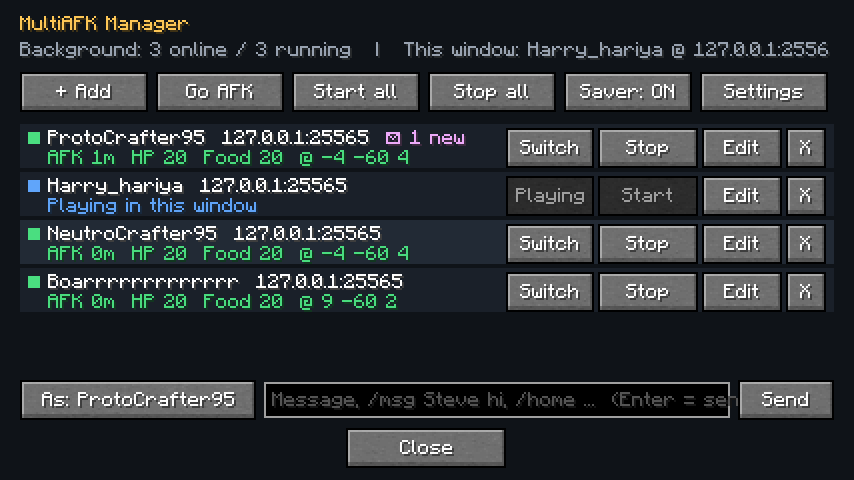
- Press O to open the manager → + Add → type a name → Play in this window.
- Set that account up, press I again. Repeat.
- Click Switch on any parked account to play it again — instantly, same connection.
Features
- Instant switching — parked accounts keep their world, inventory and position in memory; switching back does not reconnect, so you do not land in a lobby or have to log in again.
- Almost zero cost while parked — no rendering, no entity ticking, small view distance; the menu drops to a low FPS while only parked accounts are running (Power saver).
- Background accounts — start saved accounts without ever opening them (
Start/Start all), spaced out to avoid "connection throttled". - Auto-reconnect after kicks or server restarts, and optional join commands per account (for example
/login <password>; /server survivalon servers that use an auth plugin). - Auto-respawn for parked/background accounts.
- Private messages reach you — when a parked account gets a
/msg, you see it in your chat as[AFK name] …with a sound (or a toast while in menus). Public chat of parked accounts is not shown to you. - Send as any account —
/afk <name> <message or /command>,/afk all <message>, and/afkr <message>to reply to the last private message. There is also a chat bar in the manager. - Unread counters per account; full message history in each account’s Edit screen.
- Works with proxy networks (Velocity/BungeeCord server switches) and survives keep-alive timeouts.
Keys and commands
| Key / command | What it does |
|---|---|
O |
Open the MultiAFK manager |
I |
Go AFK — park the account you are playing |
/afk <name\|all> <text> |
Send chat or a command as an account |
/afkr <text> |
Reply to the last private message an AFK account got |
Keys can be changed in Options → Controls → MultiAFK.
Settings
Power saver · resume AFK accounts on game start · auto-respawn · auto-accept server code of conduct ·
optional arm-swing anti-AFK (off by default — only use it where the server allows it) ·
background view distance · gap between joins.
Saved in config/multiafk.json (join commands are stored there in plain text).
Requirements
- Minecraft 1.21.11, Fabric Loader 0.18+, Fabric API, Java 21
- Client-side only. Nothing to install on the server.
Notes
- Private messages sent by server plugins (Essentials and similar) are recognised by their format, such as
(Name -> me). If your server uses an unusual format, add part of it towhisperPatternsin the config. - Each parked account keeps its world in memory, so very many parked accounts use more RAM than background-only ones.
常见问题
MultiAFK Manager 支持哪些 Minecraft 版本?
MultiAFK Manager 支持 Minecraft Java 版 1.21.11,可用的加载器:Fabric。下载时注意选择和你游戏版本一致的文件。
MultiAFK Manager 怎么安装?
先用 PCL2 或 HMCL 启动器安装对应版本的 Fabric,再把下载的 .jar 文件放进游戏目录的 mods 文件夹,重新启动游戏即可。开启了版本隔离的,mods 文件夹在 versions/版本名 下面。
ProtonSir 的其他作品
查看全部 →
Boss Challenge
A sequential boss-rush gauntlet — fight escalating bosses, survive an expanding border, and earn Sovereign relic gear.

Everything is Random
Hard mode challenge mod — random loot from every block, free items every 10s, and 50/50 chaos events every 25s.
Sin Loot
Your sins drop OP loot — the more you sin, the better the drops, but the world grows more aggressive.

Chaotic Crafting
Every time you open a crafting table, every recipe gets completely scrambled and randomized.
评论
登录后评论和评分