
Hotbar Plus
expand your hotbar from 9 up to 16 slots! Craft Hotbar Expansion Cores to access the first 7 slots of your inventory.
介绍
🎒 Hotbar Plus
Hotbar Plus breaks the 9-slot limit, allowing you to expand your hotbar up to 16 full slots! Integrates with vanilla gameplay, custom resource packs, and multiplayer servers.

✨ Features
🔹 Hotbar Expansion
The Hotbar Expansion Core: A craftable consumable item that adds +1 Hotbar Slot upon use.
Up to 16 Slots: Consume up to 7 cores to expand your hotbar from the default 9 slots up to a maximum of 16 slots.
🎨 Centered HUD & Resource Pack Friendly
Dynamic Auto-Centering: The HUD automatically measures your unlocked slots and keeps your hotbar perfectly centered across any screen resolution.
100% Resource Pack Compatible: Does not rely on hardcoded assets. It dynamically slices the active GUI texture, ensuring custom resource pack borders and slot artwork render cleanly.

⌨️ Controls & Keybind Integration
Mouse Wheel Scrolling: Scroll through all 16 slots.
Dedicated Keybinds: Adds 7 separate keybindings under the “Hotbar Plus” controls category for direct slot access:
Slot 10: Default `0`
Slot 11: Default `-`
Slot 12: Default `=`
Slot 13: Default `u`
Slot 14: Default `i`
Slot 15: Default `o`
Slot 16: Default `p`
🔨 Crafting Recipe
To craft the Hotbar Expansion Core:
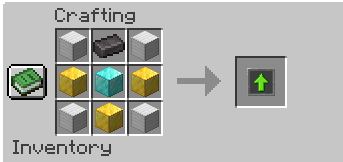
📜 Credits & Details
Author: Hmidox
Platform: NeoForge
常见问题
Hotbar Plus 支持哪些 Minecraft 版本?
Hotbar Plus 支持 Minecraft Java 版 1.21.1,可用的加载器:NeoForge。下载时注意选择和你游戏版本一致的文件。
Hotbar Plus 怎么安装?
先用 PCL2 或 HMCL 启动器安装对应版本的 NeoForge,再把下载的 .jar 文件放进游戏目录的 mods 文件夹,重新启动游戏即可。开启了版本隔离的,mods 文件夹在 versions/版本名 下面。
Hmidox 的其他作品
查看全部 →
Skypiea Golden Bell
An audio resource pack that changes the vanilla bell to the legendary Golden Bell from One Piece's Skypiea arc.
Skypiea Golden Bell
An audio resource pack that changes the vanilla bell to the legendary Golden Bell from One Piece's Skypiea arc.

Access Pad
A simple mod that adds a pad to let you open your benches (chests, furnaces, and blocks from any mod) anywhere in any dimension!
评论
登录后评论和评分