Hotbar Configurator
Automate your hotbar with custom slot rules, smart inventory sorting, dimension profiles, and auto-equipping.
介绍
Hotbar Configurator
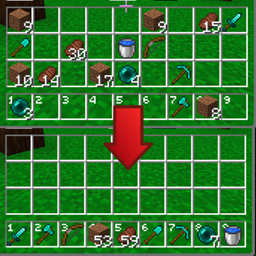
A client-side Fabric mod for Minecraft 1.21.1 that automates hotbar and inventory management. Define custom slot rules, auto-equip gear, switch profiles between dimensions, and keep items organized when looting chests.
✨ Features
- 🎯 Custom Slot Rules: Assign item IDs, native tags (
#minecraft:swords), or potion/enchantment filters with priority fallbacks. - 🧠 Smart Sorting: Automatically slots items by list priority, tier, durability, and enchantments without scrambling existing gear.
- 🌍 3 Flexible Dimension Profiles: Configure distinct layouts for any vanilla or modded dimensions (each profile can cover multiple dimensions) with optional auto-switching on portal/dimension travel.
- 🛡️ Auto-Equip: Equips armor, Elytras, shields, and Totems automatically.
- ⚡ Container Quick-Move: Shift-clicking from chests, barrels, and furnaces routes items directly into designated hotbar slots.
- 🔄 Stack Refill: Restocks depleted hotbar stacks from main inventory reserves with a keybind.
⌨️ Default Keybindings
Configure in Options → Controls → Key Binds → Hotbar Configurator:
| Action | Default Key |
|---|---|
| Refill Hotbar | , (Comma) |
| Sort Hotbar | . (Period) |
| Cycle Profiles | Unbound |
| Select Profile 1 / 2 / 3 | Unbound |
📦 Requirements
- Minecraft:
1.21.1(Fabric) - Fabric API
- Cloth Config API (
>= 15.0.0) - Mod Menu (Recommended for in-game configuration)
⚠️ Multiplayer Notice
Hotbar Configurator is 100% client-side and safe for singleplayer, Realms, and survival SMPs. Use caution on strict competitive PvP servers with anti-cheats (e.g. Hypixel), as automated inventory actions may be restricted by server rules.
常见问题
Hotbar Configurator 支持哪些 Minecraft 版本?
Hotbar Configurator 支持 Minecraft Java 版 1.21.1,可用的加载器:Fabric。下载时注意选择和你游戏版本一致的文件。
Hotbar Configurator 怎么安装?
先用 PCL2 或 HMCL 启动器安装对应版本的 Fabric,再把下载的 .jar 文件放进游戏目录的 mods 文件夹,重新启动游戏即可。开启了版本隔离的,mods 文件夹在 versions/版本名 下面。
评论
登录后评论和评分