Pack Branding
Customize window title, menu text, colors and hide Realms button. Perfect for modpack creators.
介绍
PackBranding
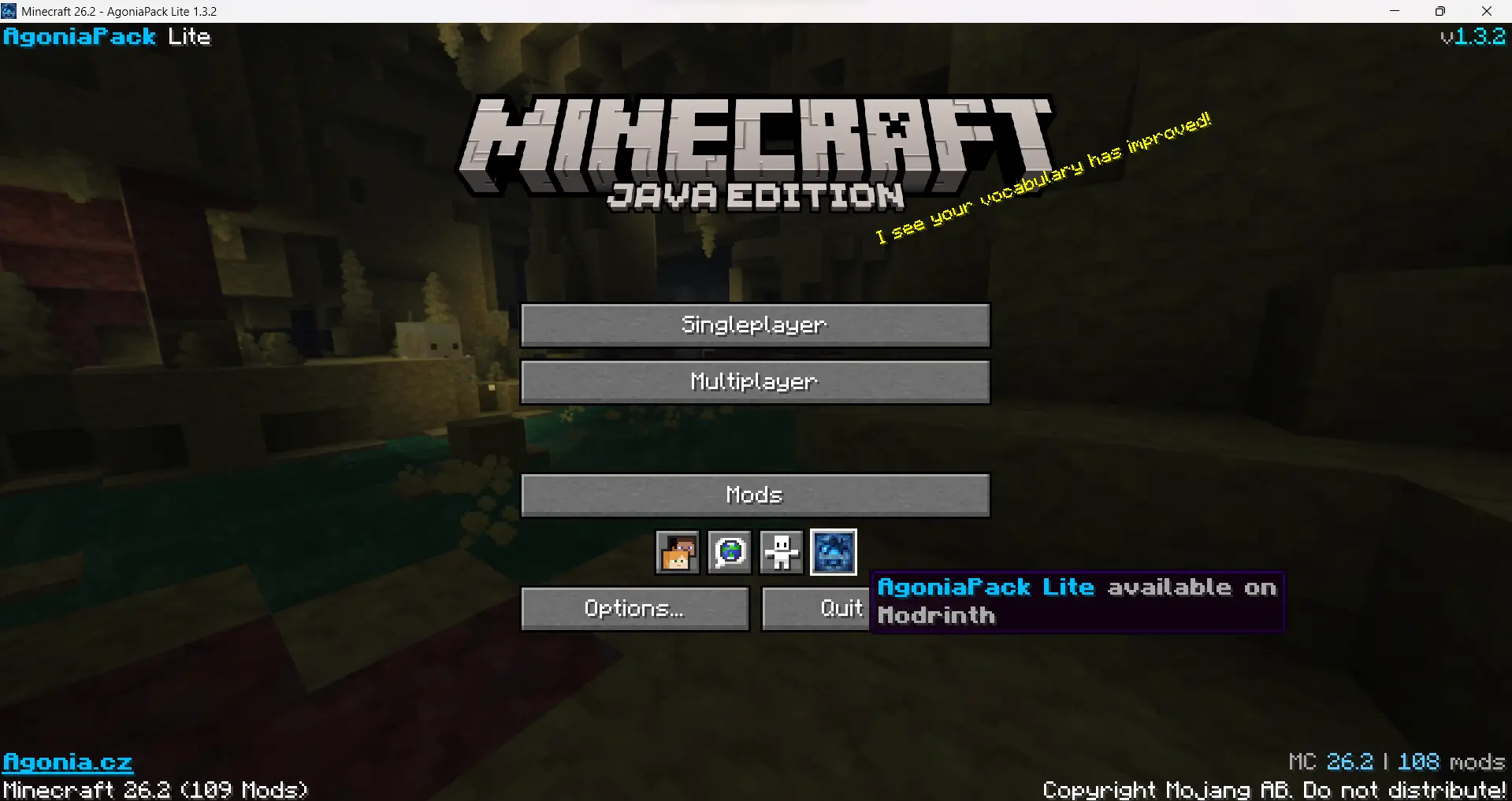
Make Minecraft feel like your modpack. PackBranding is a lightweight, client-side Fabric mod that lets modpack creators rebrand the game window, the main menu and the pause menu — no coding required, just a couple of config files.
Everything is optional and configurable, so you only change what you want.
⚠️ Versions older than 1.2.0 are no longer supported. Please update to the latest release.
✨ What it can do
- 🪟 Custom window title — replace the boring "Minecraft 26.2" title bar with your pack’s name, using dynamic tokens.
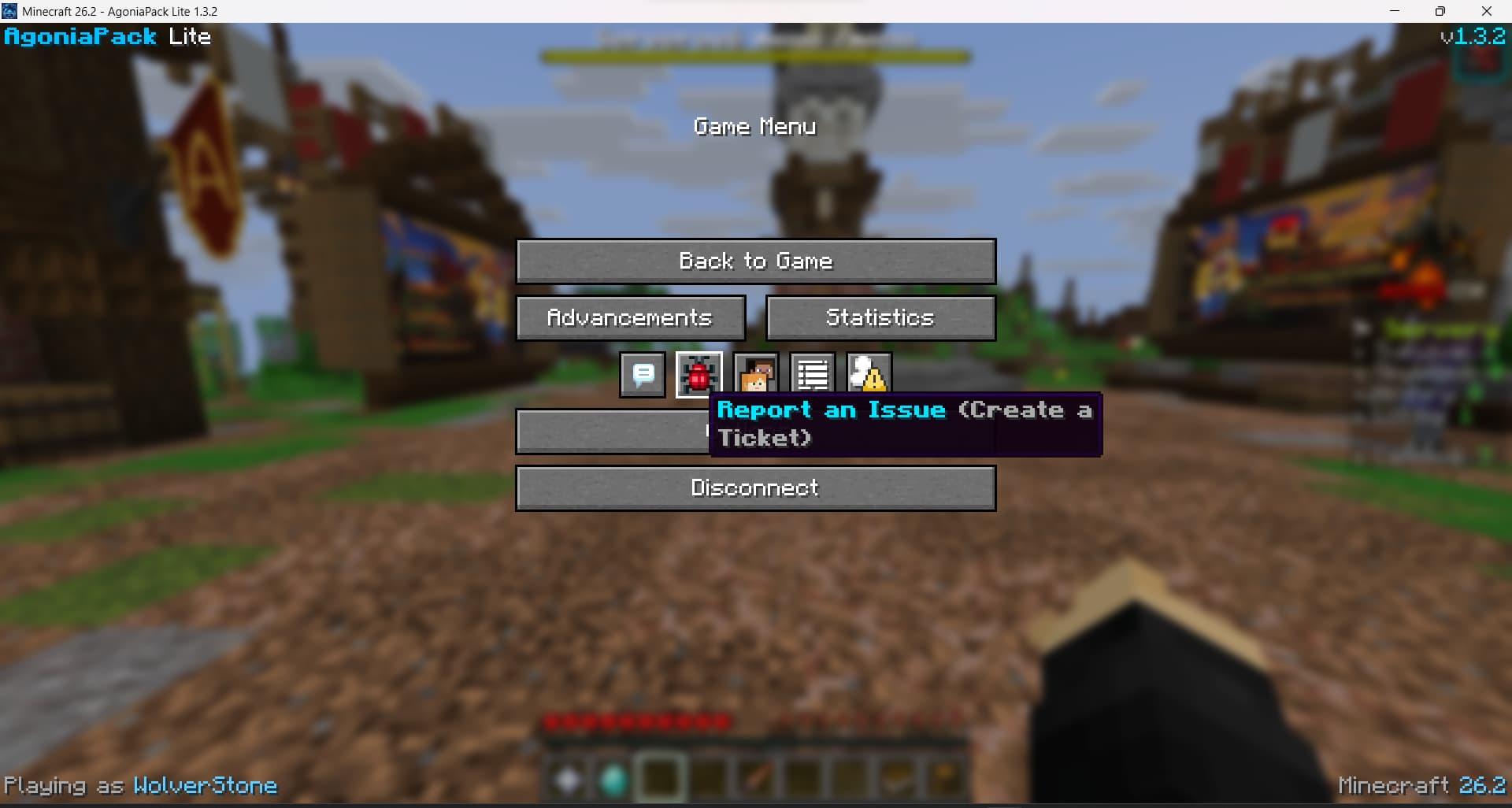
- 📝 Menu text — show custom branded text in any of the four corners of the main menu and the pause menu, a separate text per corner.
- 🔗 Clickable links — turn part of any menu text into a link with
[label](https://…), opened via the vanilla confirmation prompt. - 🔘 Icon buttons — add your own clickable icon buttons (Discord, website, …) to the pause menu and title screen, position them anywhere in the row, and use a PNG or a built-in sprite.
- 🚫 Hide vanilla icons — remove the bug-report / feedback / player-reporting / friends icons from the pause menu and replace them with your own.
- 🎨 Full color support — hex colors (
#RRGGBB) and classic Minecraft color codes (&c,&a,&l, …). - 🔢 Dynamic tokens — automatically insert the Minecraft version, your pack version, the player name, the mod count, or any mod’s version.
- 🛰️ Hide Realms — remove the Realms button and its notifications from the main menu for a cleaner look.
- 🖼️ Custom window icon — swap the window/taskbar icon for your own.
⚙️ How it works
On first launch, PackBranding creates a single config file at:
.minecraft/config/packbranding/config.json
Edit it, restart the game, and your branding is applied. A working example is
generated on first run. Every section includes a _comment field explaining it
(the mod ignores all _-prefixed keys, they’re just in-file documentation).
config.json
{
  "packVersion": "1.0",
  "windowTitle": {
    "enabled": true,
    "title": "Minecraft {mcversion}"
  },
  "icon": {
    "enabled": false
  },
  "hideRealms": true,
  "mainMenu": {
    "enabled": true,
    "aboveCopyright": true,
    "topLeft": "&6&lMyPack",
    "topRight": "&7v{packversion}",
    "bottomLeft": "[Website](https://example.com)",
    "bottomRight": "&8| &fMC {mcversion}"
  },
  "pauseMenu": {
    "enabled": true,
    "topLeft": "&6&lMyPack",
    "topRight": "&7v{packversion}",
    "bottomLeft": "&7Playing as &f{username}",
    "bottomRight": "&8| &fMC {mcversion}"
  },
  "menuButtons": {
    "enabled": true,
    "title": [
      { "icon": "example.png", "url": "https://example.com", "tooltip": "&9Visit our website" }
    ],
    "pause": [
      { "icon": "example.png", "url": "https://example.com", "tooltip": "&9Visit our website" }
    ],
    "hidePauseIcons": []
  }
}
Each menu has four independent corners (topLeft, topRight, bottomLeft,
bottomRight) — leave one empty to render nothing there. On the title screen,
aboveCopyright: true keeps the bottom corners above the vanilla
copyright/version line.
🔤 Formatting reference
These apply to every menu text field and tooltip.
Tokens
| Token | Replaced with |
|---|---|
{mcversion} |
Current Minecraft version |
{packversion} |
packVersion from config.json |
{username} |
Current player name |
{modcount} |
Number of loaded mods |
{modversion:modid} |
Version of a specific mod (window title only) |
Colors & styles
| Code | Meaning | Code | Meaning | |
|---|---|---|---|---|
&0–&9, &a–&f |
Standard colors | &l |
Bold | |
#RRGGBB |
Any hex color | &o |
Italic | |
&r |
Reset | &n |
Underline | |
&m |
Links
Turn part of any text into a clickable link:
[Website](https://example.com)
Clicking it opens the URL after the vanilla "Open this link?" confirmation.
🖼️ Custom icon
- Set
"icon": { "enabled": true }inconfig.json. - Provide either:
- a single square PNG at
config/packbranding/icon.png(256×256 works well), or - a split pair:
config/packbranding/icon/icon_16x16.pngandicon_32x32.png(both required).
- a single square PNG at
- Restart the game.
🔘 Icon buttons
Add clickable icon buttons to the pause menu and title screen — great for a
Discord invite, your website, a wiki, etc.
- Drop icon PNGs (16×16 recommended) into
config/packbranding/buttons/. - List them under
menuButtonsinconfig.json— separately for the
titlescreen and thepause(ESC) menu:
"menuButtons": {
  "enabled": true,
  "title": [
    { "icon": "discord.png", "url": "https://discord.gg/example", "tooltip": "&9Join our Discord" }
  ],
  "pause": [
    { "icon": "website.png", "url": "https://example.com", "tooltip": "Visit our website" }
  ],
  "hidePauseIcons": ["menu.reportBugs"]
}
- Restart. Clicking a button opens its link after the vanilla "Open this link?"
confirmation. Buttons with a missing icon or invalid link are skipped.
Using a built-in (vanilla) icon
Instead of a PNG file, an icon can reference a vanilla/atlas sprite by
prefixing it with sprite::
{ "icon": "sprite:icon/language", "url": "https://example.com", "tooltip": "Language-style icon" }
Useful sprites: icon/language, icon/accessibility, pause_menu/bug,
pause_menu/social_interactions, pause_menu/player_reporting. Sprites from
other mods work too (e.g. modid:path).
Button position
Each button may set an index to place it at an exact spot in the icon row
(0 = first, before the vanilla icons). Omit it (or use -1) to append at
the end. This works on both the title screen and the pause menu, and the row is
re-centered automatically so there are no gaps.
{ "icon": "example.png", "url": "https://example.com", "tooltip": "First!", "index": 0 }
Hiding vanilla pause icons
hidePauseIcons removes vanilla icons from the ESC menu icon row by name, so you
can replace them with your own. Available keys:
| Key | Icon |
|---|---|
menu.reportBugs |
Report bugs |
menu.sendFeedback |
Give feedback |
menu.playerReporting |
Player reporting |
menu.online |
Friends |
(Icons added by other mods, like ModMenu, can’t be hidden this way.)
📦 Installation
- Install Fabric Loader.
- Install Fabric API.
- Drop
packbranding-x.x.x.jarinto yourmodsfolder. - Launch once to generate
config.json, then edit it.
PackBranding is client-side only — players don’t need it on the server, and it’s safe to bundle in any modpack.
✅ Requirements
- Minecraft 26.2
- Fabric Loader 0.19.3+
- Fabric API
📄 License
Apache 2.0 — feel free to include it in any modpack.
常见问题
Pack Branding 支持哪些 Minecraft 版本?
Pack Branding 支持 Minecraft Java 版 26.3,可用的加载器:Fabric。下载时注意选择和你游戏版本一致的文件。
Pack Branding 怎么安装?
先用 PCL2 或 HMCL 启动器安装对应版本的 Fabric,再把下载的 .jar 文件放进游戏目录的 mods 文件夹,重新启动游戏即可。开启了版本隔离的,mods 文件夹在 versions/版本名 下面。
WolverStones 的其他作品
查看全部 →
AgoniaPack Lite
The modpack for the Minecraft server agonia.cz includes optimization and useful mods that may come in handy while playing on the server.
AgoniaPack
The modpack for the Minecraft server agonia.cz includes optimization and useful mods that may come in handy while playing on the server.
评论
登录后评论和评分