截图


介绍
中文介绍正在准备中,下面暂时显示原文。
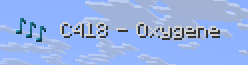
Changes the newly added music toasts as follows:
- Removes the toast background
- The notes icon will not animate (move)
Does not change the following:
- The text will still animate in when the song changes
- The notes icon will change color automatically
- The notes icon will use the texture of your resource pack
How to use:
- Run Minecraft 1.21.6 or later
- Options… -> Music & Sounds… -> set Show Music Toast to ON
- Done -> Resource Packs… -> enable Undistract music toast -> Done
- You may already see the effect, otherwise join any world to see it
常见问题
Undistract music toast 支持哪些 Minecraft 版本?
Undistract music toast 支持 Minecraft Java 版 1.21.6–26.3,共 11 个版本。下载时注意选择和你游戏版本一致的文件。
Undistract music toast 怎么安装?
把下载的 .zip 文件(不用解压)放进游戏目录的 resourcepacks 文件夹,进游戏后在「选项 → 资源包」里把它移到右边启用。
robotkoer 的其他作品
查看全部 →
No Chat Reports
by robotkoer, Aizistral
让聊天消息无法被举报(在可行范围内)
1.9亿
1 个月前
Modrinth · CurseForge

Translations for Sodium
by FlashyReese, robotkoer
Sodium 模组的非官方翻译
3268万
4 天前
Modrinth · CurseForge

Fabulously Optimized
by Fabulously Optimized
精美画质、流畅性能,熟悉的功能一应俱全,简单整合。Wilderness Bound beta版!
2794万
3 天前
Modrinth · CurseForge
Fast Better Grass
by Fabulously Optimized
让草方块及相关方块的侧面使用顶部材质。兼容其他资源包!
261万
1 个月前
Modrinth · CurseForge
评论
登录后评论和评分