
Kit Loom
Assemble repeatable team supply allotments from real local materials using a four-stack pattern.
截图
介绍
Kit Loom
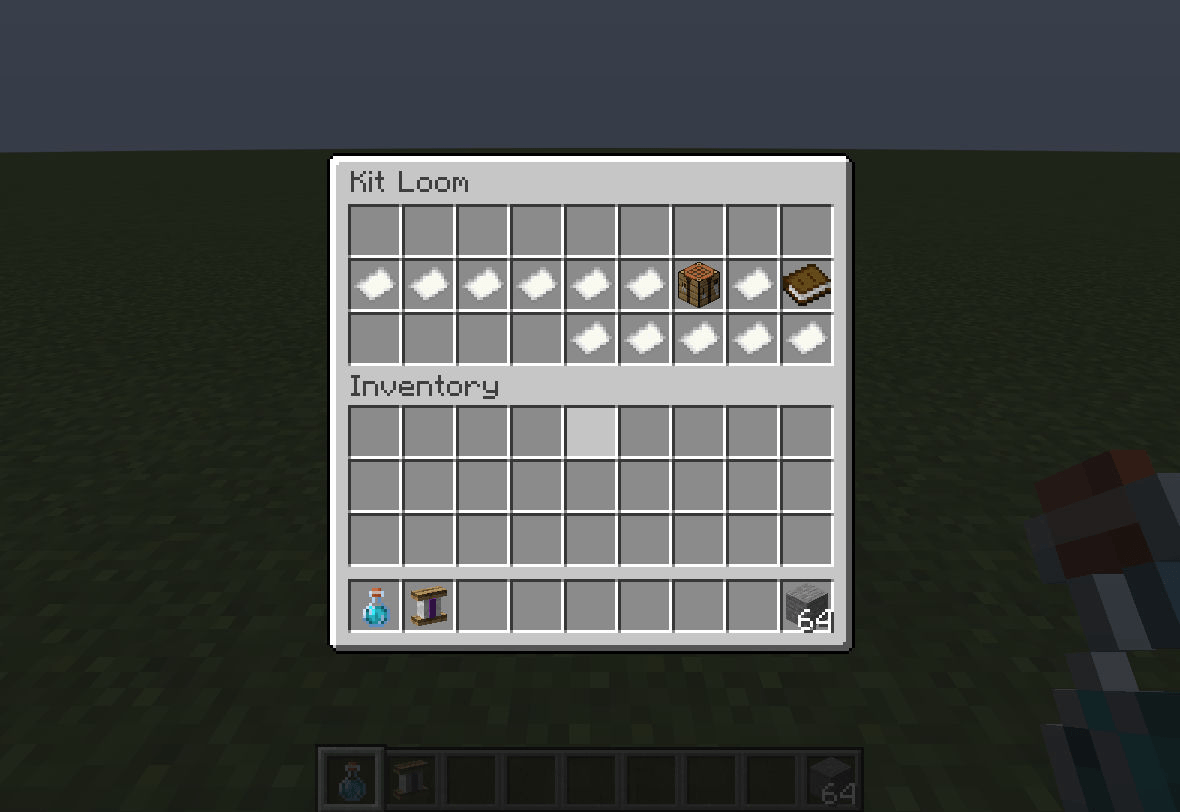
Prepare matching team supply kits without recounting stacks every time. This physical bench assembles a four-stack pattern from nine real local supply slots. Patterns copy item details, not items. Missing materials or occupied output? Nothing moves.
Craft with string/plank/string, plank/chest/plank, plank/plank/plank; right-click the bench.
- Place real materials in the top nine slots.
- Hold a stack of the desired quantity and left-click a pattern slot to copy its item, count and components without consuming it. Right-click to clear.
- Click the crafting-table control to assemble one allotment. All four output slots must be empty.
- Remove the ordinary output stacks before assembling again. Paper labels show each requirement’s readiness.
Exact components include names, damage, enchantments and contents. Patterns and control icons cannot be taken. There is no special kit item, free supplies, remote storage, player-loadout replacement, command or new keybind.
The bench is communal: nearby non-spectator players can edit it; it is not a claim/security system. Hopper/capability automation is deliberately unsupported. Breaking drops real contents once, not patterns. Normal save/reload preserves supplies and patterns; no crash-atomic storage guarantee.
Install on both client and server: Minecraft 1.21.1, NeoForge, Java 21. No other mod required. No 26.3 release available yet.
New beta; bugs may remain. Planner, exact-JAR server/menu/conservation and actual world-restart checks passed. Basic real 1.21.1 pattern, supply, assembly and corrected-title checks at GUI scales 2/3 passed. Multiplayer timing and full adversarial menu/modpack testing are not exhaustive. Test addon excluded from release.
Credits
RickCode, MIT. Original logic and geometric artwork; internal MIT RickCode scaffolding reused. References Minecraft textures without bundling copies.
常见问题
Kit Loom 支持哪些 Minecraft 版本?
Kit Loom 支持 Minecraft Java 版 1.21.1,可用的加载器:NeoForge。下载时注意选择和你游戏版本一致的文件。
Kit Loom 怎么安装?
先用 PCL2 或 HMCL 启动器安装对应版本的 NeoForge,再把下载的 .jar 文件放进游戏目录的 mods 文件夹,重新启动游戏即可。开启了版本隔离的,mods 文件夹在 versions/版本名 下面。
RickCode 的其他作品
查看全部 →
Wayfarer’s Ledger
A focused exploration mod with personal camps, biome surveys, milestone rewards, trail rations, and balanced recall.

Rail Trace
Inspect vanilla rail connections, open ends, slopes and loops with a bounded, read-only topology report.

Last Good Tick
Record redstone signals before and after a stopped clock or stuck-high signal, then inspect the timeline.

Fair Parcel
Share a held stack evenly with nearby consenting teammates, with capacity checks and no dropped leftovers.
评论
登录后评论和评分