FullBright-G to toggle (For DonutSMP)
作者:Thejon4h
A simple mod that adds light block sources all around to light up dark areas. This is great for donutsmp.
介绍
中文介绍正在准备中,下面暂时显示原文。
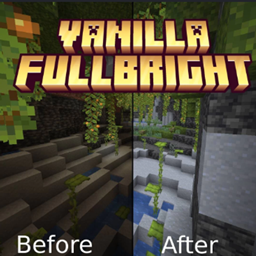
Fullbright is a lightweight, vanilla-friendly utility mod designed to streamline your mining and cave exploration experience. If you are tired of dealing with the pitch-black darkness of the deep world, squinting through dimly lit tunnels, or constantly running out of torches and coal, this mod fixes it by providing permanent, perfect visibility across every single dimension.
🌟 Key Features
- Instant Maximum Visibility: Automatically eliminates shadows and darkness, rendering every block at maximum brightness so you can see perfectly at any depth or time of day.
- Inventory De-clutter: Stop filling your inventory slots with stacks of torches, lanterns, and coal. Free up your hotbar for valuable ores and drops.
- Customizable Gamma Config: Easily toggle the fullbright effect on or off, or fine-tune the exact brightness levels using a simple in-game hotkey or config file.
- Vanilla Compatibility: Fully compatible with client-side play, meaning you can use it on your favorite multiplayer servers to navigate dark areas without changing server-side world generation.
🕹️ How it Transforms Gameplay
This mod is built for players who want a straightforward, uncomplicated caving and building experience.
This mod is built for players who want a straightforward, uncomplicated caving and building experience.
- The Explorer: Spot valuable ores, structures, and hidden hazards from a distance across massive cave systems without needing to light them up first.
- The Speed-Miner: Maintain maximum efficiency during strip-mining sessions by focusing entirely on pathing and clearing blocks instead of constantly placing torches.
Keep your inventory clean, your vision clear, and your subterranean world permanently bright!
常见问题
FullBright-G to toggle (For DonutSMP) 支持哪些 Minecraft 版本?
FullBright-G to toggle (For DonutSMP) 支持 Minecraft Java 版 26.2,可用的加载器:Fabric。下载时注意选择和你游戏版本一致的文件。
FullBright-G to toggle (For DonutSMP) 怎么安装?
先用 PCL2 或 HMCL 启动器安装对应版本的 Fabric,再把下载的 .jar 文件放进游戏目录的 mods 文件夹,重新启动游戏即可。开启了版本隔离的,mods 文件夹在 versions/版本名 下面。
评论
登录后评论和评分