
Terra Stack: Quick Stack, Sorting & QoL
Terraria-style Quick Stack to nearby chests with flying items, plus inventory and chest sorting, bundle organizer, elytra slot, quiver, crafter recipe lock, beacon upgrades and QoL fixes.
介绍
English below · Español más abajo
One click and your loot flies into the right chests. Terra Stack brings Terraria’s Quick Stack to Minecraft, plus inventory sorting, a bundle organizer, an elytra slot, a quiver, crafter recipe lock, beacon upgrades and a pack of quality-of-life fixes. Every QoL tweak can be turned off.
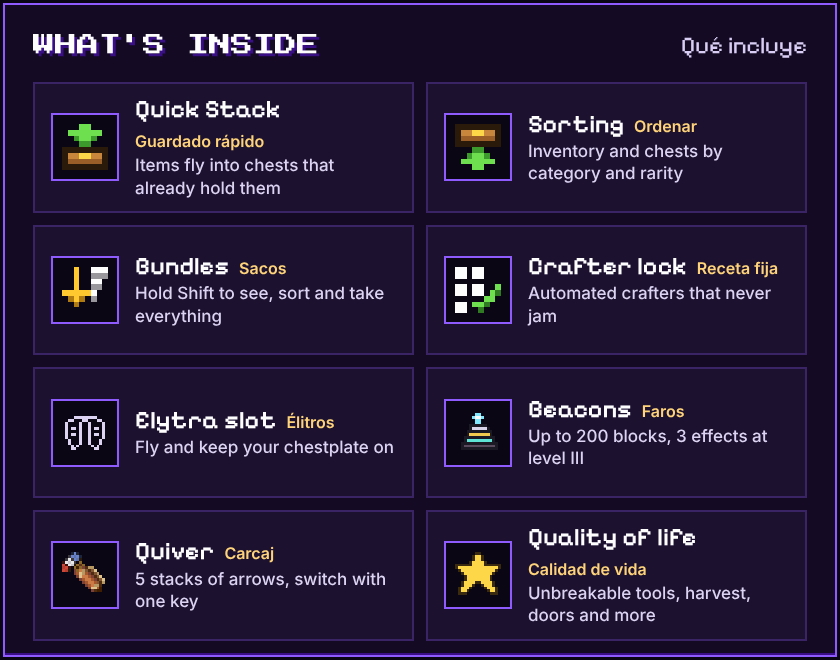

Tired of opening chest after chest to put away your cobblestone, logs and ores? Open your inventory and press the Quick Stack button. Every item that already has a home flies into the right chest.
- Moves items into chests within 12 blocks (configurable up to 32) that already contain that item, just like Terraria.
- Items go to the chest that holds the most of that item, so your storage stays organized. On a tie, the closest chest wins.
- Your hotbar is never touched, only your main inventory.
- Works with chests (single, double, trapped, copper), barrels and shulker boxes. It never puts a shulker box inside another one.
- Respects locked chests and chests that can’t be opened (a block on top, a cat sitting on it).
- Items fly in an arc into each chest, and the lid opens to catch them. Players who have the chest open are never interrupted.

New buttons appear when you open a chest, barrel or shulker box:
- Deposit here moves every item from your inventory that this chest already contains.
- Sort chest merges partial stacks and sorts the chest.
- Sort inventory does the same for your own inventory (the hotbar is left alone).
Items are grouped by category (weapons, ammo, tools, armor, accessories, storage, potions & books, food, materials, blocks). Inside each category they’re sorted by rarity (epic to common) and then in creative menu order, so woods, ingots and slabs end up next to each other. Modded items are sorted too.

- Hover a bundle and hold Shift to open a panel with everything inside it. Works in survival and creative.
- Click an item to take the whole stack. Right-click to take one.
- Sort and Take all buttons.

Automatic crafters are great until one wrong item jams the whole line. Terra Stack fixes that.
- Put 1 of each ingredient in the crafter grid.
- Press Lock recipe (the green check to the left of the grid). Works with any recipe, including modded ones.
- The crafter now only accepts that recipe’s ingredients, each in its own slot. The recipe and its result show as ghost items.
- It only crafts when every ingredient is in place, so a redstone clock never wastes a pulse.
- Items that aren’t part of the recipe go to the junk: first a container behind the crafter, then the new junk slot, and if that’s full they’re thrown out the back. Your hopper line never jams.
- The result still comes out the front, like vanilla.
- Remove locked recipe (red X) turns it back into a normal crafter.

- A new inventory slot next to your helmet, just for elytra. Fly and keep your chestplate on.
- Works in survival and creative. Shift-click sends elytra straight to the slot.
- Other players see your wings, and your cape hides while you wear them, like vanilla.
- Durability, Mending, Unbreaking and the curses work as usual. The elytra drops on death unless keepInventory is on.
- Works with glider items from other mods.

The beacon now checks what each layer of the pyramid is made of. Better materials, more range:
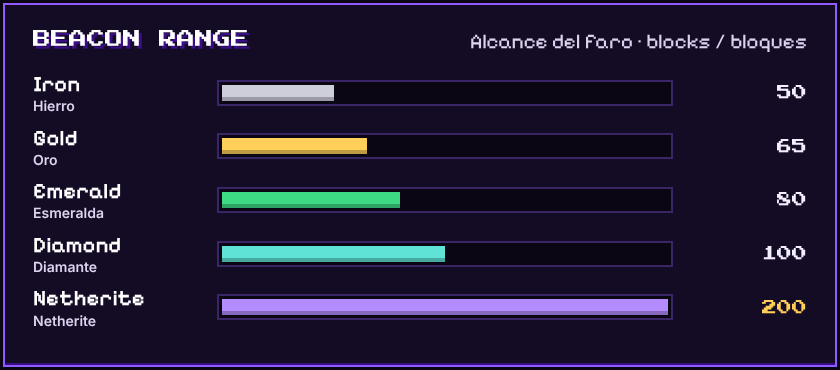
- Each layer counts on its own, so you can upgrade the pyramid one layer at a time. A mixed layer counts as its weakest block.
- The beacon screen shows the current range. Hover it to see the material of each layer.
- Netherite mode: with a full netherite pyramid, pay with a netherite ingot to pick up to 3 effects at once, all at level III (Haste III, Speed III, Strength III…).
- Beacon base blocks from other mods count as iron.

- Recipe: 7 leather, 1 lead and 1 gold ingot. Top row: leather, lead, leather. Middle row: leather, gold ingot, leather. Bottom row: 3 leather.
- Holds 5 stacks of arrows: normal, tipped, spectral and modded arrows.
- Press X to switch arrows (Shift + X goes back). You can change the key in Controls.
- The selected arrow shows in the bottom-right corner with its count.
- Bows and crossbows shoot the selected arrow. Arrows in your hands still go first, like vanilla. Infinity works.
- Arrows you pick up go straight into the quiver.
- Use it like a bundle: click arrows onto it to store them, right-click it to take out the selected stack.

Each one can be turned off in config/terrastack.json.
- Tool protection: your enchanted tools and weapons never break. You get a warning when they’re about to break, and at 1 durability they stop working until you repair them.
- No more “Too Expensive!” in the anvil. The cost is capped at 39 levels.
- Right-click harvest: right-click a grown crop to harvest and replant it. Works with wheat, carrots, potatoes, beetroots, nether wart, cocoa and modded crops. Fortune applies. Sneak to use items on the crop instead.
- Double doors open and close together. Sneak to open just one.
- No crop trampling: jumping on farmland no longer turns it into dirt, for players and mobs.
- Shulker box preview: hover a shulker box (or any item with contents) to see the full grid of what’s inside.
- Death coordinates: when you die, chat tells you where. Click to copy.

Requirements
- Fabric Loader and Fabric API. Check the Files tab for the Minecraft versions each release supports.
- Install it on the client and the server. In singleplayer, the client is enough. If a server doesn’t have Terra Stack, the buttons show as disabled.
Compatibility
- Inventory Profiles Next: slots you lock in IPN are never moved or sorted, and the buttons sit next to IPN’s own.
- JEI: the bundle panel takes priority over JEI clicks and doesn’t cover its item list.
- ItemPhysic, Trinkets, Artifacts: accessories get their own sorting category.
- Lithium: its optimized hoppers also send non-recipe items to the crafter junk.
Configuration
config/terrastack.json is created on first launch:
radius: chest search radius, 1 to 32 (default 12)includeHotbar: also move hotbar items (default false)openChests/flyingItems: animations (default true)buttonOffsetX/buttonOffsetY: fine-tune the button positiontoolProtection,anvilNoLimit,rightClickHarvest,doubleDoors,noTrampling,deathCoordinates,containerPreview: quality-of-life features (default true)
FAQ
Forge or NeoForge? Fabric only for now.
Which Minecraft versions? Each file in the Files tab lists the versions it supports. New versions are added as the mod grows.
Can I use it in my modpack? Yes. It’s MIT licensed, go for it.
Found a bug or have an idea? Leave a comment. Feedback shapes the next update.

Un clic y todo tu botín vuela al cofre correcto. Terra Stack trae a Minecraft el Quick Stack (guardado rápido) de Terraria, y además orden de inventario, organizador de sacos, ranura de élitros, carcaj, crafter con receta fija, mejoras del faro y varias mejoras de calidad de vida. Cada una se puede desactivar.
¿Cansado de abrir cofre por cofre para guardar la piedra, la madera y los minerales? Abre tu inventario y pulsa el botón de guardado rápido. Cada ítem que ya tiene su lugar sale volando al cofre correcto.
- Mueve los ítems a los cofres a menos de 12 bloques (configurable hasta 32) que ya tienen ese ítem, igual que en Terraria.
- Los ítems van al cofre que tiene más de ese ítem, para que tu almacén siga ordenado. Si hay empate, gana el más cercano.
- Tu barra rápida no se toca, solo el inventario principal.
- Funciona con cofres (sencillos, dobles, trampa, de cobre), barriles y cajas de shulker. Nunca mete una caja de shulker dentro de otra.
- Respeta los cofres bloqueados y los que no se pueden abrir (bloque encima, gato sentado).
- Los ítems vuelan en arco hacia cada cofre y la tapa se abre para recibirlos. Si otro jugador tiene el cofre abierto, no se le interrumpe.
Al abrir un cofre, barril o caja de shulker aparecen botones nuevos:
- Depositar aquí mueve todos los ítems de tu inventario que ese cofre ya tiene.
- Ordenar cofre junta los montones incompletos y ordena el cofre.
- Ordenar inventario hace lo mismo con tu inventario (sin tocar la barra rápida).
Los ítems se agrupan por categoría (armas, munición, herramientas, armadura, accesorios, almacenamiento, pociones y libros, comida, materiales, bloques). Dentro de cada categoría se ordenan por rareza (épico a común) y luego por el orden del menú creativo, así que maderas, lingotes y losas quedan juntos. También ordena ítems de otros mods.
- Pon el cursor sobre un saco (bundle) y mantén Shift para abrir un panel con todo lo que tiene dentro. Funciona en supervivencia y creativo.
- Clic en un ítem para sacar el montón entero. Clic derecho para sacar uno.
- Botones Ordenar y Sacar todo.
Los crafters automáticos son geniales hasta que un ítem equivocado atasca toda la línea. Terra Stack lo soluciona.
- Pon 1 de cada ingrediente en la cuadrícula del crafter.
- Pulsa Fijar receta (el check verde a la izquierda de la cuadrícula). Funciona con cualquier receta, también de otros mods.
- El crafter ahora solo acepta los ingredientes de esa receta, cada uno en su casilla. La receta y el resultado se ven como ítems fantasma.
- Solo fabrica cuando todos los ingredientes están puestos, así un reloj de redstone nunca desperdicia un pulso.
- Los ítems que no son de la receta van a la basura: primero a un contenedor detrás del crafter, luego a la nueva casilla de basura, y si se llena los escupe por detrás. Tu línea de tolvas nunca se atasca.
- El resultado sigue saliendo por delante, como en vanilla.
- Quitar receta fijada (X roja) lo vuelve un crafter normal.
- Una ranura nueva en el inventario, junto al casco, solo para élitros. Vuela sin quitarte la pechera.
- Funciona en supervivencia y creativo. Con Shift + clic los élitros van directo a la ranura.
- Los demás jugadores ven tus alas, y la capa se oculta mientras las llevas, como en vanilla.
- Durabilidad, Reparación, Irrompibilidad y las maldiciones funcionan normal. Los élitros caen al morir, salvo con keepInventory.
- Funciona con planeadores de otros mods.
El faro ahora revisa de qué está hecho cada piso de la pirámide. Mejor material, más alcance:
- Cada piso cuenta por separado, así puedes mejorar la pirámide piso por piso. Un piso mezclado cuenta como su bloque más débil.
- La pantalla del faro muestra el alcance actual. Pasa el cursor para ver el material de cada piso.
- Modo netherite: con una pirámide completa de netherite, paga con un lingote de netherite y elige hasta 3 efectos a la vez, todos en nivel III (Prisa III, Velocidad III, Fuerza III…).
- Los bloques de base de faro de otros mods cuentan como hierro.
- Receta: 7 de cuero, 1 rienda y 1 lingote de oro. Fila de arriba: cuero, rienda, cuero. Fila del medio: cuero, lingote de oro, cuero. Fila de abajo: 3 de cuero.
- Guarda 5 montones de flechas: normales, con efecto, espectrales y de otros mods.
- Pulsa X para cambiar de flecha (Shift + X va hacia atrás). La tecla se cambia en Controles.
- La flecha seleccionada se ve en la esquina inferior derecha con su cantidad.
- Arcos y ballestas disparan la flecha seleccionada. Las flechas en la mano van primero, como en vanilla. Infinidad funciona.
- Las flechas que recoges entran directo al carcaj.
- Úsalo como un saco: haz clic con flechas encima para guardarlas, clic derecho para sacar el montón seleccionado.
Cada una se puede desactivar en config/terrastack.json.
- Protección de herramientas: tus herramientas y armas encantadas nunca se rompen. Te avisa cuando están por romperse, y con 1 de durabilidad dejan de funcionar hasta que las repares.
- Adiós al “¡Demasiado caro!” del yunque. El costo máximo queda en 39 niveles.
- Cosecha con clic derecho: clic derecho en un cultivo maduro para cosecharlo y replantarlo. Funciona con trigo, zanahorias, papas, remolachas, verrugas del Nether, cacao y cultivos de otros mods. Fortuna aplica. Agáchate para usar ítems en el cultivo.
- Puertas dobles que se abren y cierran juntas. Agáchate para abrir solo una.
- Cultivos sin pisotear: saltar sobre la tierra arada ya no la vuelve tierra, ni con jugadores ni con mobs.
- Vista previa de cajas de shulker: pasa el cursor sobre una caja de shulker (o cualquier ítem con contenido) para ver todo lo que tiene.
- Coordenadas de muerte: al morir, el chat te dice dónde. Clic para copiarlas.
Requisitos
- Fabric Loader y Fabric API. Revisa la pestaña Files para ver las versiones de Minecraft que soporta cada archivo.
- Instálalo en el cliente y el servidor. En un jugador basta con el cliente. Si un servidor no tiene Terra Stack, los botones salen desactivados.
Compatibilidad
- Inventory Profiles Next: las casillas que bloqueas en IPN nunca se mueven ni se ordenan, y los botones quedan junto a los de IPN.
- JEI: el panel del saco tiene prioridad sobre los clics de JEI y no tapa su lista.
- ItemPhysic, Trinkets, Artifacts: los accesorios tienen su propia categoría al ordenar.
- Lithium: sus tolvas optimizadas también mandan a la basura del crafter los ítems que no son de la receta.
Configuración
config/terrastack.json se crea al abrir el juego por primera vez:
radius: radio de búsqueda de cofres, de 1 a 32 (por defecto 12)includeHotbar: mover también la barra rápida (por defecto false)openChests/flyingItems: animaciones (por defecto true)buttonOffsetX/buttonOffsetY: ajustar la posición de los botonestoolProtection,anvilNoLimit,rightClickHarvest,doubleDoors,noTrampling,deathCoordinates,containerPreview: mejoras de calidad de vida (por defecto true)
Preguntas frecuentes
¿Forge o NeoForge? Por ahora solo Fabric.
¿Qué versiones de Minecraft? Cada archivo en la pestaña Files indica las versiones que soporta. Se agregan nuevas a medida que el mod crece.
¿Puedo usarlo en mi modpack? Sí. Tiene licencia MIT, adelante.
¿Encontraste un error o tienes una idea? Déjala en los comentarios. Tus ideas definen la próxima actualización.
Inspired by Terraria’s Quick Stack. Terra Stack is not affiliated with Re-Logic or Terraria.
Inspirado en el Quick Stack de Terraria. Terra Stack no está afiliado a Re-Logic ni a Terraria.
常见问题
Terra Stack: Quick Stack, Sorting & QoL 支持哪些 Minecraft 版本?
Terra Stack: Quick Stack, Sorting & QoL 支持 Minecraft Java 版 26.2,可用的加载器:Fabric。下载时注意选择和你游戏版本一致的文件。
Terra Stack: Quick Stack, Sorting & QoL 怎么安装?
先用 PCL2 或 HMCL 启动器安装对应版本的 Fabric,再把下载的 .jar 文件放进游戏目录的 mods 文件夹,重新启动游戏即可。开启了版本隔离的,mods 文件夹在 versions/版本名 下面。
评论
登录后评论和评分