介绍
Hotswappable Armor
Swap your armor instantly!
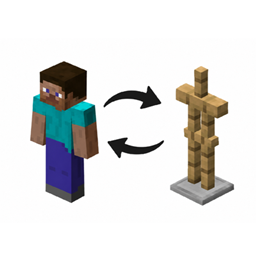
Tired of manually changing your armor every time you head out on an adventure? Hotswappable Armor makes switching equipment quick and effortless.
Simply sneak + right-click an armor stand to instantly exchange your equipped armor with the armor displayed on the stand. Your old armor goes onto the stand, ready for next time!
Features
- Instant armor swapping — exchange your armor set in a single interaction.
- All four armor slots — helmets, chestplates, leggings, and boots are swapped.
- No inventory management — your armor is exchanged directly with the stand.
- Vanilla-friendly — uses existing armor stands and familiar controls.
- Simple and lightweight — no extra items, complicated menus, or unnecessary features.
- Mod Compatible — 100% compatible with modded armors.
How to Use
-
Equip an armor stand with your preferred armor set.
-
Equip the armor you want to exchange.
-
Sneak and right-click the armor stand.
-
Enjoy your newly equipped armor!
You may use this mod in your modpacks. kinda weird how you actually have to specify that lol… Enjoy Hotswappable Armor!!
常见问题
Hotswappable Armor 支持哪些 Minecraft 版本?
Hotswappable Armor 支持 Minecraft Java 版 1.21.1–26.2,共 3 个版本,可用的加载器:Fabric / NeoForge。下载时注意选择和你游戏版本一致的文件。
Hotswappable Armor 怎么安装?
先用 PCL2 或 HMCL 启动器安装对应版本的 Fabric / NeoForge,再把下载的 .jar 文件放进游戏目录的 mods 文件夹,重新启动游戏即可。开启了版本隔离的,mods 文件夹在 versions/版本名 下面。
fluffy_pickles 的其他作品
查看全部 →
Modded Dark Mode
A dark mode compatible with many mods!

Liminal Deco – Blocks & Stuff
Blocks and items for backrooms builds.
Better Achievements
Adds tons of new achievements!

Create Ultimate Multiplayer
create modpack for those too lazy to make their own
评论
登录后评论和评分