Vextris
A lightweight mesh loading and rendering library for Minecraft mods, with optional GeckoLib integration.
介绍
Vextris is a lightweight mesh loading and rendering library for Minecraft mods.
It loads and validates triangle and quad meshes, provides immutable geometry and a resource-reload cache, and renders through Minecraft’s vertex consumers. Static meshes work without GeckoLib. An optional bridge lets GeckoLib animate bones while Vextris draws the mesh.
I use Vextris for the mesh rendering in the mods I’m developing, and publish it on its own so they can depend on it as a separate library.


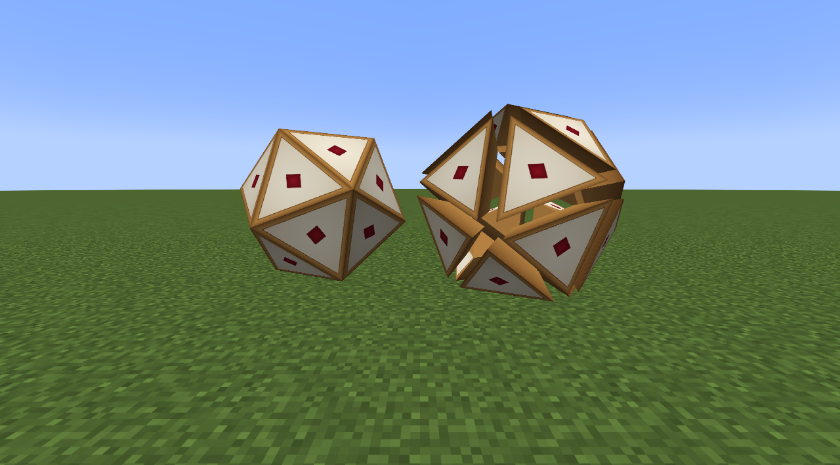
Left: a D20 mesh loaded from a resource pack. Right: the same die built as 20 solid pieces with MeshModel.builder() and moved apart by a per-bone transform. Faces at any angle, not just cubes.


.vxmesh.jsonmeshes (formats 1 to 4), standalone or paired with a GeckoLib/Bedrock.geo.jsonof the same path for its bones.- Triangles and planar convex quads, with flat or smooth normals.
- Large meshes: up to 64 MiB per file, 512 parts, 786,432 vertices and 262,144 triangle-equivalents.
- Strict validation: degenerate or non-planar faces and bad indices are rejected. Every file is rejected on its own with a clear message; the other files still load.

- Per-vertex normals, or automatic crease smoothing by angle (corner-angle or face-area weighting), with optional hard edges.
- Under Oculus/Iris shader packs, smooth parts are drawn as triangles, so the pack keeps their smooth normals.
- Computed once when resources load; flat parts draw exactly as in 0.1.0.

- Vertices are submitted through Minecraft’s vertex consumers, in cutout and translucent layers. Cutout parts are also drawn in a shader pack’s shadow pass.
- Baked once per resource reload into an immutable snapshot; F3+T is safe.
- Safe on dedicated servers: the data API is common code, rendering is client-only.

MeshGpuCachekeeps a mesh’s cutout parts on the GPU and draws them with one matrix per bone, instead of resubmitting every vertex each frame. Meant for vehicles, machines and other static meshes.GpuGeometrydoes the same for your own vertices (road or terrain pieces).- Draws with the RenderType’s own shader, or the shader pack’s, so the picture matches the CPU path. Translucent parts stay on the CPU path;
-Dvextris.gpuCache=falseturns the cache off.

- Bone hierarchies with pivots and bind rotations; bind-pose rendering without GeckoLib.
- A per-bone
BonePoserhook for your own transforms: spin, hover, part separation. - Locators: named attachment points on bones (seats, muzzles, lights), with bone and locator transform queries that also work on a dedicated server.
- Skinned surfaces (format 4): up to four bone weights per vertex, skinned on the CPU, for joints that must not break apart.
- Code-built meshes through
MeshModel.builder(), with the same validation as files.

- Draws Vextris meshes on bones that GeckoLib animates, and skinned surfaces that follow them. GeckoLib owns skeletal animation.
- Active with GeckoLib 4.7.4 or 4.8.4. Without GeckoLib, Vextris Core works normally.

In detail:
- No skeletal animation engine, keyframes or animation state.
- No OBJ/FBX/glTF importer or converter yet.
- No dynamic UVs or morph targets. Skinning runs on the CPU.
- No blocks, items, block entities, collision shapes or networking.

Installation
- Install Minecraft 1.20.1 with Forge 47.4.22 and Java 17.
- Put
vextris-forge-1.20.1-0.1.2.jarin the instance’smodsfolder and remove any previous Vextris JAR. - Install GeckoLib 4.7.4 or 4.8.4 only when a mod you use needs the animation bridge.
- Forge 47.4.22 (Minecraft 1.20.1) (required) – Declared range [47.4.22,48); verified on 47.4.22 only.
- GeckoLib 4.7.4 or 4.8.4 (optional) – Only for the optional animation bridge. Not required for Vextris Core.
Oculus, Iris and Embeddium are not required. Tested with Embeddium 0.3.31, and with Oculus 1.8.0 and the Sundial Lite shader pack; other rendering mods and shader packs have not been tested.

Get Vextris from Curse Maven (the snippet is also on each file’s page here). Version 0.1.0 is on Maven Central as io.github.dwom10912:vextris; later versions are not. Do not bundle Vextris into your own mod.
repositories {
    maven {
        url = "https://cursemaven.com"
        content { includeGroup "curse.maven" }
    }
}
dependencies {
    compileOnly fg.deobf("curse.maven:vextris-1738149:9448393")
    runtimeOnly fg.deobf("curse.maven:vextris-1738149:9448393")
}
In your mods.toml:
[[dependencies.yourmod]]
    modId="vextris"
    mandatory=true
    versionRange="[0.1.1,0.2.0-alpha)"
    ordering="AFTER"
    side="BOTH"
Existing [0.1.0,0.2.0-alpha) declarations already accept 0.1.1 and 0.1.2; mods built against 0.1.0 keep working.
Known limits
One texture per model draw. Skinning runs on the CPU (linear blend, up to four bones per vertex); there are no morph targets and no general model importer. The GPU geometry cache is render-thread only and covers cutout parts; translucent parts use CPU submission. Shader packs are tested with Oculus 1.8.0 and Sundial Lite only.
Changelog
0.1.2
- Licence change only, same code as 0.1.1: All Rights Reserved from this version.
- Versions up to 0.1.1 keep the Apache License 2.0.
0.1.1
- Smooth shading: per-vertex normals and crease smoothing (mesh format 3), kept under shader packs.
- Locators and bone/locator transform queries, also on a dedicated server.
- Skinned meshes (mesh format 4), skinned on the CPU, with GeckoLib support.
- GPU geometry cache for static meshes (
MeshGpuCache,GpuGeometry). - GeckoLib 4.8.4 supported alongside 4.7.4.
- Raised limits per mesh file: 64 MiB, 512 parts, 786,432 vertices, 262,144 triangle-equivalents.
- Additive: mods built for 0.1.0 and format 1/2 mesh files work exactly as before.
0.1.0
- Stabilization release of the existing 0.1.0-alpha.1 mesh library baseline.
- Preserves the Java API, resource format, Mod ID and rendering implementation.
- Publishes
io.github.dwom10912:vextris:0.1.0on Maven Central, with POM metadata and Javadoc. - Updates installation, integration and release documentation.

From 0.1.2, Vextris is All Rights Reserved: you can use it in any modpack that downloads it from this page, and build mods that depend on it, but not re-upload it, redistribute modified builds or copy its code. Versions up to 0.1.1 were published under the Apache License 2.0 and keep it. The Vextris name and logo have separate terms (TRADEMARKS.md in the jar).
Development disclosure
Vextris was developed with substantial AI coding assistance. The page text and changelog were drafted with AI help. The logo and page images are drawn by code (SVG and HTML templates) written with AI help; no image-generation models were used. The D20 showcase is a real in-game screenshot. All releases are built, tested and reviewed by the author.
常见问题
Vextris 支持哪些 Minecraft 版本?
Vextris 支持 Minecraft Java 版 1.20.1,可用的加载器:Forge。下载时注意选择和你游戏版本一致的文件。
Vextris 怎么安装?
先用 PCL2 或 HMCL 启动器安装对应版本的 Forge,再把下载的 .jar 文件放进游戏目录的 mods 文件夹,重新启动游戏即可。开启了版本隔离的,mods 文件夹在 versions/版本名 下面。

评论
登录后评论和评分