
截图
介绍

Physical player shops for Minecraft servers, with no client mod




Stall is a player shop system for Fabric dedicated servers on Minecraft 26.3. Players turn an ordinary barrel into a shop, stock it with items, and set up trades that other players buy with a click. Shops are real blocks with real stock, and players on a vanilla client need nothing installed: Stall runs entirely on the server.
Running Paper instead? The Paper plugin is on Modrinth and the GitHub releases, and it reads the same shop files.
How It Works
- Get a Stall token with
/stall token. - Use the token on a barrel you’re allowed to open. The barrel becomes your shop, and whatever is inside is your stock.
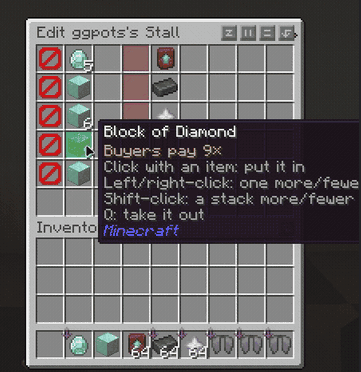
- Set up offers. Sneak and right-click your shop with empty hands, then click items from your inventory into an offer. Your items stay with you; the menu only holds copies.
- Players buy with a click. Anyone else who right-clicks your shop sees your offers and buys any offer the shop has stock for.
- Move it whenever you like. Break your shop or use
/stall remove, and the token comes back to you.
Key Features
-
Physical Shops A shop is a vanilla barrel, and its contents are the shop’s stock. Payments go into the same barrel.
-
Two-for-Two Trades Every offer asks for up to two items and gives up to two items, each up to one stack. For example, 1 diamond + 2 gold ingots → 8 iron ingots.
-
Up to Six Offers One row per offer, all on one page.
-
Clear Availability Each offer shows whether it’s in stock, whether you can afford it, and whether the shop has room for your payment, and lists what’s missing.
-
All-or-Nothing Trades Every trade is checked in full before anything moves. No partial trades and no lost items.
-
Exact Item Matching Enchantments, names, durability and potion types all count.
-
Shop Limits by Permission Tiers such as
stall.limit.5, checked through Fabric API’s permission API, so LuckPerms works out of the box. -
Claim Friendly Shops only go where their owner could open the barrel anyway, so protection mods decide where shops can go.
-
Protected Stock Other players can’t break or open a shop, and hoppers can’t drain it.
-
Saved With the World Shops are kept in the world’s own folder, so a world backup includes them.
Explosions aren’t blocked yet, and barrels are the only shop container so far. Both are coming in later versions.
Requirements
- Minecraft 26.3, Java 25
- Fabric Loader 0.19.3 or newer
- Fabric API
- LuckPerms is optional
Commands
| Command | |
|---|---|
/stall |
Show how shops work and the commands below. |
/stall token [amount] |
Get Stall tokens. |
/stall list |
List your shops and your shop limit. |
/stall info |
Show the owner and offers of the shop you’re looking at. |
/stall remove |
Remove the shop you’re looking at and give its token back to its owner. |
/stall reclaim |
Collect tokens from shops removed while you were offline. |
/stall preview |
See your own shops the way buyers do. |
/stall admin give <player> [amount] |
Give a player Stall tokens. |
Permissions
| Permission | Default | |
|---|---|---|
stall.use |
everyone | Open shops and buy from them. |
stall.create |
everyone | Turn a barrel into a shop with a token. |
stall.token |
everyone | Use /stall token. |
stall.limit.<n> |
none | Own up to n shops, from 0 to 100. |
stall.limit.unlimited |
op | Own any number of shops. |
stall.admin |
op | Edit and remove any shop, and use /stall admin. |
Players without a stall.limit tier can own 3 shops.
Links
常见问题
Stall 支持哪些 Minecraft 版本?
Stall 支持 Minecraft Java 版 26.3,可用的加载器:Fabric。下载时注意选择和你游戏版本一致的文件。
Stall 怎么安装?
先用 PCL2 或 HMCL 启动器安装对应版本的 Fabric,再把下载的 .jar 文件放进游戏目录的 mods 文件夹,重新启动游戏即可。开启了版本隔离的,mods 文件夹在 versions/版本名 下面。


评论
登录后评论和评分