SimpleDynamite
Craftable dynamite you can place, throw and upgrade, linked by hanging cables to a timed detonator for chain explosions.
截图
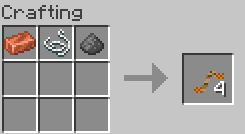
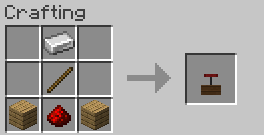
介绍
SimpleDynamite
Adds craftable dynamite, a cable system and a timed detonator for controlled (and chained) explosions. Requires Fabric API.
Dynamite
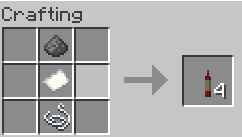
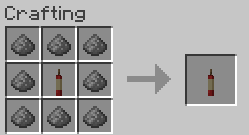
- Craft: gunpowder, paper and string in a vertical line give you 4 sticks.
- Place a stick on the ground or on a wall, then light it with a flint and steel.
- Hand-light a stick by holding flint and steel in your other hand and right-clicking. Throw it with another right-click, or drop it with Q. The fuse keeps burning wherever it lands, and picking it back up does not reset it.
- Fuse: 5 seconds. Water and rain put it out.
- Chain reaction: a blast sets off nearby dynamite after a short delay based on distance.
Power upgrades (1 to 4)
Put a dynamite stick in the center of a crafting table and surround it with 8 gunpowder to raise its power by one level, up to level 4. The tooltip shows the current level (for example “Power: 2/4”). Power carries over when you place, throw or break the dynamite, and a stronger blast means a larger radius and bigger effects.
With default settings the radius is 3.0, 4.2, 5.4 and 6.6 blocks for levels 1 to 4.
Cables and sparks
- Use the Detonator Cable on two dynamite blocks (or a detonator) to link them. The cable hangs in the air between the two points.
- When the network is triggered, a spark runs along every cable and lights each dynamite in turn, so blasts follow each other in sequence instead of all at once.
- Shears cut a cable, and dye recolors it. Maximum length is configurable (16 blocks by default).
- Dynamite placed directly next to each other also passes the fire on.
Detonator with timer
- Right-click the detonator to fire the whole connected network.
- Shift + right-click the detonator to choose a delay: none, 5, 10 or 30 seconds. A countdown appears above the block, and Shift + right-click again cancels it.
- With nothing connected, it only clicks and makes no fuse sound.
Config
A simpledynamite.json file in your config folder lets you tune:
- blast radius and how much each power level adds
- whether explosions destroy blocks
- explosion effects, chain reaction and its range and delay
- cable length, thickness, material and spark speed
- sparks on or off
Languages
English and Polish.
Contact
Bug, suggestion, or just want to say hi? [email protected]
常见问题
SimpleDynamite 支持哪些 Minecraft 版本?
SimpleDynamite 支持 Minecraft Java 版 26.3,可用的加载器:Fabric。下载时注意选择和你游戏版本一致的文件。
SimpleDynamite 怎么安装?
先用 PCL2 或 HMCL 启动器安装对应版本的 Fabric,再把下载的 .jar 文件放进游戏目录的 mods 文件夹,重新启动游戏即可。开启了版本隔离的,mods 文件夹在 versions/版本名 下面。
Krysztok 的其他作品
查看全部 →
SimpleTPA
为你的Minecraft服务器添加简单的传送命令,如/tpa、/tpaccept和/tpdeny。非常适合多人游戏世界。

EssentialHomes(FABRIC/FORGE)
一款简单且适合服务器使用的模组,可设置命名家园并传送至那里。

SimpleTPA(FORGE/FABRIC)
为 Minecraft 服务器添加 /tpa、/tpaccept 等简易传送指令,多人地图的理想选择。

AutoTool Switcher(FORGE/FABRIC)
自动装备最适合挖掘方块的工具
评论
登录后评论和评分