
Enchanting Item
A custom GUI-based enchanting mod that lets you configure enchantment presets for any weapon, tool, or armor category and apply them instantly with a single command.
截图
介绍
About
Enchanting Item is a mod that lets you quickly enchant items in Minecraft. With this mod, you can apply all the enchantments you need to an item using a single command. Simply put, it is an advanced version of the `/enchant` command.
Usage
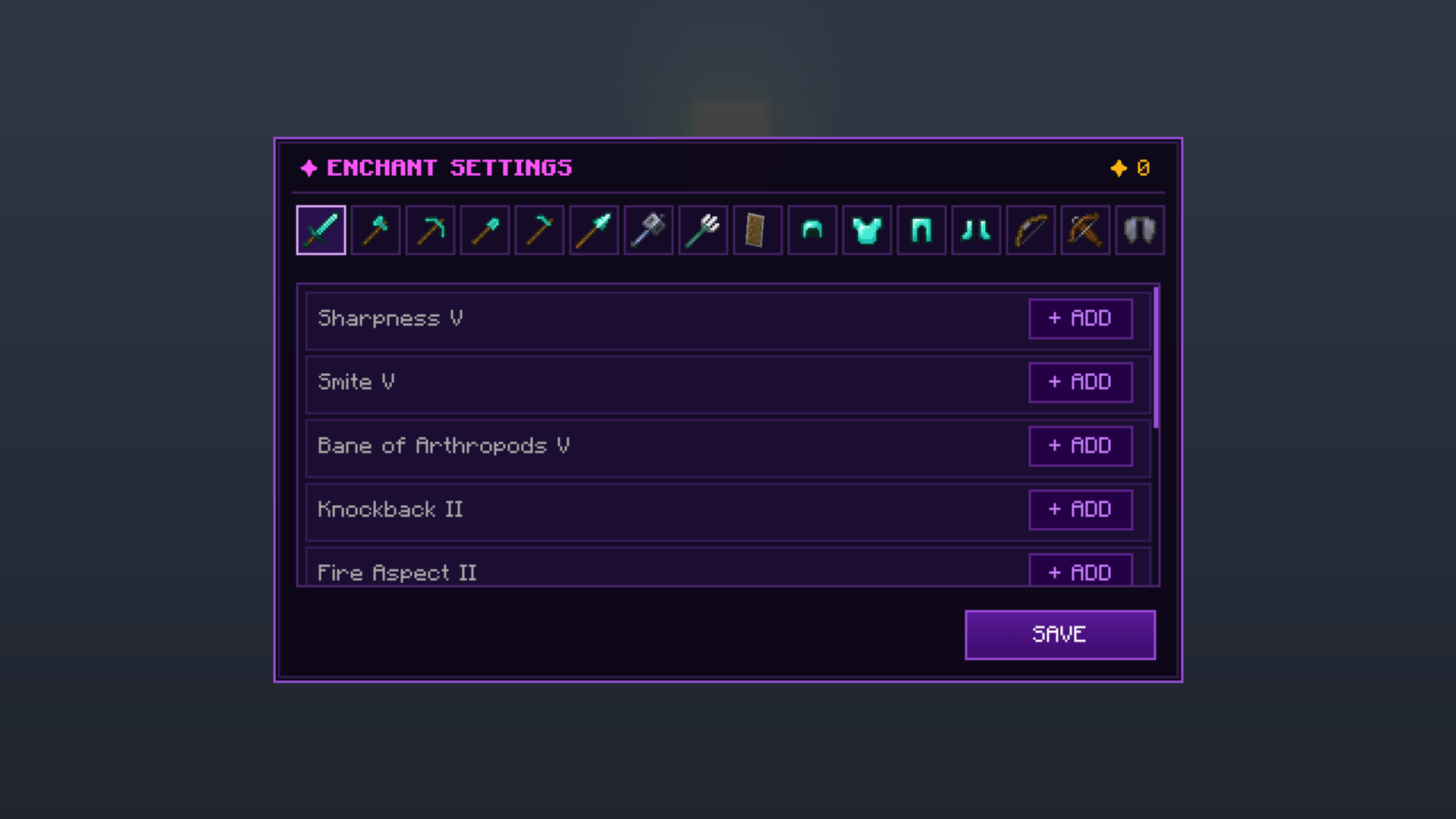
/enchanting settings (or /enchanting setting): Opens the enchantment settings menu. You can select any of the 16 item tabs at the top, add enchantments using the `+` button next to them, or remove them with the `-` button. The SAVE button at the bottom right saves your settings.
/enchanting item: Applies the enchantments you saved for that category to the item held in your hand (regardless of what material it is made of) and prints Item Enchanted in purple in the chat. If you are holding an item that cannot be enchanted (such as wood or a block), it gives a This Item Cannot Be Enchanted warning.
Requirements
– Minecraft: 1.21.11
– Loader: Fabric (Requires Fabric API)
Türkçe Açıklama
Enchanting Item modu, Minecraft’ta hızlı büyü yapmanızı sağlayan bir moddur. Mod sayesinde tek bir komutla eşyaya gereken tüm büyüleri basabilirsiniz. Kısaca açıklamak gerekirse /enchant komutunun gelişmiş halidir.
Kullanım
/enchanting settings (veya `/enchanting setting`): Büyü ayar menüsünü açar. Üstteki 16 eşya sekmesinden istediğinizi seçip büyülerin yanındaki `+` tuşuyla ekleyebilir, `-` tuşuyla çıkarabilirsiniz. Sağ alttaki `SAVE` tuşu yaptığınız ayarları kaydeder.
/enchanting item: Elinizde tuttuğunuz eşyaya (hangi madenden yapılmış olursa olsun) o kategori için kaydettiğiniz büyüleri basar ve sohbette mor renkle `Eşya Büyülendi` yazar. Eğer elinizde büyülenemeyen bir eşya (örneğin odun veya blok) varsa `Bu Eşya Büyülenemez` uyarısı verir.
常见问题
Enchanting Item 支持哪些 Minecraft 版本?
Enchanting Item 支持 Minecraft Java 版 1.21.11,可用的加载器:Fabric。下载时注意选择和你游戏版本一致的文件。
Enchanting Item 怎么安装?
先用 PCL2 或 HMCL 启动器安装对应版本的 Fabric,再把下载的 .jar 文件放进游戏目录的 mods 文件夹,重新启动游戏即可。开启了版本隔离的,mods 文件夹在 versions/版本名 下面。
评论
登录后评论和评分