Aerux Life Watch
作者:liams
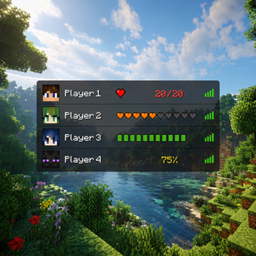
Display your teammates’ health directly in the TAB player list, with customizable health indicators and critical health alerts.
介绍
中文介绍正在准备中,下面暂时显示原文。
Aerux Life Watch
Keep track of your team’s health directly from the TAB player list and configure it with the L.
Aerux Life Watch enhances Minecraft’s vanilla TAB list by adding a clear and customizable way to see each player’s current health, while keeping the original player list and ping indicators intact.
✦ Features
- ❤️ Dynamic Hearts — Minecraft-style hearts that visually reflect the player’s current health.
- 🧡 Classic Hearts — A traditional heart display for a familiar vanilla look.
- 📊 Health Bars — A compact bar showing the player’s current health.
- 💯% Percentage — Displays the player’s health as a percentage.
- 🎨 Dynamic health colors — Health indicators change color based on the player’s remaining health.
- ⚠️ Critical Health Alerts — Receive an alert when a player reaches 25% health or less.
- 🔔 Smart alerts — The same player won’t repeatedly trigger alerts while remaining in critical condition.
- 🎮 Vanilla-friendly — Designed to enhance the TAB list without replacing its original functionality.
Know your team’s health at a glance.
常见问题
Aerux Life Watch 支持哪些 Minecraft 版本?
Aerux Life Watch 支持 Minecraft Java 版 1.20.1,可用的加载器:Fabric。下载时注意选择和你游戏版本一致的文件。
Aerux Life Watch 怎么安装?
先用 PCL2 或 HMCL 启动器安装对应版本的 Fabric,再把下载的 .jar 文件放进游戏目录的 mods 文件夹,重新启动游戏即可。开启了版本隔离的,mods 文件夹在 versions/版本名 下面。
评论
登录后评论和评分