
截图
介绍
XYZ Book
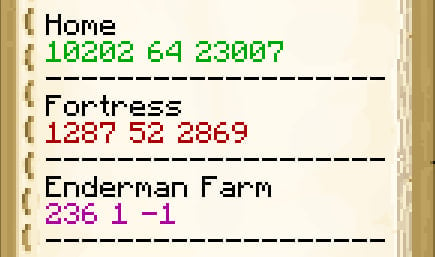
This book makes it easy to save coordinates. Instead of writing them manually, you write only the name of location, and the mod will do the rest for you. The coordinates will be added to the book automatically. Also the coordinates will be colored with current dimension (green for Overworld, red for Nether and purple for The End).
Usage
You need to rename the Book and Quill with the Anvil so that the name contains “XYZ”.
Book GUI
“Sign” button will be replaced with “New Entry” button. Click it then enter the name of the location, then click the «Done» button. The entry with the current XYZ colored with the current dimension will be saved in the book.
常见问题
XYZ Book 支持哪些 Minecraft 版本?
XYZ Book 支持 Minecraft Java 版 1.14.4–26.2,共 43 个版本,可用的加载器:Fabric。下载时注意选择和你游戏版本一致的文件。
XYZ Book 怎么安装?
先用 PCL2 或 HMCL 启动器安装对应版本的 Fabric,再把下载的 .jar 文件放进游戏目录的 mods 文件夹,重新启动游戏即可。开启了版本隔离的,mods 文件夹在 versions/版本名 下面。运行环境:仅客户端。
diskria 的其他作品
查看全部 →
Advancements Fullscreen
一个客户端模组,将进度窗口扩展至全屏,使其变得更大。是 Advancements Enlarger 模组的延续。

Advancements Search
一款为客户端进度窗口添加搜索功能的模组。
Shut Up Dead Entities
A client-side mod that smoothly fades out mob sounds upon death. Mutes dead mobs by fading, silencing, and stopping persistent ghost audio from Endermens, Creepers and Nether portals.

ATD [AchieveToDo official modpack]
The ultimate AchieveToDo experience: an achievement-focused pack featuring the AchieveToDo mod, pre-installed BaC datapacks, UI enhancements, and essential optimizations.
评论
登录后评论和评分