
BuildBudget
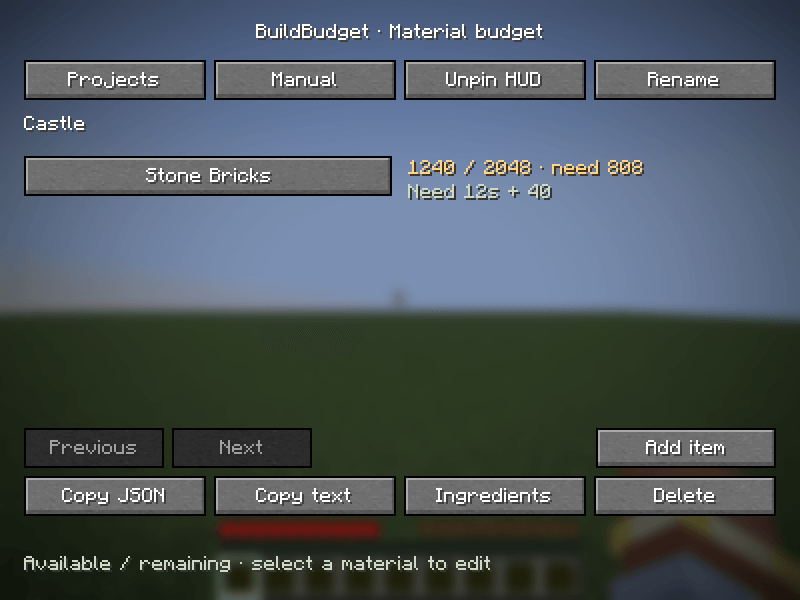
Plan survival builds with material budgets, live inventory deficits, ingredient estimates, and a pinned HUD.
截图
介绍
BuildBudget
Plan survival builds without a schematic. Create named projects, add materials and counts, and see what remains to gather.
Features
- Search items by name or ID; enter whole counts or stacks such as
32s. - Track live main inventory, hotbar and offhand availability, or enter manual totals.
- Record consumed resources and see remaining requirements and deficits.
- Pin deficits in a configurable HUD: four corners and one to ten rows.
- Choose recipes and ingredient alternatives; inspect acquisition estimates, cooking fuel, surplus, reusable seeds and returned items.
- Opt into historical observations of already-open vanilla singleplayer storage, separate from budget progress.
- Share requirements through clipboard JSON, explicit item-ID CSV import or compact text. Imports reset progress.
- Local saves with backups and read-only recovery protection. Common English and Ukrainian UI.
Installation
Version 0.2.0 beta has separate jars for these exact Minecraft releases:
| Minecraft | Loader and dependencies | Java |
|---|---|---|
| 26.3 | Fabric Loader 0.19.5+, Fabric API 0.162.0+26.3 | 25 |
| 1.21.11 | Fabric Loader 0.19.5+, Fabric API 0.141.6+1.21.11 | 21 |
| 1.16.5 | Forge 36.2.42 tested | 8 |
| 1.12.2 | Forge 14.23.5.2847 tested | 8 |
| 1.8.9 | Forge 11.15.1.2318 tested | 8 |
Install only the jar matching your exact Minecraft release and loader in your profile’s mods folder. Fabric builds require matching Fabric API; Forge builds do not. Client-side only; no server installation required.
Press B in a world to open Projects. Rebind under Options > Controls > Key Binds > BuildBudget. Create a project, add materials and choose Inventory or Manual progress.
What progress means
Progress represents currently available resources. Record consumed resources only after they leave your inventory; manual availability must also exclude consumed resources. Projects compare independently against the same inventory and do not reserve items.
Armor, nested shulker/bundle contents, crafting slots, cursor stacks and storage observations do not count toward progress. Ingredient estimates do not subtract raw inputs already carried. Alternatives need explicit choices; unsupported, dynamic or component-sensitive recipes remain terminal. Unavailable fuel timing is labeled unknown. Recipe types follow the Minecraft release. This is an estimate, not an automatic crafting tool or native schematic importer.
Storage recording is off by default and restricted to already-open supported vanilla singleplayer containers. Snapshots have timestamps and become stale; remote menus and unopened containers remain unknown.
Saves and beta status
Projects live in config/buildbudget/projects.json, with a previous-save .bak. Malformed or future-format saves are preserved and open read-only. Back up config/buildbudget before moving between profiles; item identifiers differ across Minecraft versions.
Unit/contract tests and isolated native game-client checks passed for all five targets. Authenticated multiplayer, large modpacks and separate-launcher installed-jar checks remain unverified.
License: All Rights Reserved.
常见问题
BuildBudget 支持哪些 Minecraft 版本?
BuildBudget 支持 Minecraft Java 版 1.8.9–26.3,共 5 个版本,可用的加载器:Fabric / Forge。下载时注意选择和你游戏版本一致的文件。
BuildBudget 怎么安装?
先用 PCL2 或 HMCL 启动器安装对应版本的 Fabric / Forge,再把下载的 .jar 文件放进游戏目录的 mods 文件夹,重新启动游戏即可。开启了版本隔离的,mods 文件夹在 versions/版本名 下面。
l1ghtik 的其他作品
查看全部 →
PackCheck
A client-side inventory checklist that shows which items and gear you have or are missing before your next activity.

TradeLedger
Remember observed villager trades, search prices and enchantments, save favorites, export CSV, and navigate to last-seen locations. Client-side Fabric/Forge mod.
评论
登录后评论和评分