Arena Forge
⚔️ Arena Forge — Turn your server into a full PvE boss-arena hub. Build wave-based monster arenas with fully customizable multi-boss fights (even from other mods like CustomNPCs), parties, spectating, difficulty tiers, an in-game GUI editor...
截图
介绍
⚔️ Arena Forge
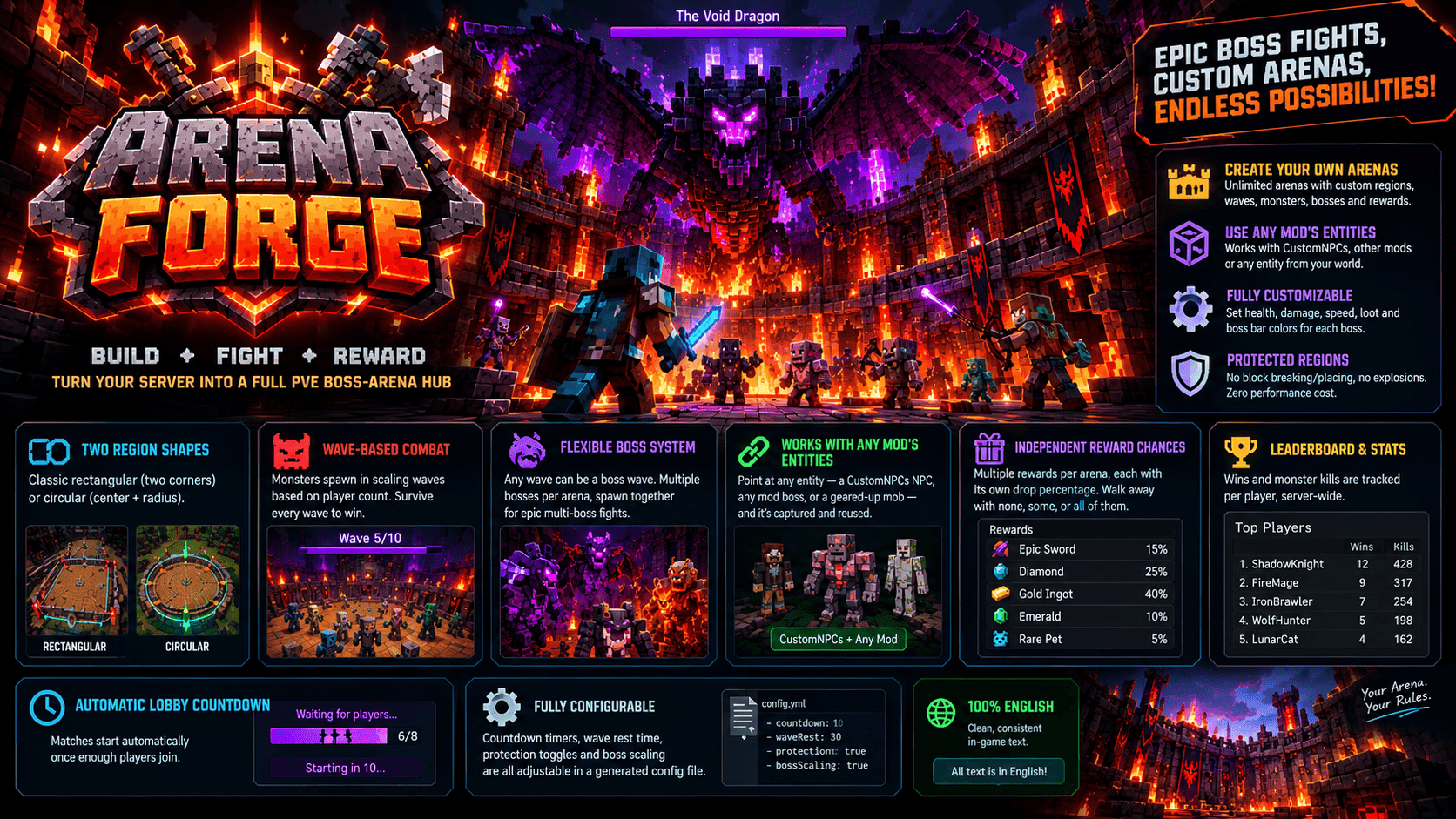
Arena Forge turns your Minecraft server into a complete PvE boss-arena minigame hub. Build unlimited custom arenas, fight through scaling monster waves, face off against fully customizable bosses, team up with friends, and climb a server-wide leaderboard — set up entirely with in-game commands or a built-in GUI editor, no config editing required.
🛡️ Key Features
🏟️ Unlimited Arenas — Create as many arenas as you want, each with its own region, waves, monsters, bosses and rewards.
🎮 In-Game GUI Editor — /af edit opens an Arena Control Panel: click to adjust player limits, wave count, protection and difficulties live, no commands needed for the basics.
🔵⬛ Two Region Shapes — Classic rectangular regions (two corners) or circular regions (just stand at the center and set a radius).
👹 Wave-Based Combat — Monsters spawn in scaling waves based on player count and difficulty. Survive every wave to win.
🎚️ Four Difficulty Tiers — Easy, Normal, Hard and Nightmare scale every monster and boss’s health/damage and add a bonus to every reward’s drop chance. Chosen by whoever joins first (or a party leader), and fully toggleable per arena.
🐉 Fully Flexible Boss System — Any wave can be a boss wave, not just the last one. Add multiple bosses to one arena, assign each its own wave, and bosses sharing a wave spawn together for epic multi-boss fights.
🧩 Works With Any Mod’s Entities — Point Arena Forge at any entity already in your world — a fully customized CustomNPCs NPC, a boss from another mod, or a geared-up vanilla mob — and it’s captured and reused exactly, no compatibility patch needed.
🎚️ Full Boss Customization — Override health, damage and movement speed individually per boss, toggle its natural loot drops on or off, and show or hide its boss bar in any of 7 colors.
👥 Parties — Team up and queue together. When the party leader joins an arena, every online member is pulled into the same match at once, guaranteed.
👻 Spectating — Dying no longer ends your fun: you become a spectator of your own match until you leave. Anyone can also watch a match already in progress without ever joining it.
💬🔊 Big Titles & Sounds — Wave starts, boss waves, wave clears, boss kills and victory trigger large on-screen titles with matching sounds, shown only to that match’s players and spectators.
🎁 Independent Reward Chances — Attach multiple rewards to one arena, each with its own drop percentage. Preview every possible reward and its odds before joining with /af rewards.
📍 Purpose-Split Spawn Points — Separate spawn points for players, monsters and bosses, so they never get mixed up.
🔒 Permanently Protected Arenas — Once a region is set, players can’t break or place blocks there, and explosions never destroy blocks inside it — no destructible/self-repairing system, so there’s zero performance cost after every match.
🛡️ Anti-Exploit — Ender pearls and chorus fruit are blocked for active combatants, and elytra is safely stashed for the match’s duration, so nobody can simply fly out of an unwalled arena mid-fight.
🏆 Leaderboard & Stats — Wins and monster kills are tracked per player, server-wide.
⏱️ Automatic Lobby Countdown — Matches start automatically once enough players join.
⚙️ Fully Configurable — Countdown timers, wave rest time, protection toggles and boss scaling are all adjustable in a generated config file.
🇬🇧 100% English — clean, consistent in-game text.
📜 Commands
All commands work as both /af and /arenaforge.
🔧 Arena Setup (operator)
/af create name — create a new arena
/af delete name — delete an arena
/af edit name — opens the GUI Arena Control Panel
/af setcorner1 name and /af setcorner2 name — define a rectangular region
/af setcircle name radius height — define a circular region centered on your position
/af setprotect name true/false — toggle region protection
/af setlobby name — set the waiting lobby
/af addplayerspawn name — add a player spawn point
/af addspawn name — add a monster spawn point
/af addbossspawn name — add a boss spawn point
/af setminplayers name n and /af setmaxplayers name n — player limits
/af setwaves name n — total wave count
/af setdifficulty name difficulty true/false — enable or disable a difficulty tier
👹 Monster Pool (operator)
/af addmonster name entityId weight — add a monster by id
/af addmob name target weight — capture a real entity from the world into the pool
/af clearmonsters name — reset to the default pool
🐉 Bosses (operator)
/af addboss name bossId target — capture an entity as a new boss
/af removeboss name bossId and /af clearbosses name — remove bosses
/af listbosses name — view every boss and its settings
/af setbosswave name bossId wave — set which wave a boss spawns on
/af setbosshealth name bossId value — override boss health
/af setbossdamage name bossId value — override boss damage
/af setbossspeed name bossId value — override boss movement speed
/af setbossdrops name bossId true/false — toggle natural loot drops
/af setbossbar name bossId true/false — show or hide the boss bar
/af setbossbarcolor name bossId color — set the boss bar color
🎁 Rewards (operator)
/af addreward name itemId count chancePercent — add a reward with its own drop chance
/af clearrewards name — clear all rewards
👥 Parties
/af party create — start a party
/af party invite player — invite a player (leader only)
/af party accept leader — accept a pending invite
/af party leave — leave your party
/af party info — list your party’s members
🎮 Player Commands
/af list — list all arenas
/af info name — view an arena’s full setup
/af join name [difficulty] — join an arena, optionally requesting a difficulty
/af leave — leave your current arena (waiting, fighting, or spectating)
/af spectate name — watch a match already in progress
/af rewards name — preview every possible reward and its drop chance
/af stats — view your personal wins and kills
/af top — view the top 10 players by wins
🛠️ Admin Match Control
/af forcestart name — skip the countdown
/af forcestop name — force-stop and reset a match
👤 Created by AnonymDv
常见问题
Arena Forge 支持哪些 Minecraft 版本?
Arena Forge 支持 Minecraft Java 版 1.16.5,可用的加载器:Forge。下载时注意选择和你游戏版本一致的文件。
Arena Forge 怎么安装?
先用 PCL2 或 HMCL 启动器安装对应版本的 Forge,再把下载的 .jar 文件放进游戏目录的 mods 文件夹,重新启动游戏即可。开启了版本隔离的,mods 文件夹在 versions/版本名 下面。
AnonymDv 的其他作品
查看全部 →
Skin Restorer Forge
🎭 SkinRestoreForge lets players set custom skins in-game — even on cracked/offline servers! Change your skin by username or URL, browse favourites, revisit your skin history, and more. No client mod required for other players. Forge.

Mine Mine Cuffs
Mine Mine Cuffs is an essential addon mod for Mine Mine no Mi that introduces a realistic handcuff system ⛓️ It features 3 unique handcuffs, redesigned keys, Den Den Mushi Marine alerts, Belly & Gold rewards, and dynamic faction combat mechanics 🏴☠️

One Sleeper Forge
A lightweight server-side Forge mod that instantly skips the night and clears bad weather when just a single player sleeps! 🌙⚡

Authentic Player Skulls
Authentic Player Skulls drops non-forgeable player heads upon death with seamless skin preservation, custom death broadcasts, and strict anti-tampering protection for SMP & Survival servers!
评论
登录后评论和评分