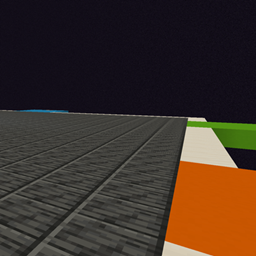
Realm Foundry
Start in a void world. Create and store up to 6 limited sized versions of the overworld to gather resources and find structures. Good for Minigames and modpacks.
介绍
Features:
- New players begin in
realmfoundry:hub, a shared void platform with vertical building space and six guarded gateway corridors. - Each gateway controls one real, separate dimension with normal, superflat, or amplified terrain.
- Right-click an empty gateway to choose terrain, a starting climate, and world-border radius.
- Border radius can be selected from 500 through 2000 blocks.
- The creating survival player owns that realm slot. Its owner or an operator can replace or retire it; everyone may enter it.
- Replacing a realm evacuates players to the hub and moves the slot to untouched terrain at runtime. Existing terrain is no longer reachable through the gate.
- Every realm has an above-ground protected arrival platform.
- Every player receives a reusable Foundry Atlas that returns them to the hub.
- A reusable Netherway Key travels to a protected shared shelter in the vanilla Nether. It can be supplied through quests, commands, or an optional server setting.
- Sneak-right-click any hub gate to open its management screen.
/realmfoundry manage [slot]
/realmfoundry hub
/realmfoundry enter <slot>
/realmfoundry generate <slot> <terrain> <climate> <radius>
/realmfoundry replace <slot> <terrain> <climate> <radius> confirm
/realmfoundry retire <slot> confirm
/realmfoundry status
Climate choices are random, temperate, warm, cold, mountain, and forest. Terrain choices are normal, superflat, and amplified. Superflat always uses plains.
The travel items can also be granted by commands:
/give <player> realmfoundry:foundry_atlas
/give <player> realmfoundry:netherway_key
The server’s config/realmfoundry-server.toml file includes:
giveNetherwayKeyOnLogin = false
Set it to true to automatically give missing Netherway Keys on login and respawn.
常见问题
Realm Foundry 支持哪些 Minecraft 版本?
Realm Foundry 支持 Minecraft Java 版 1.21.1,可用的加载器:NeoForge。下载时注意选择和你游戏版本一致的文件。
Realm Foundry 怎么安装?
先用 PCL2 或 HMCL 启动器安装对应版本的 NeoForge,再把下载的 .jar 文件放进游戏目录的 mods 文件夹,重新启动游戏即可。开启了版本隔离的,mods 文件夹在 versions/版本名 下面。
Upgrade255 的其他作品
查看全部 →
Immersive Pocket Dimensions
沉浸式传送门的附属模组,为玩家提供自己的口袋维度。适合娱乐或独特的玩法挑战。

Re:Zero RBD and Witch Factors
Adds quest friendly Return by Death with minor and major lives. Adds two witch factors to compensate for progress reset. Meant for use in Quests and Modpacks.
The Chosen Player
Adds a raw attribute level up system and skill system, inspired by Solo Leveling

Unique Systems
Allows compatible mods to be applied or enabled for certain players on certain actions, and is meant to create unique experiences per world and per player.
评论
登录后评论和评分