
Age of Amethyst
Age of Amethyst is a Minecraft mod that expands the game with powerful amethyst-based tools, blocks, and progression, introducing a new tier focused on beauty, strength, and mystical utility.
介绍
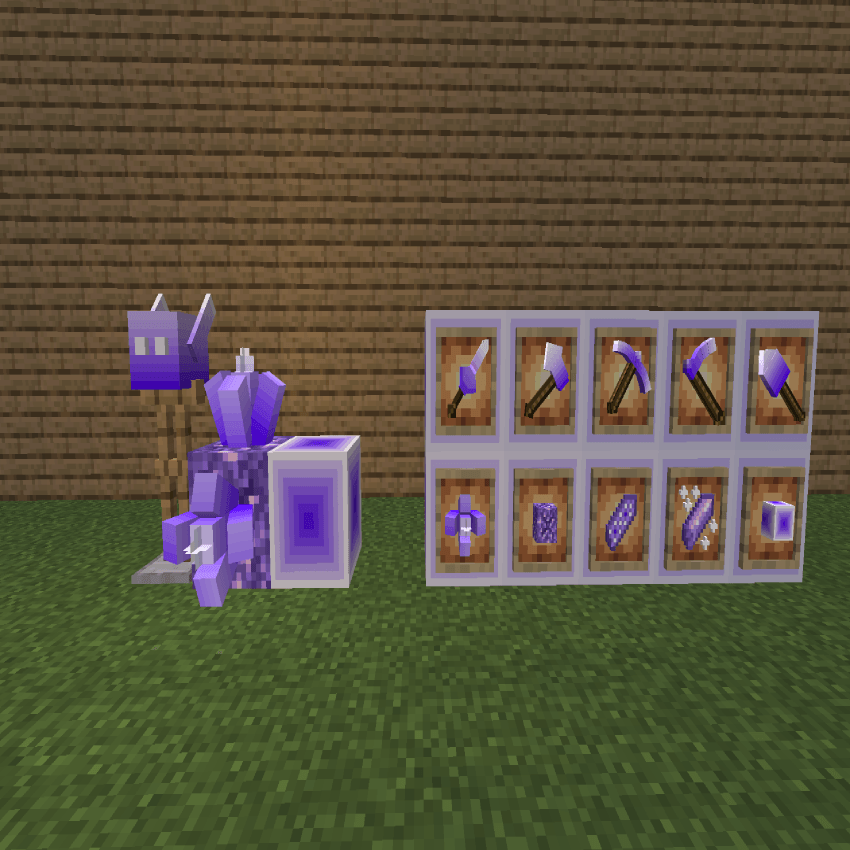
Main Features (English)
Age of Amethyst introduces a brand-new progression tier built around amethyst, expanding gameplay with balanced power and visual depth.
-
New Amethyst Tier: A complete tool and weapon set crafted from amethyst, positioned between existing vanilla tiers.
-
Custom Tools & Weapons: Amethyst pickaxe, axe, shovel, hoe, and sword with unique stats and durability.
-
Decorative & Functional Blocks: New amethyst-based blocks for building, crafting, and progression.
-
Polished Progression: Clear crafting recipes and logical advancement that fits naturally into vanilla Minecraft.
-
Visual Consistency: High-quality textures designed to match Minecraft’s art style while adding a unique purple aesthetic.
-
Survival-Friendly Balance: Designed for survival gameplay without overpowering existing mechanics.
Ana Özellikler (Türkçe)
Age of Amethyst, ametist temelli yeni bir ilerleme seviyesi ekleyerek oyunu hem görsel hem de oynanış açısından genişletir.
-
Yeni Ametist Seviyesi: Vanilla seviyeler arasına uyumlu, dengeli bir ametist ekipman aşaması.
-
Özel Aletler ve Silahlar: Ametist kazma, balta, kürek, çapa ve kılıç.
-
Dekoratif ve İşlevsel Bloklar: İnşa, üretim ve ilerleme için yeni ametist blokları.
-
Düzenli İlerleme Sistemi: Vanilla Minecraft ile uyumlu, anlaşılır tarifler ve gelişim.
-
Görsel Uyum: Minecraft stiline sadık, mor temalı yüksek kaliteli dokular.
-
Hayatta Kalma Odaklı Denge: Oyunu bozmadan zenginleştiren dengeli mekanikler.
İstersen bunu Modrinth / CurseForge açıklaması, README.md, ya da kısa sürüm haline de dönüştürebilirim.
常见问题
Age of Amethyst 支持哪些 Minecraft 版本?
Age of Amethyst 支持 Minecraft Java 版 1.21.8,可用的加载器:Fabric。下载时注意选择和你游戏版本一致的文件。
Age of Amethyst 怎么安装?
先用 PCL2 或 HMCL 启动器安装对应版本的 Fabric,再把下载的 .jar 文件放进游戏目录的 mods 文件夹,重新启动游戏即可。开启了版本隔离的,mods 文件夹在 versions/版本名 下面。
评论
登录后评论和评分