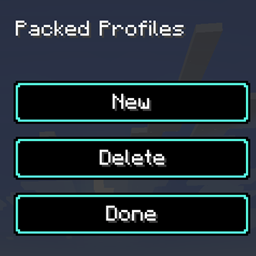
Pack Profiles
Save, switch and manage profiles of enabled resource packs. Click a profile, toggle packs, apply.
介绍
Packed Profiles
Profiles for your resource packs on Minecraft 1.20.1 (Fabric). Stop manually
re-enabling the same packs every time — save your setups and switch with one click.
Features
- Click a profile to edit it — every available resource pack is shown as a
toggle button, no more fiddling with the vanilla arrow buttons. - Instant saving — toggling a pack updates the profile immediately.
- "Apply & Done" activates the profile’s selection and reloads the packs.
- Create, delete and rename profiles from the profile screen.
- Profiles are stored as readable JSON in
config/packedprofiles/resourcepacks/. - A "Profiles" button is added to the top right of Options → Resource Packs.
Installation
- Install Fabric Loader 0.15.6 or newer and Fabric API for 1.20.1.
- Put the jar into your
modsfolder. - Open Options → Resource Packs and click "Profiles".
Usage
- New creates an empty profile and opens the editor — toggle the packs you want.
- Click a profile to edit it, or to change its name.
- Apply & Done switches to the profile’s pack selection (packs are reloaded).
- Delete removes the last edited profile.
Notes
- Client-side only. Currently resource packs are supported; data packs are planned.
- Inspired by Packed Packs (MIT, fishstiz);
this is a reduced-scope re-implementation for 1.20.1. - Licensed under MIT. Source code: <DEIN-GITHUB-LINK>
常见问题
Pack Profiles 支持哪些 Minecraft 版本?
Pack Profiles 支持 Minecraft Java 版 1.20.1,可用的加载器:Fabric。下载时注意选择和你游戏版本一致的文件。
Pack Profiles 怎么安装?
先用 PCL2 或 HMCL 启动器安装对应版本的 Fabric,再把下载的 .jar 文件放进游戏目录的 mods 文件夹,重新启动游戏即可。开启了版本隔离的,mods 文件夹在 versions/版本名 下面。
BioBauerHartmut 的其他作品
查看全部 →
Monster Energy and Caffeine
White Monster 模组加入了魔爪能量饮料和瓜拉纳植物。饮用能量饮料可获得咖啡因加成,提高移动速度和伤害。你可以种植瓜拉纳并制作能量饮料。所有物品都位于“Monster Energy”创造模式物品栏分类中。

Herbcraft
向游戏中添加一种新的魔法草药种子。种子可以通过破坏草来找到。在耕地上经历不同阶段种植该植物。收获它以收集特殊草药。将草药制作成魔法物品。与村民交易换取绿宝石。

Throwable poop
一个有趣的 Minecraft Fabric 和 Forge 模组,允许玩家在游戏中生成和投掷便便物品。
Spartan Weaponry Port
D:\daswu\Minecraft Commissions\spartanweaponry-26.2-neoforge\build\libs\spartan_weaponry_unofficial-2.0.0-26.2.jar
评论
登录后评论和评分