截图

介绍
Area Lib
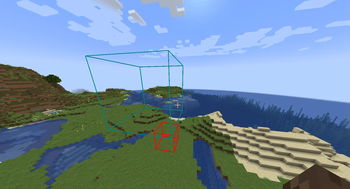
Creating areas
Create areas using /area create
For example /area create <id> box ~ ~ ~ ~5 ~5 ~5 creates a 5x5x5 box area
Modifying area properties
Built-In
Some built-in properties, such as color and priority can be changed using
/area modify <id> <property> <value>
Components
Components can be set and removed using
/area modify <id> components (set|remove|get|copy_from) ...
Union areas
You can create union areas using \
/area create <id> union <...areas>
Adding additional sub-areas can be done using \
/area modify_composite <id> add <sub_area>
Similarly, ub-areas can be removed by running \
/area modify_composite <id> remove <sub_area>
Deleting areas
To completely delete an area use
/area delete <id>
Querying areas
To check which area you are currently in, use
/area query
Functionality Note
Note that these areas don’t do anything by themselves, but require additional mods that can implement specific functionality for them. For example area-tools adds various area related tools using this library
Documentation
Partial documentation is available here
常见问题
Area Lib 支持哪些 Minecraft 版本?
Area Lib 支持 Minecraft Java 版 1.20.1–26.3,共 10 个版本,可用的加载器:Fabric。下载时注意选择和你游戏版本一致的文件。
Area Lib 怎么安装?
先用 PCL2 或 HMCL 启动器安装对应版本的 Fabric,再把下载的 .jar 文件放进游戏目录的 mods 文件夹,重新启动游戏即可。开启了版本隔离的,mods 文件夹在 versions/版本名 下面。运行环境:客户端和服务端都要装。



评论
登录后评论和评分