
Smart Inventory Restock
Automatically refills the selected hotbar stack from your inventory when it runs low. Client-side Fabric mod with Mod Menu settings.
截图
介绍
# Smart Inventory Restock
Small client-side Fabric mod for keeping the selected hotbar slot stocked.
When the stack in your hand gets low, the mod swaps in the biggest matching stack from your main inventory. It does not touch the rest of the hotbar and does not move items while you have a container or another screen open.
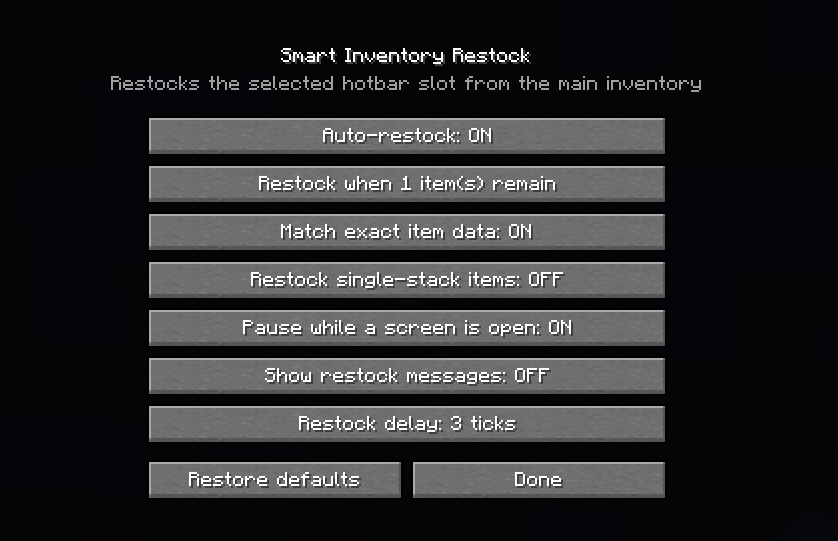
## Settings
Open the config through Mod Menu, or press `R` in-game.
You can change:
– enable/disable the mod;
– restock threshold;
– cooldown between swaps;
– exact item matching;
– support for tools and other non-stackable items;
– pause while a screen is open;
– action-bar message after a swap.
The config is saved in `config/smart-inventory-restock.json`.
## Notes
This is a client-side mod. The server does not need to install it.
Pick the JAR that matches your Minecraft version:
– 1.20.1
– 1.21.1
– 1.21.11
– 26.1.2
– 26.2
常见问题
Smart Inventory Restock 支持哪些 Minecraft 版本?
Smart Inventory Restock 支持 Minecraft Java 版 1.20.1–26.2,共 5 个版本,可用的加载器:Fabric。下载时注意选择和你游戏版本一致的文件。
Smart Inventory Restock 怎么安装?
先用 PCL2 或 HMCL 启动器安装对应版本的 Fabric,再把下载的 .jar 文件放进游戏目录的 mods 文件夹,重新启动游戏即可。开启了版本隔离的,mods 文件夹在 versions/版本名 下面。
评论
登录后评论和评分