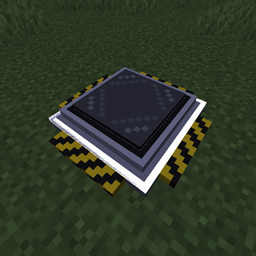
Flat Trans
Turn a simple floor block into a teleporter network. Place Flat Trans blocks to form a rectangle and they merge into one nameable pad. Right-click to pick a destination, travel across dimensions, rename or remove pads, and see them on JourneyMap.
介绍
Flat Trans
A lightweight NeoForge mod for Minecraft 1.21.1 that turns a simple floor block into a rectangular teleporter network — no portal frame to craft, no complex machinery. Place one or more Flat Trans blocks edge-to-edge to fill a rectangle, and it becomes a single teleport pad you can name, rename, and jump between.
Features
- Placement is the setup. Drop a single
Flat Transblock and it’s immediately a working teleporter. - Multi-block pads. Place several blocks edge-to-edge so they exactly fill a rectangle (no gaps, no notches) and they automatically merge into one larger teleport pad, registered at the rectangle’s lowest-coordinate corner. A connected shape that isn’t a perfect rectangle isn’t registered as a destination, but any already-named pad involved keeps its name intact until the shape is completed.
- Cross-dimension travel. Destinations aren’t limited to the current dimension — teleporters in the Nether, the End, or any other dimension appear in the destination list too, with same-dimension destinations sorted first by distance.
- In-world destination picker. Right-click any block of a valid pad to open a paginated menu listing every other registered teleporter.
- Naming. Rename a pad from the destination screen, or place a block using an anvil-renamed item to name it on placement.
- Safe deletion. Hold the "X" button next to a destination for one second to permanently remove it from the network — the deliberate hold prevents accidental deletes.
- Optional JourneyMap integration. If JourneyMap is installed, every valid teleporter pad automatically gets a shared waypoint marker visible to every player, kept in sync as pads are built, merged, or renamed.
Requirements
| Minecraft | 1.21.1 |
| Mod Loader | NeoForge 21.1.235+ |
| Java | 21 |
| JourneyMap | (optional) 1.21.1-6.0.0-beta.1+ — only needed for teleporter waypoints on the map |
Installation
- Install NeoForge for Minecraft 1.21.1.
- Download the latest
flattrans-*.jarfrom Releases / CurseForge / Modrinth. - Drop the jar into your
modsfolder. - (Optional) Install JourneyMap if you want teleporter locations to show up on the map. No configuration needed — it’s detected automatically.
Crafting
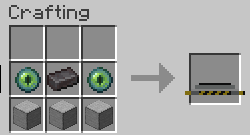
2 Ender Eyes + 1 Netherite Ingot + 3 Smooth Stone → 1 Flat Trans block. The two rows can be swapped (Ender Eyes/Netherite Ingot on top or bottom row both work).
How It Works
Building a teleporter
Place Flat Trans blocks on solid ground. A single block is already a working 1×1 teleporter. Placing more blocks edge-to-edge so they exactly fill a rectangle (say, a 2×3 area with no missing corners) merges them into one larger pad.
Teleporting
Right-click any block of a valid pad to open the destination screen. Pick a destination to teleport there, landing in the center of the pad if it’s larger than 1×1.
Naming
- Type a name into the field at the top of the destination screen — it saves when the screen closes.
- Or rename the item in an anvil before placing it; the block takes that name on placement.
Deleting a destination
Open the destination screen and hold the "X" button next to any entry for one second. This removes that teleporter from the network — including its JourneyMap marker, if any — without needing to physically break the blocks.
JourneyMap Integration
Flat Trans has a soft (optional) dependency on JourneyMap — the mod works fully without it, and there’s nothing to configure if it’s installed. When present:
- Forming a valid rectangular pad creates a shared waypoint, visible to every player, at the pad’s anchor corner.
- Renaming a pad updates its waypoint’s name to match.
- Breaking blocks does not remove the waypoint automatically — waypoints are only removed by deleting the destination from the in-game menu (see above), so the map doesn’t lose a marker just because a pad is being rebuilt.
Building From Source
git clone https://github.com/BadlyacX/FlatTrans.git
cd FlatTrans
./gradlew build
The built jar will be in build/libs/.
License
Licensed under the MIT License.
常见问题
Flat Trans 支持哪些 Minecraft 版本?
Flat Trans 支持 Minecraft Java 版 1.21.1,可用的加载器:NeoForge。下载时注意选择和你游戏版本一致的文件。
Flat Trans 怎么安装?
先用 PCL2 或 HMCL 启动器安装对应版本的 NeoForge,再把下载的 .jar 文件放进游戏目录的 mods 文件夹,重新启动游戏即可。开启了版本隔离的,mods 文件夹在 versions/版本名 下面。
BADlyAC 的其他作品
查看全部 →
ServerManager
This mod introduces several powerful commands to manage player ranks, permissions, and features. Below is a summary of the available commands:
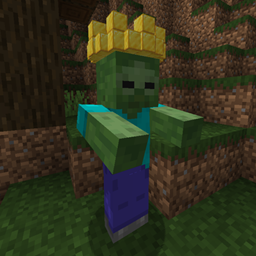
ZombieKing
Adds the rare Zombie King — crowned in gold, immune to sunlight, and able to summon 7-10 diamond-armored Zombie Soldiers when it spots player. Once they fall, TNT-helmeted Crazy Bombers rush in and self-destruct with real TNT blast force.
评论
登录后评论和评分