
介绍
Wear it. Capture it. Keep the moment.
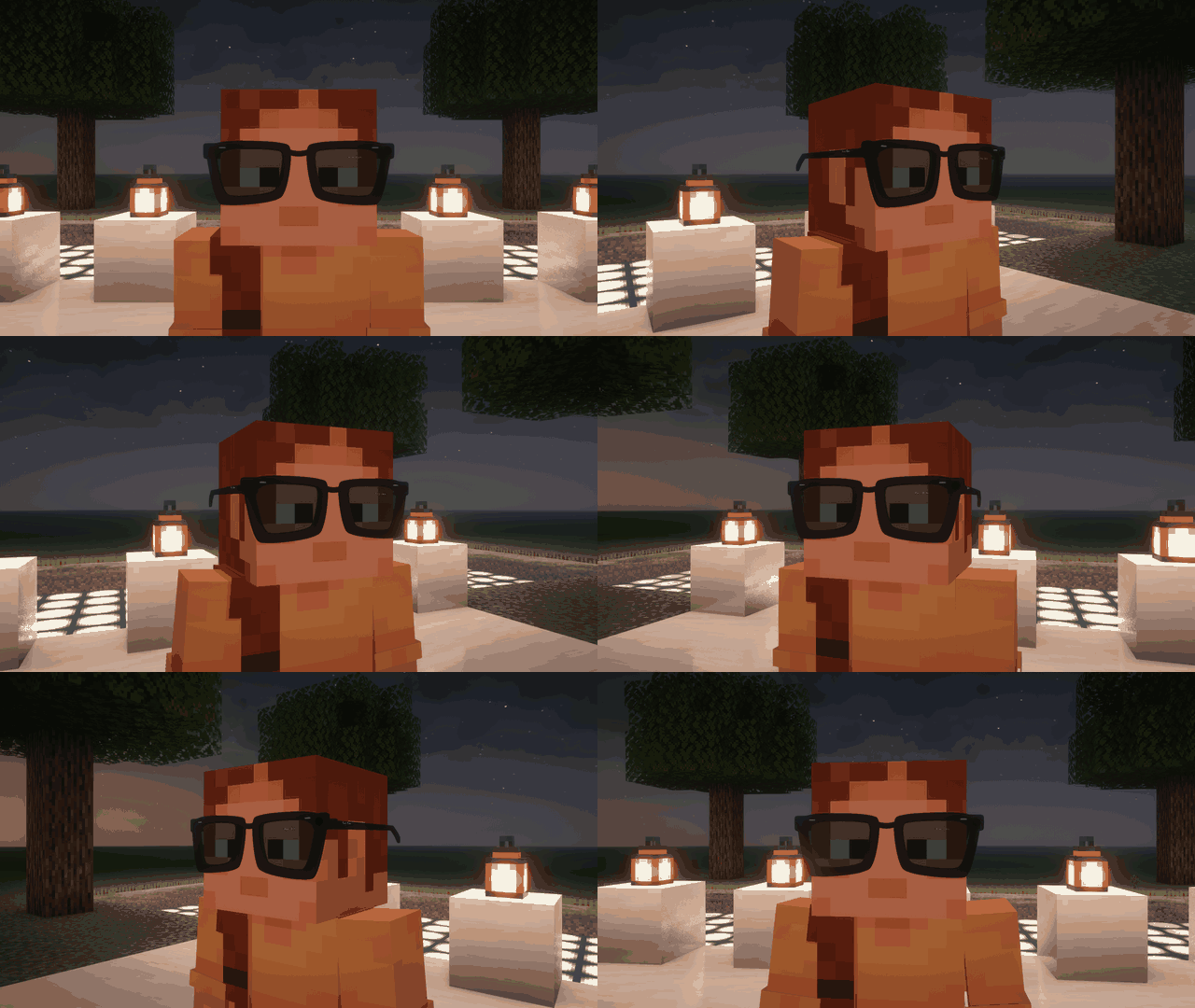
(THE FIRST EVER META AI GLASSES MOD SUII!!!!)
Bring a pair of smart glasses into Minecraft with a detailed, wearable Ray-Ban Wayfarer model. Capture your adventures as screenshots or record up to five minutes of gameplay, then save the files directly to your computer.
Features
- Detailed 3D glasses with tinted lenses, camera details, and open temples.
- Wearable in the helmet slot, with a crafting recipe and Creative inventory entry.
- Full-resolution PNG screenshots of your current game view.
- Video recording for up to five minutes, with automatic stopping.
- Local file storage with timestamped filenames.
- Customizable keybindings through Minecraft’s Controls menu.
Controls
Equip the glasses in your helmet slot, then:
| Key | Action |
|---|---|
| F6 | Take and save a screenshot |
| F7 | Start or stop a video recording |
Switch to first-person view with F5 for a glasses-eye perspective. Hide the HUD with F1 for cleaner captures.
Your captures, saved locally
Photos and videos are saved inside your active Minecraft instance:
%APPDATA%\.minecraft\rayban-meta- Photos:
rayban-meta/photos/ - Videos:
rayban-meta/videos/
The mod displays the full file path in chat after saving.
Videos use AVI/MJPEG at 20 FPS, with a maximum resolution of 1280 × 720. Audio recording is not included. When rendering or file processing slows down, frames may repeat to preserve the recording’s duration.
An unofficial fan-made mod. Not affiliated with or endorsed by Meta or Ray-Ban.
常见问题
RayBan Meta Glasses 支持哪些 Minecraft 版本?
RayBan Meta Glasses 支持 Minecraft Java 版 1.20.1,可用的加载器:Forge。下载时注意选择和你游戏版本一致的文件。
RayBan Meta Glasses 怎么安装?
先用 PCL2 或 HMCL 启动器安装对应版本的 Forge,再把下载的 .jar 文件放进游戏目录的 mods 文件夹,重新启动游戏即可。开启了版本隔离的,mods 文件夹在 versions/版本名 下面。
Sarissimo 的其他作品
查看全部 →
Portal Gun Reloaded
Think with portals: wield 3D Portal Guns, outsmart deadly turrets, and face GLaDOS in her own dimension.

Project Oppenheimer
Unleash massive nuclear explosions with towering mushroom clouds, shockwaves, huge craters, remote detonators, and laser-triggered Claymore mines.
评论
登录后评论和评分