Inventory Tweaks Settings Button Switch
An extended version of the Inventory Tweaks mod that adds an option to disable the mod's settings button - "..." everywhere it appears, for 1.8.9!
截图
介绍
English
What exactly does this mod do?
This is a fork a modification of the well known Inventory Tweaks by JimeoWan & Kobata. It adds just one feature that was missing from the original mod the ability to disable the mod’s settings button “…” specifically for version 1.8.9.
Now, after installing this fork, you can disable this button so it won’t get in your way or annoy you.
Why did we create this fork? As I mentioned above, this button can be distracting or annoying, so now you can turn it off. Plus, there wasn’t a fork like this for 1.8.9 yet we’re the first.
I borrowed the idea for this fork from Mahghuuuls, the author of the fork for the original mod, though he had already done this for version 1.12.2. Original fork
I’ve described the entire process where to go and what to disable below and in the screenshots.
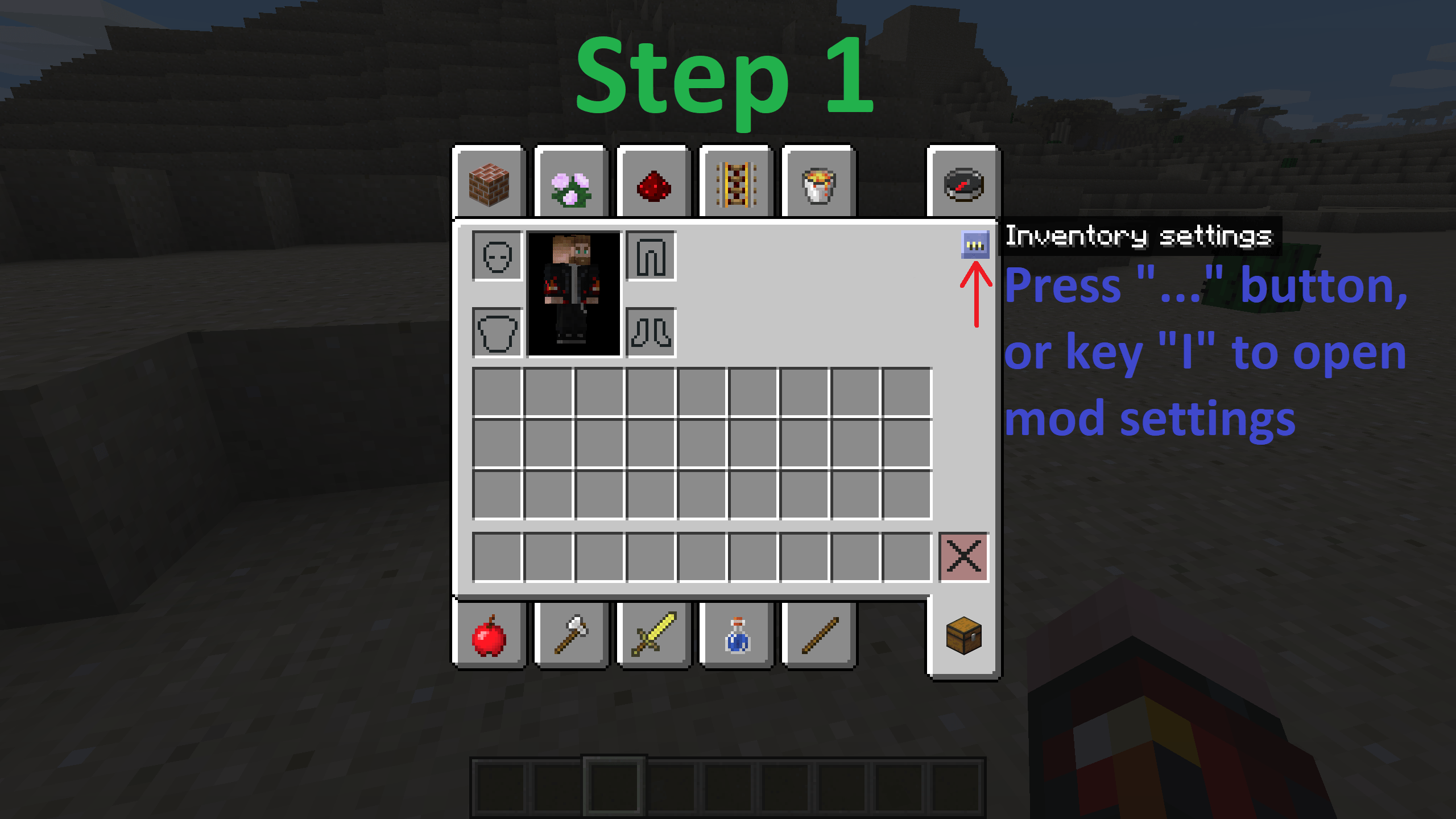
1. Click the button “…” in your inventory (or anywhere else it appears), or press the “I” key (or whichever key you’ve set as the default) to open the mod settings.
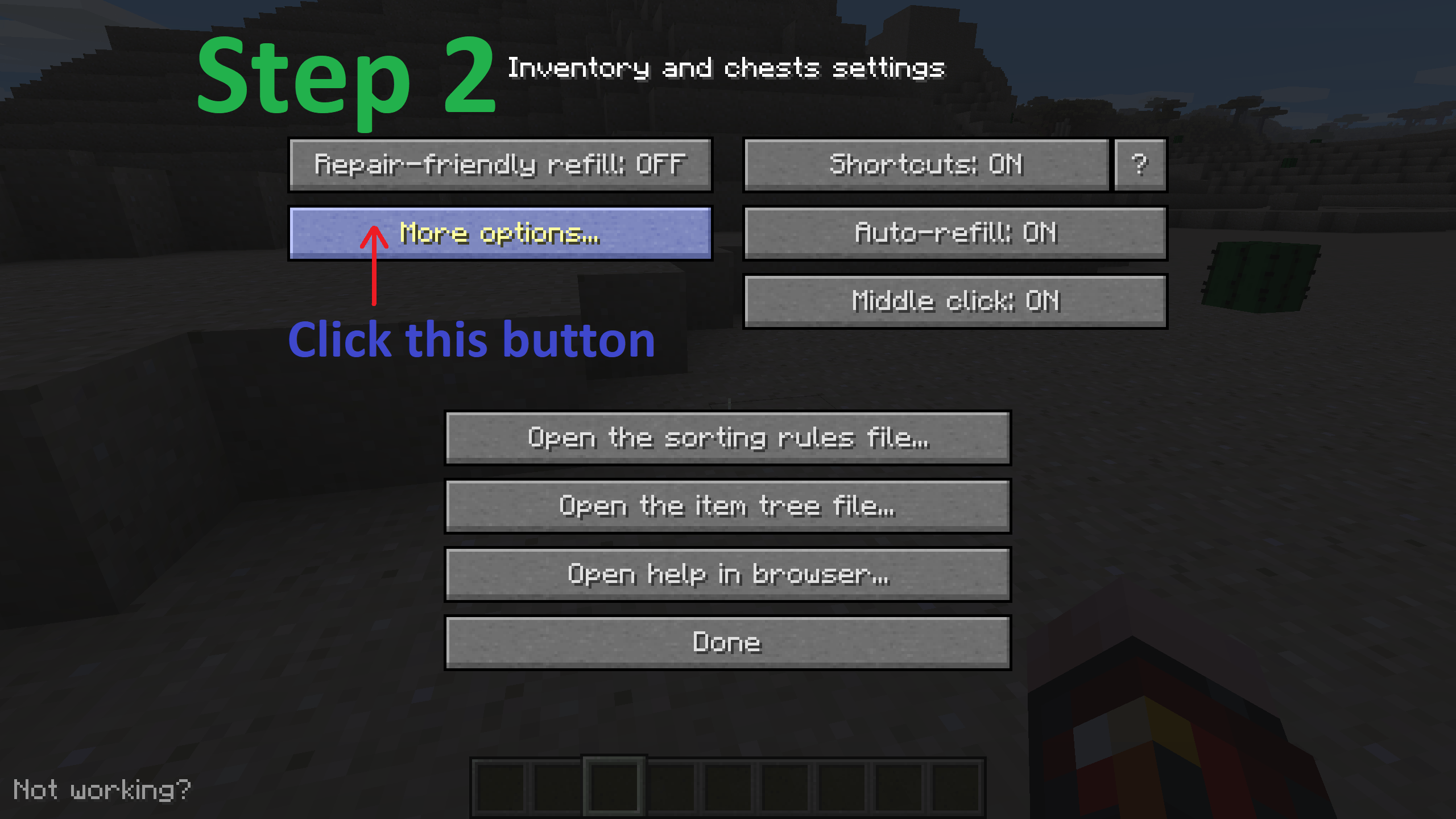
2. Click the “More options…” button.
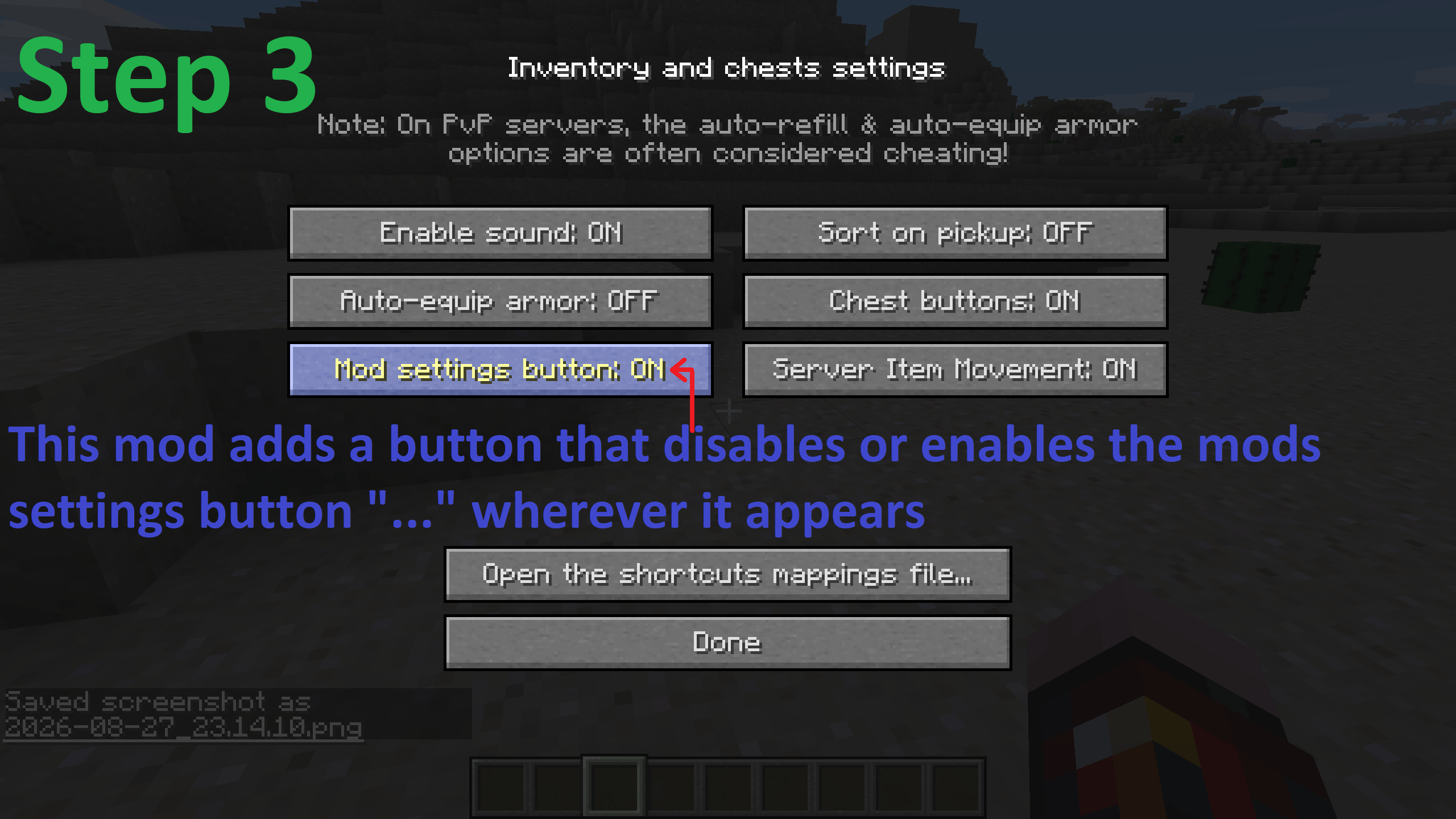
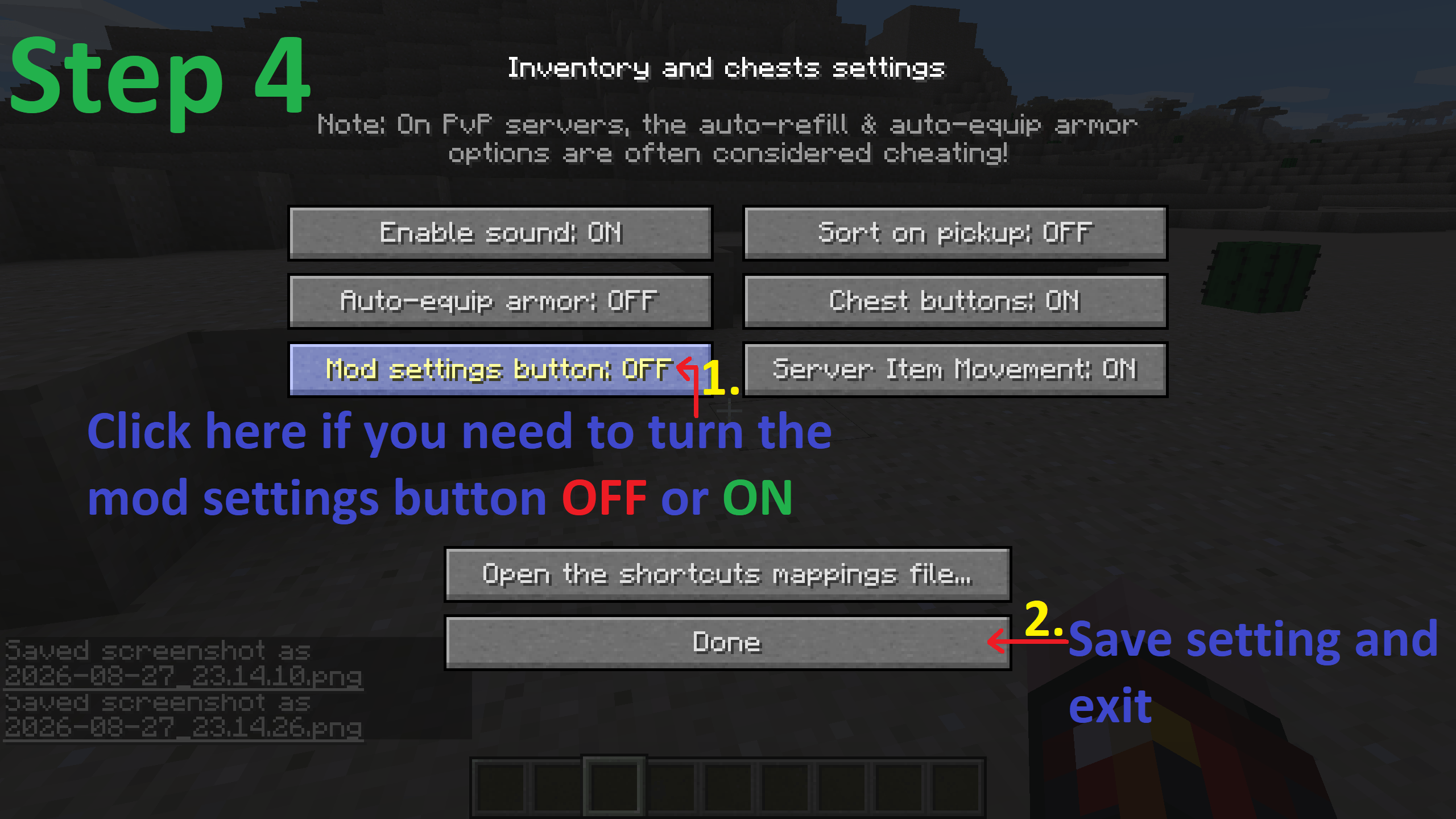
3. To disable the “…” button, click on “Mod settings button” it should say OFF.
4. Click “Done.”
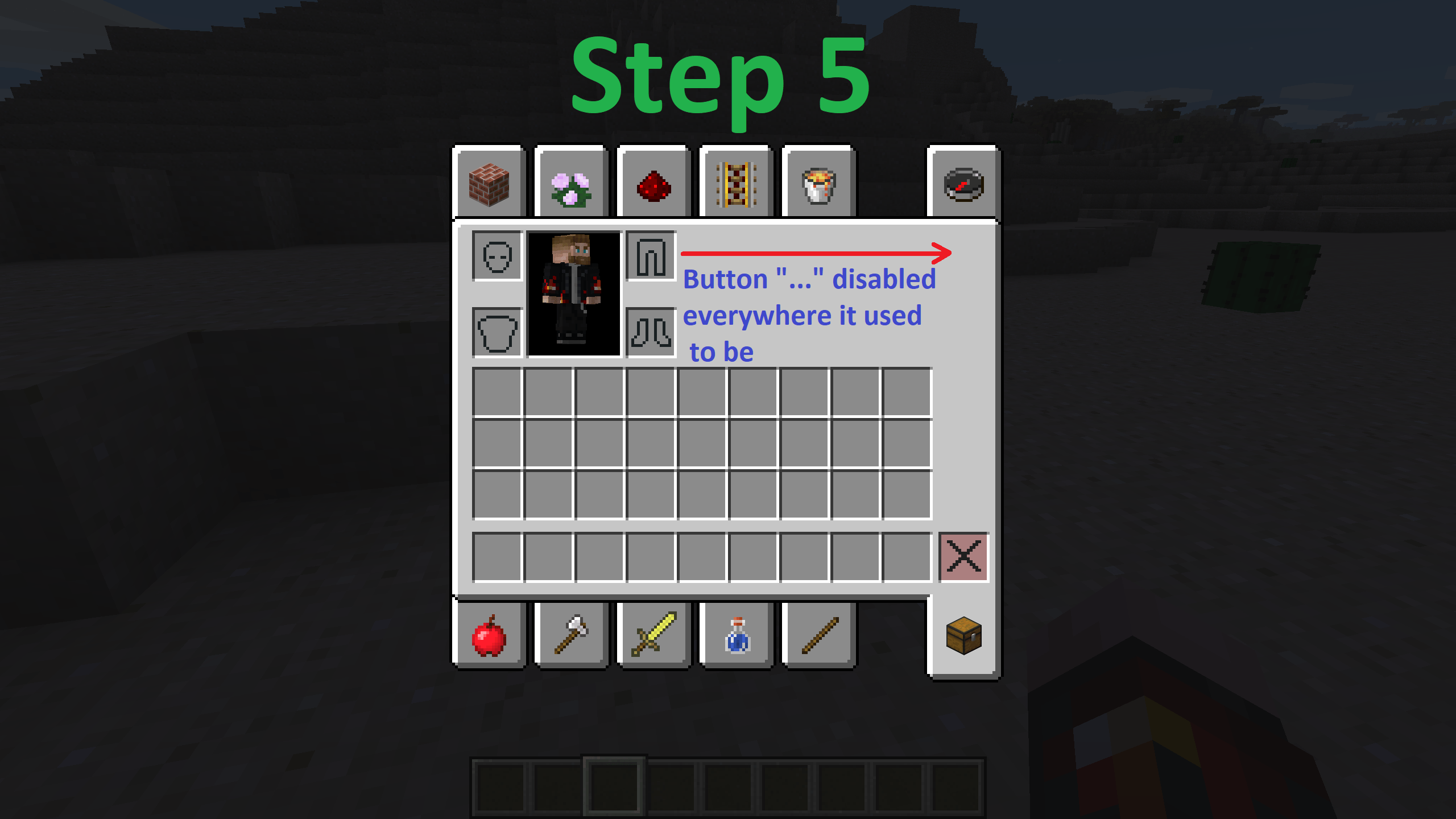
5. The “…” button is now disabled everywhere it appeared.
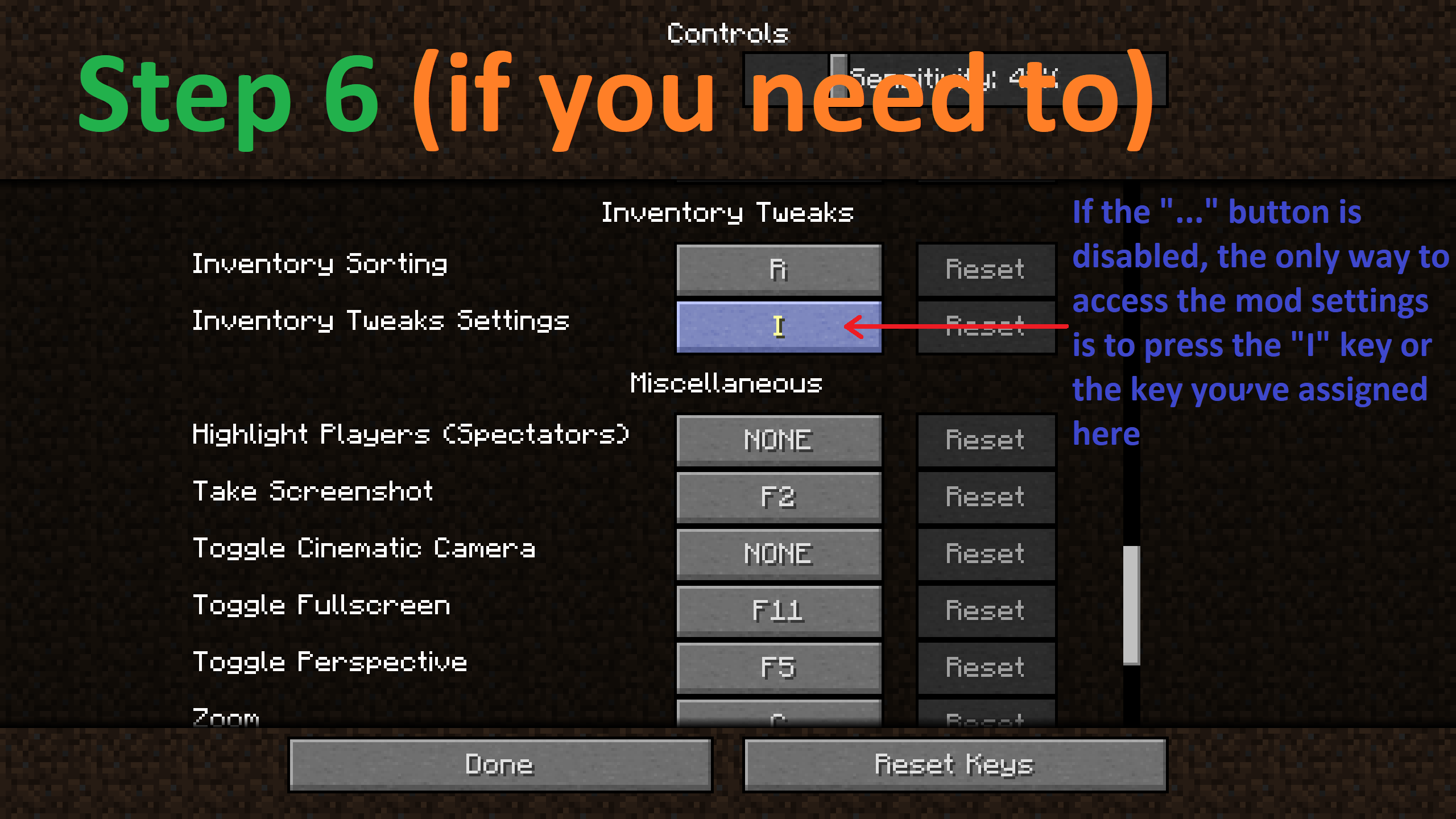
6. If you’ve disabled the “…” button, the only way to access the settings and to enable it if needed is to open the mod’s settings menu using the “I” key (by default) or whichever key you’ve assigned, and then repeat the same steps as above, but this time to enable it.
I order this fork from – ddanatellik. We thoroughly checked it for any bugs and fixed them, but if you find a bug or an incompatibility with any other mod/fork, please let us know in the comments – we’ll try to fix it in future versions!
You are free to use this and our other mods anywhere you like, customize them to your liking, include them in your mod packs, port them to other versions, and so on. Just be sure to credit the mod’s/fork’s author.
That’s all I wanted to share, thanks for reading to the end! <3
P.S. Paulie
Русский
Что конкретно делает этот мод?
Это форк, доработка всеми известеого мода Inventory Tweaks от авторов JimeoWan и Kobata. Он добавляет лишь одну функцию, которой нехватало в этом моде – отключение кнопки настроек мода – “…” специально для версии 1.8.9.
Теперь после установки форка, вы сможете отключить эту кнопку и она не будет мешать вам или раздражать своим видом.
Зачем мы создали форк? Как я и писал выше, эта кнопка может мешать или раздражать, поэтому теперь её можно выключить. К томуже для 1.8.9 еще небыло такого форка, мы первые.
Идею для реализации данного форка я позаимствовал у Mahghuuuls, автора форка для оригинального мода, но уже он делал это для версии 1.12.2. Оригинальный форк
Весь путь, куда нужно идти и что отключить я описал ниже, и в скриншотах.
1. Нажмите на кнопку “…” в инвентаре (или любом другом месте где она есть), или клавишу “Ш” (I) (или ту которую вы назначили по умолчанию) чтобы открыть настройки мода.
2. Перейдите по кнопке “Дополнительные параметры”.
3. Чтобы выключить кнопку “…”, нажмите на “Кнопка настроек мода”, должно быть ВЫКЛ.
4. Нажмите “Готово”.
5. Теперь кнопка “…” отключена везде где была.
6. Если вы отключили кнопку “…”, единственный способ попасть в настройки и если нужно включить её, нужно вызвать меню нвстроек мода при помощи клавиши “Ш” (I) (по умолчанию), или той которую вы назначили и повторить те же действия что и выше но только для включения.
Я заказал этот форк у ddanatellik. Мы тщательно проверили мод на наличие багов и исправили их, но если вы обнаружите баг или несовместимость с каким-либо другим модом/форком, пожалуйста, сообщите нам об этом в комментариях – мы постараемся исправить это в будущих версиях!
Вы можете свободно использовать этот и другие наши моды/форки где угодно, редактировать их код по своему усмотрению, включать в свои сборки модов, портировать на другие версии и так далее. Просто не забудьте указать автора мода/форка.
Это всё, чем я хотел поделиться, спасибо, что дочитали до конца! <3
П.С. Паули
常见问题
Inventory Tweaks Settings Button Switch 支持哪些 Minecraft 版本?
Inventory Tweaks Settings Button Switch 支持 Minecraft Java 版 1.8.9,可用的加载器:Forge。下载时注意选择和你游戏版本一致的文件。
Inventory Tweaks Settings Button Switch 怎么安装?
先用 PCL2 或 HMCL 启动器安装对应版本的 Forge,再把下载的 .jar 文件放进游戏目录的 mods 文件夹,重新启动游戏即可。开启了版本隔离的,mods 文件夹在 versions/版本名 下面。
PauliePerson 的其他作品
查看全部 →
Flat Drop
Renders dropped items and launched item entities as flat 2D sprites

Retro Shugar Cane
Removes biome color tinting from placed sugar cane, restoring its classic pre-1.7.2 appearance

The Void Fog
Brings back the iconic Void Fog to the game, which was removed in version 1.8. Now, the - Void is great once again!

Wool Desert Temples
Replaces the hardened clay blocks in the desert temples generation with wool blocks, restoring the structure to how it was before version 1.8
评论
登录后评论和评分