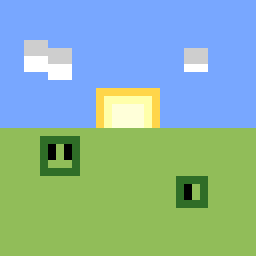
截图




介绍
/!\ ========== IMPORTANT ========== /!\
When creating a world, do NOT choose the superflat preset!
The pack is set up where the default generation is a superflat.
Thank you!
———- Info ———-
Survive on a superflat with only the resources available to you.
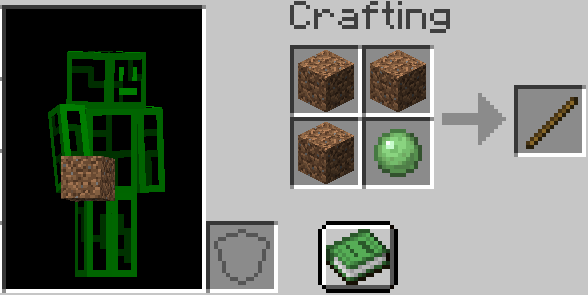
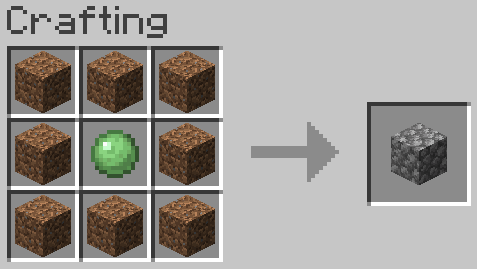
While theoretically possible alone, theres extra recipes to help you on your journey.
On the left side, there is the item list from REI. To see an items recipe, click it.
While hovering over an item in your inventory, press R to see the recipes or press U for the uses.
To locate yourself, press TAB for the minimap or M for the world map.
When the minimap is open, press [ to toggle chunk borders and ] to toggle slime chunks.
The Create mod is also included, allowing you to automate almost anything.
Essentials is included, allowing you to zoom with C and invite others with I. (make sure you understand and are ok with the dialogue box that shows up!)
Sodium + Iris shaders are included, as well as the BVS shader. Press K to toggle the shader or O to open the shader selection screen.
———- Mods ———-
AppleSkin (https://modrinth.com/mod/EsAfCjCV)
Architectury (https://modrinth.com/mod/lhGA9TYQ)
Cloth Config v11 (https://modrinth.com/mod/9s6osm5g)
CobbleGen (https://modrinth.com/mod/qRogT5Gy)
Collective (https://modrinth.com/mod/e0M1UDsY)
Create (https://modrinth.com/mod/Xbc0uyRg)
Dynamic FPS (https://modrinth.com/mod/LQ3K71Q1)
Easy Deaths (https://modrinth.com/mod/5Tx9JNce)
End Portal Recipe (https://modrinth.com/mod/VbCjkvcq)
Fabric API (https://modrinth.com/mod/P7dR8mSH)
Global Packs (https://modrinth.com/mod/NRLPy2mk)
Indium (https://modrinth.com/mod/Orvt0mRa)
Iris (https://modrinth.com/mod/YL57xq9U)
LambDynamicLights (https://modrinth.com/mod/yBW8D80W)
Roughly Enough Items (https://modrinth.com/mod/nfn13YXA)
Sodium (https://modrinth.com/mod/AANobbMI)
Xaero’s Minimap (https://modrinth.com/mod/JkSi2Fzx)
Xaero’s World Map (https://modrinth.com/mod/NcUtCpym)
Yeetus Experimentus (https://modrinth.com/mod/HaaH232J)
essential-container (https://modrinth.com/mod/k2ZPuTBm)
包含的模组 29 个
 苹果皮
 Architectury API
 BSL Shaders
 Bundle Tweaks
 BVS - Best Vanilla Shader
 Cloth Config API
 CobbleGen
 Collective
 Complementary Shaders - Reimagined
 Create Fabric
 遥远的地平线
 Dynamic FPS
 Easy Deaths
 End Portal Recipe
 实体剔除
 Essential Mod
 Fabric API
 FerriteCore
 Global Packs
 ImmediatelyFast
 Indium
 Iris Shaders
 More Culling
 鼠标微调
 REI物品管理器
 钠
 Xaero的小地图
 Xaero的世界地图
 Yeetus Experimentus
绿色边框的模组本站有收录,点进去看中文介绍;其余跳转到 Modrinth。
常见问题
FlatBlock 支持哪些 Minecraft 版本?
FlatBlock 基于 Minecraft Java 版 1.20.1,使用 Fabric 加载器。
FlatBlock 怎么安装?
点本页「前往下载」拿到整合包文件(Modrinth 的是 .mrpack,CurseForge 的是 .zip),在 PCL2 或 HMCL 启动器里选择「导入整合包」,启动器会自动装好 Minecraft、加载器和全部模组。这个整合包有 29 个模组,建议在启动器里给游戏分配 4–6 GB 内存。
FlatBlock 开服需要多大内存?
推荐服务器内存 12 GB。在线人数多、或者建了大量机器和区块加载器时,可以再加 2–4 GB。
怎么和朋友一起玩 FlatBlock?
点本页的「一键开服」,选好配置后会自动安装 FlatBlock 的服务端,几分钟就能开好。把服务器地址发给朋友,大家用同一个版本的整合包连进去就行。


评论
登录后评论和评分