ItemZoom Reborn
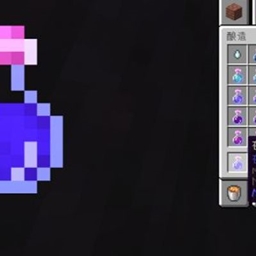
enlarged items are re-rendered at a larger size instead of only stretching the normal small GUI icon.
介绍
Item Zoom is a NeoForge 26.1.2 port inspired by mezz/ItemZoom. When the player opens an inventory or container screen and hovers over an item slot, or hovers over an item in the JEI ingredient/bookmark list, the mod displays a larger preview of that item in the empty space beside the GUI.
Features include:
- Item zoom support for inventories and container slots
- JEI ingredient list and bookmark list support
- Automatic left/right placement to avoid covering the hovered item
- Toggle key binding
- Hold-to-display key binding
- Zoom in and zoom out key bindings
- Optional JEI-only mode
- Optional help text below the zoomed item
- Optional stack size, durability bar, and cooldown display
- Crisp pixel scaling to reduce blurry fractional scaling
- High-resolution zoom rendering for clearer enlarged item previews
The high-resolution rendering path is designed for Minecraft/NeoForge 26.1.2’s newer GUI rendering system. Instead of simply scaling up the normal small GUI item icon, the mod creates a dedicated zoom render state and uses Minecraft’s larger item rendering flow where possible, producing a clearer result closer to the original ItemZoom experience.
常见问题
ItemZoom Reborn 支持哪些 Minecraft 版本?
ItemZoom Reborn 支持 Minecraft Java 版 26.1.1–26.1.2,共 2 个版本,可用的加载器:NeoForge。下载时注意选择和你游戏版本一致的文件。
ItemZoom Reborn 怎么安装?
先用 PCL2 或 HMCL 启动器安装对应版本的 NeoForge,再把下载的 .jar 文件放进游戏目录的 mods 文件夹,重新启动游戏即可。开启了版本隔离的,mods 文件夹在 versions/版本名 下面。
emoQvQ 的其他作品
查看全部 →
Custom Virtual Vein
Set connected virtual ore veins of different sizes for world blocks through configuration files and mine them using MBD2's custom machinery.

Added support for collapsible creative tabs
This prerequisite mod adds collapsible creative tab display, featuring simplicity, high efficiency and sleek design.
fabricate out of nothing
Ex Nihilo starting setup is now available for 26.1.2.
评论
登录后评论和评分