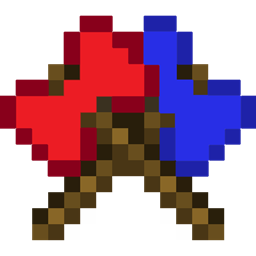
moreeaxebettercombat
Expand your arsenal with combat-ready axes featuring full, fluid animations and custom attributes via seamless Better Combat integration!
截图


介绍
# More Axes Better Combat – Project Description
**More Axes Better Combat** is a compatibility and content expansion mod designed to seamlessly integrate a brand-new variety of axes into the modern Minecraft combat system. If you love using axes but feel limited by the vanilla options and attack animations, this mod is built for you.
—
### 🛡️ Features Offered
* **Expanded Axe Arsenal:** Adds a complete set of new axes crafted from vanilla and custom progression tiers, filling the gaps in your weapon choices.
* **Full ‘Better Combat’ Integration:** Out-of-the-box configuration files that assign realistic, fluid, and satisfying attack animations to every single axe.
* **Custom Weapon Attributes:** Custom attack speeds, reach distances, and damage values meticulously tailored to balance heavier swinging weapons.
* **Dual-Wielding Support:** Fully compatible with dual-wielding mechanics, allowing you to strike or alternate attacks with axes in both hands.
—
### 🎮 How It Affects Your Experience
* **Fluid Combat Flow:** Say goodbye to the clunky, repetitive vanilla cooldown sweeps. Combat feels responsive, dynamic, and visually rewarding.
* **Enhanced Roleplay & Playstyles:** Choose to become a heavy-hitting berserker or a dual-wielding skirmisher, giving you more tactical freedom during PvE and PvP encounters.
* **Satisfying Progression:** Upgrading your weaponry feels meaningful as each axe tier offers a distinct visual style and tangible power spike without breaking game balance.
—
### 🔧 Requirements & Compatibility
- **Required Mod:** Better Combat (by Invisible_Recon)
* **Modloaders:** Fabric / NeoForge / Forge (Depending on the downloaded file version)
ITA:
# More Axes Better Combat – Descrizione del Progetto
**More Axes Better Combat** è una mod di compatibilità ed espansione dei contenuti progettata per integrare perfettamente una nuova varietà di asce nel sistema di combattimento moderno di Minecraft. Se ami usare le asce ma ti senti limitato dalle opzioni vanilla e dalle animazioni di attacco standard, questa mod è fatta apposta per te.
—
### 🛡️ Funzionalità Offerte
* **Arsenale di Asce Ampliato:** Aggiunge un set completo di nuove asce create con materiali vanilla e livelli di progressione personalizzati, colmando le lacune nella scelta delle armi.
* **Integrazione Completa con ‘Better Combat’:** File di configurazione pronti all’uso che assegnano animazioni di attacco realistiche, fluide e appaganti a ogni singola ascia.
* **Attributi delle Armi Personalizzati:** Velocità di attacco, raggio d’azione e valori di danno modificati su misura per bilanciare le armi da fendente più pesanti.
* **Supporto al Dual-Wielding:** Pienamente compatibile con le meccaniche di doppia impugnatura, permettendoti di colpire o alternare gli attacchi con le asce in entrambe le mani.
—
### 🎮 Come Influisce sulla tua Esperienza di Gioco
* **Flusso di Combattimento Fluido:** Dì addio ai movimenti di ricarica lenti e ripetitivi del gioco base. Il combattimento diventa reattivo, dinamico e visivamente gratificante.
* **Stili di Gioco e Gioco di Ruolo Avanzati:** Scegli se diventare un berserker dai colpi pesanti o un combattente agile con doppia ascia, offrendoti maggiore libertà tattica negli scontri PvE e PvP.
* **Progressione Appagante:** Potenziare il tuo equipaggiamento diventa significativo, poiché ogni livello di ascia offre uno stile visivo distinto e un aumento di potenza tangibile senza rompere il bilanciamento del gioco.
—
### 🔧 Requisiti e Compatibilità
* **Mod Richiesta:** Better Combat (di Invisible_Recon)
* **Modloader:** Fabric / NeoForge / Forge (A seconda della versione del file scaricata)
常见问题
moreeaxebettercombat 支持哪些 Minecraft 版本?
moreeaxebettercombat 支持 Minecraft Java 版 1.20.1,可用的加载器:Forge。下载时注意选择和你游戏版本一致的文件。
moreeaxebettercombat 怎么安装?
先用 PCL2 或 HMCL 启动器安装对应版本的 Forge,再把下载的 .jar 文件放进游戏目录的 mods 文件夹,重新启动游戏即可。开启了版本隔离的,mods 文件夹在 versions/版本名 下面。
VAMPxs 的其他作品
查看全部 →
FailCraft: Fossils & Combat (Unofficial Port)
Bring back the classic combat elements of the legendary 1.7.10 Fossils and Archaeology mod into modern Minecraft 1.21.1! This mod ports the iconic ancient weapons and the two signature gems, fully updated for modern gameplay.

TKoTNS
A modern 1.21.1 NeoForge adventure pack inspired by classic Italian Failcraft-2014 series, featuring quests, dimensions, and future AI integration.
Simplye Adventure
A survival or even hardcore experience accompanied by a hundred mods for a pleasant semi-vanilla experience;
评论
登录后评论和评分