
Auto Torch Item
Automatically places a torch at the player's feet in low light when an enabled Automatic Torch is in the inventory.
介绍
English|简体中文
Auto Torch Item
Automatically places a torch at the player’s feet when the light level is low and an enabled Automatic Torch is in the inventory.
Crafting
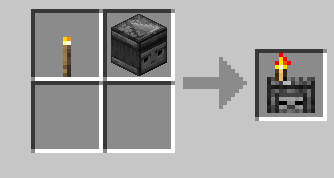
Torch + Observer (shapeless recipe).
Usage
1. Put an Automatic Torch in your inventory.
2. Right-click it to enable or disable automatic placement.
3. The item glints while enabled.
Configuration
– Do not consume torches: automatic placement does not require or consume normal torches. Placed torches become Temporary Torches and do not drop when broken.
– Maximum placement light level: controls the light threshold for automatic placement.
常见问题
Auto Torch Item 支持哪些 Minecraft 版本?
Auto Torch Item 支持 Minecraft Java 版 1.16.5–1.21.1,共 3 个版本,可用的加载器:Fabric / Forge / NeoForge。下载时注意选择和你游戏版本一致的文件。
Auto Torch Item 怎么安装?
先用 PCL2 或 HMCL 启动器安装对应版本的 Fabric / Forge / NeoForge,再把下载的 .jar 文件放进游戏目录的 mods 文件夹,重新启动游戏即可。开启了版本隔离的,mods 文件夹在 versions/版本名 下面。
评论
登录后评论和评分